Element Description
Download System Supervisor Checks and upgrades the current version of the system supervisor firmware
(used for the RTC and power supply handling).
Upload Configuration OS
Upload Main OS
Upload Splash Image
Upload Bootloader
Upload Main FPGA
Upload Safe FPGA
Upload System Supervisor
Copy the system files from the operator panel on the external device (usually an
USB stick).
Update System Components
System components can be updated using a USB flash drives.For each component, a couple of specific update files are
provided.
Note: Upgrading procedures depend on hardware and operating system versions. Contact technical support for
assistance.
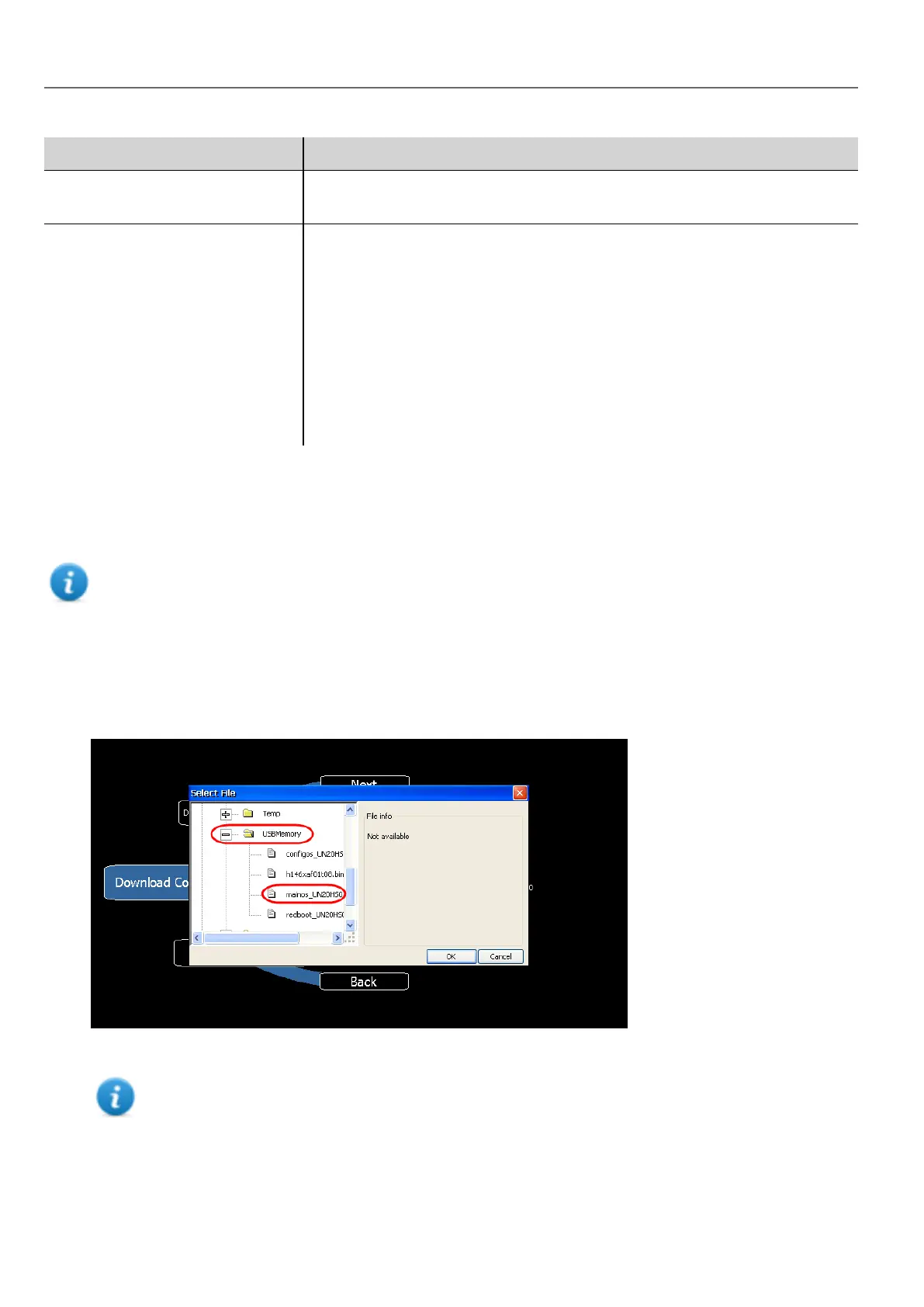
1. Copy all the upgrade files you need to a USB drive and plug it into the USB port of the HMI device.
2. Start the System Settings tool in System Mode (see "System Settings" on page381for details).
3. Click on the desired download function.
4. Browse the content of the USB drive to the files to download. The example shows Main OS components.
5. Click Download to transfer files to the HMI device.
Note: From this dialog click Upload to transfer files to the USBdevice.
384
HMWIN Studio |User Manual|v206 (2017-06-30) |EN|© 2014-2017 Panasonic Electric Works Europe AG
WinCE Devices



 To Next Page