15.24
SEL-400 Series Relays Instruction Manual Date Code 20171006
Communications Interfaces
SEL Protocol
The <Enter> key on standard keyboards sends the ASCII character CR for a car-
riage return. This manual instructs you to press the <Enter> key after commands
to send the proper ASCII code to the relay. A correctly formatted command
transmitted to the relay consists of the command, including optional parameters,
followed by either a CR character (carriage return) or CR and LF characters (car-
riage return and line feed). The following line contains this information in the
format this manual uses to describe user input:
<command> <Enter> or <command> <Enter> <CR>
You may truncate commands to the first three characters. For example,
EVENT 1 <Enter> is equivalent to EVE 1 <Enter>. You may use upper- and
lowercase characters without distinction, except in passwords.
In response to a command, the relay may respond with an additional dialog line
or message. The relay transmits dialog lines in the following format:
<DIALOG LINE ><CR><LF>
The relay transmits messages in the following format:
<STX><MESSAGE LINE 1><CR><LF>
<MESSAGE LINE 2><CR><LF>
…
<LAST MESSAGE LINE><CR><LF>< ETX>
Each message begins with the start-of-transmission character, STX, and ends
with the end-of-transmission character, ETX. Each line of the message ends with
a carriage return, CR, and line feed, LF.
Send the CAN character to the relay to abort a transmission in progress. For
example, if you request a long report and want to terminate transmission of this
report, depress the <Ctrl> and <X> keys (<Ctrl+X>) to terminate the report.
SEL Compressed ASCII Commands
The relay supports a subset of SEL ASCII commands identified as Compressed
ASCII commands. Each of these commands results in a comma-delimited mes-
sage that includes a checksum field. Most spreadsheet and database programs can
directly import comma-delimited files. Devices with embedded processors con-
nected to the relay can execute software to parse and interpret comma-delimited
messages without expending the customization and maintenance labor needed to
interpret nondelimited messages. The relay calculates a checksum for each line
by numerically summing all of the bytes that precede the checksum field in the
message. The program that uses the data can detect transmission errors in the
message by summing the characters of the received message and comparing this
sum to the received checksum.
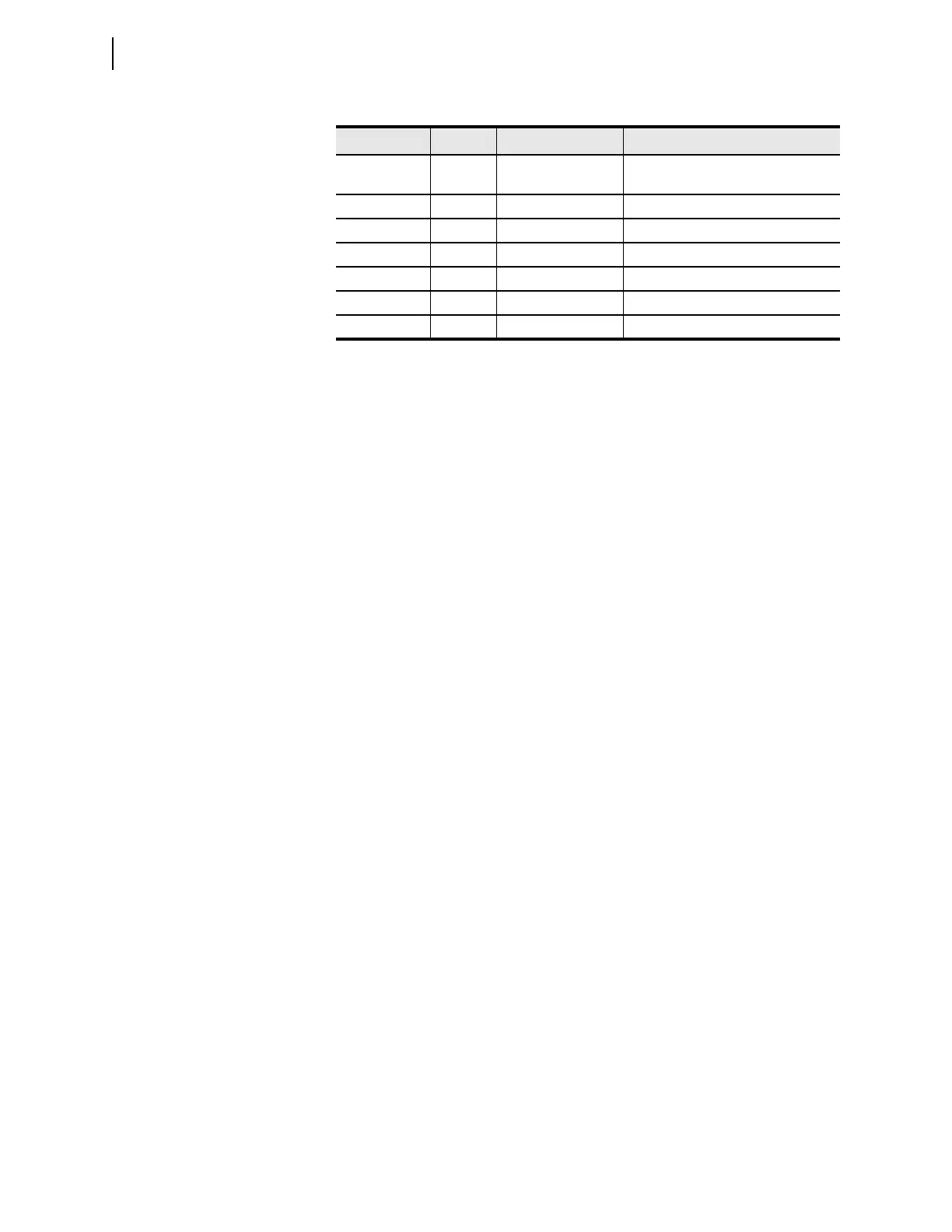
Table 15.17 Selected ASCII Control Characters
Decimal Code Name Usage Keystroke(s)
13 CR Carriage return <Enter> or <RETURN> or
<Ctrl+M>
10 LF Line feed <Ctrl+J>
02 STX Start of transmission <Ctrl+B>
03 ETX End of transmission <Ctrl+C>
24 CAN Cancel <Ctrl+X>
17 XON Flow control on <Ctrl+Q>
19 XOFF Flow control off <Ctrl+S>


 To Next Page