19.11
Date Code 20171006 Instruction Manual SEL-400 Series Relays
Remote Data Acquisition
IEC 61850-9-2 Sampled Values (SV)
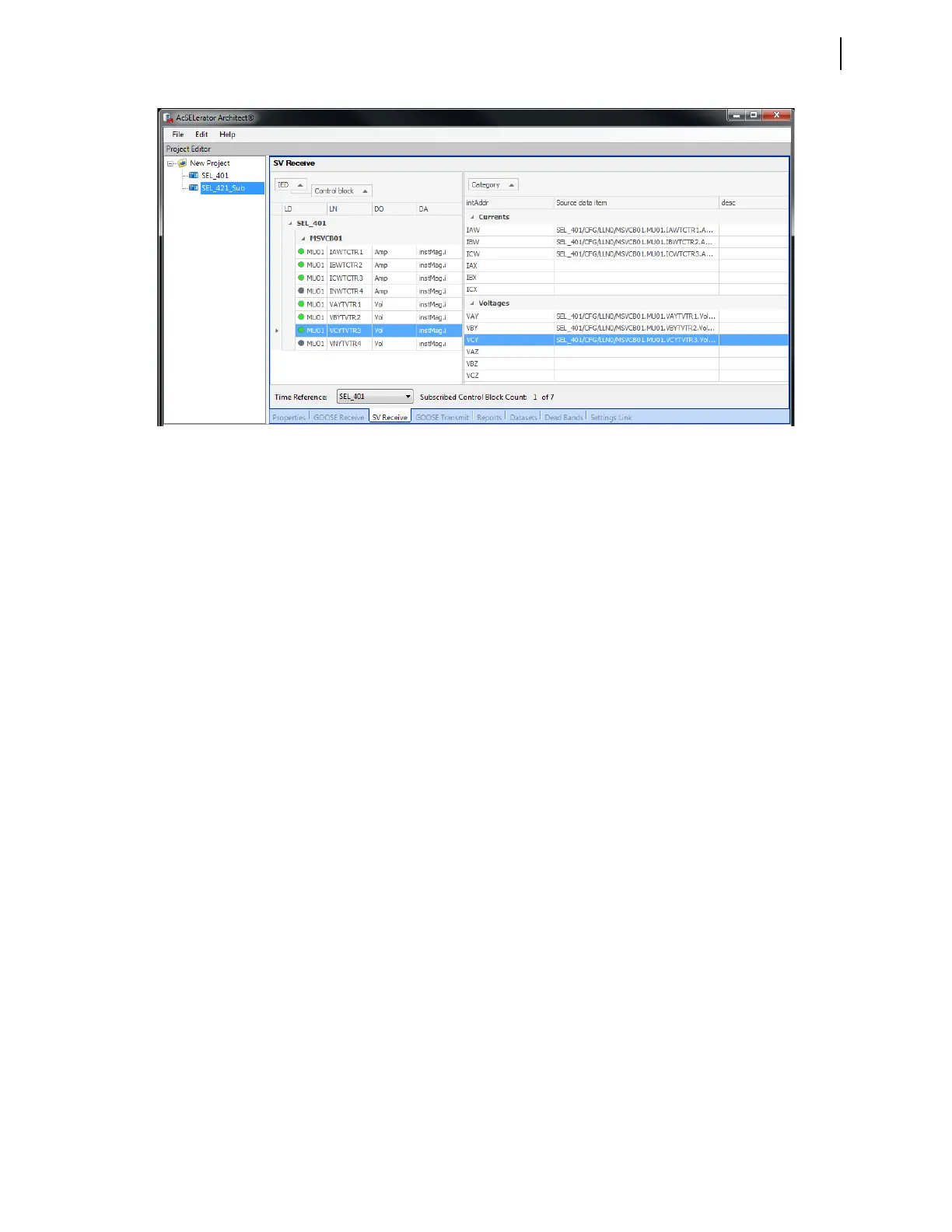
When configuring the SV subscriber, SV subscriptions are accomplished in the
same manner as GOOSE subscriptions. Simply drag a published current into an
appropriate current slot, or a published voltage into a voltage slot in the SV sub-
scriber SV Receive tab. Note that even though a publisher may have a neutral
current or voltage value in its publication, the SEL subscriber does not have a
neutral current or voltage slot to map it into. Finally, configure the time reference
of the subscriber (which selects the device whose smpSynch value all other sub-
scribed messages must match) by selecting the device name from the drop-down
menu labeled Time Reference. See Subscription Reference Stream on
page 17.19 for more information about the reference stream.
SV subscriptions may also be configured via Port 5 settings through QuickSet or
an ASCII terminal window. Port 5 settings can be used to quickly configure SV
subscriptions that do not require much customization. All phases (A, B, C) of a
current or voltage terminal must be mapped to an SV subscription. Please note
that regardless of the configuration method, you cannot map a current or voltage
phase value into more than one subscriber slot.
SV Subscriber Startup
When initially turned on, the SV subscriber ENABLED LED illuminates as soon as
protection functionality is enabled, which can take as long as 17 seconds but will
typically be within 10 seconds. Once the SV subscriber has begun accepting SV
streams, SV processing can be temporarily disabled for the following conditions:
➤ Port 5 settings are modified
➤ A new CID file configuration is enabled
➤ Power is cycled
SV subscriptions are disabled if the SV subscriber is disabled (EN Relay Word
bit = False), the Port 5 setting EPORT is set to “N”, or the processor fails. SV
subscriptions do not resume unless the disabling condition is addressed. When
SV subscriptions are disabled, so is the primary means of data acquisition for the
relay. Take care to recognize when such a condition occurs, generate appropriate
warnings or alarms, and resolve any issues.
Figure 19.11 Example Architect SV Subscription Configuration



 To Next Page