4.3
Date Code 20171006 Instruction Manual SEL-400 Series Relays
Front-Panel Operations
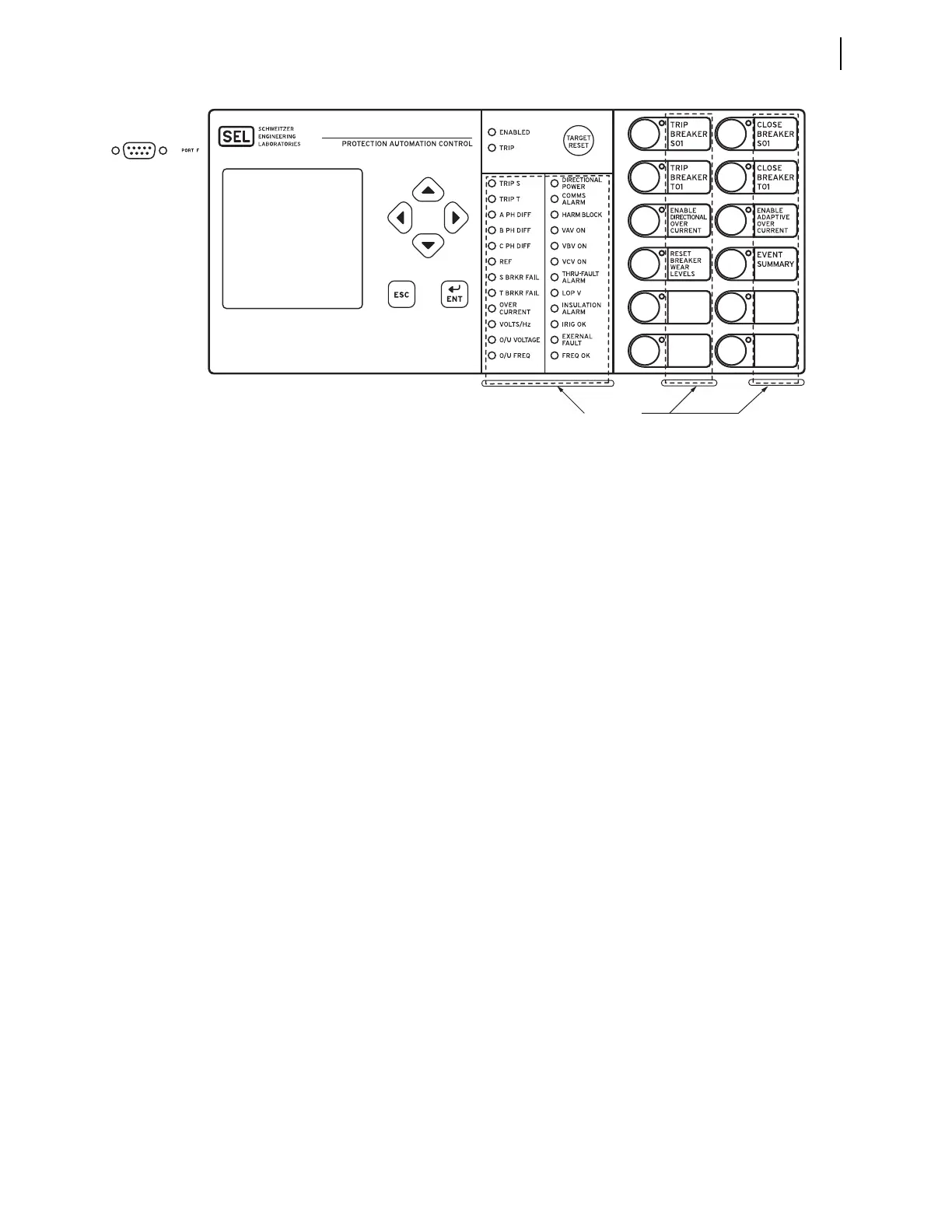
Front-Panel Layout
A 128 x 128 pixel LCD shows relay operating data including event summaries,
metering, settings, and relay self-test information.
Six navigation pushbuttons adjacent to the LCD window control the relay menus
and information screens. Sequentially rotating display screens provide important
power system metering parameters; you can easily change this
ROTATING DIS-
PLAY
to suit your particular onsite monitoring needs. Use a simple and efficient
menu structure to operate the relay from the front panel. With these menus you
can quickly access relay metering, control, and settings.
Front-panel LEDs (light emitting diodes) indicate the relay operating status. You
can confirm that the relay is operational by viewing the ENABLED LED. The relay
illuminates the TRIP LED target to indicate a tripping incident. The relay is fac-
tory programmed for particular relay elements to illuminate the other target
LEDs. You can program these target LEDs to show the results of the most recent
relay trip event. The asserted and deasserted colors for the LEDs are programmable.
Select relay models feature auxiliary TRIP/CLOSE pushbuttons. These pushbuttons
are electrically isolated from the rest of the relay.
The relay front panel features large operator control pushbuttons with annuncia-
tor LEDs that facilitate local control. Factory-default settings associate specific
relay functions with these direct-action pushbuttons and LEDs. Using SEL
OGIC
control equations or front-panel settings PBn_HMI, you can readily change the
default direct-action pushbutton functions and LED indications to fit your spe-
cific control and operational needs. Change the pushbutton and pushbutton LED
labels with the slide-in labels adjacent to the pushbuttons. The asserted and deas-
serted colors for the LEDs are programmable in 12-pushbutton models.
The relay front panel includes an EIA-232 serial port (labeled PORT F) for con-
necting a communications terminal or using the
ACSELERATOR QuickSet SEL-5030
Software program. Use the common EIA-232 open ASCII communications proto-
col to communicate with the relay via front-panel PORT F. Other communications
protocols available with the front-panel port are M
IRRORED BITS communica-
tions, and DNP3. For more information on communications protocols and PORT F,
see Section 15: Communications Interfaces.
Figure 4.3 SEL-487E Front Panel



 To Next Page