234
4 Adjusting knitting machine
Advanced adjustments
4. Knit some rows.
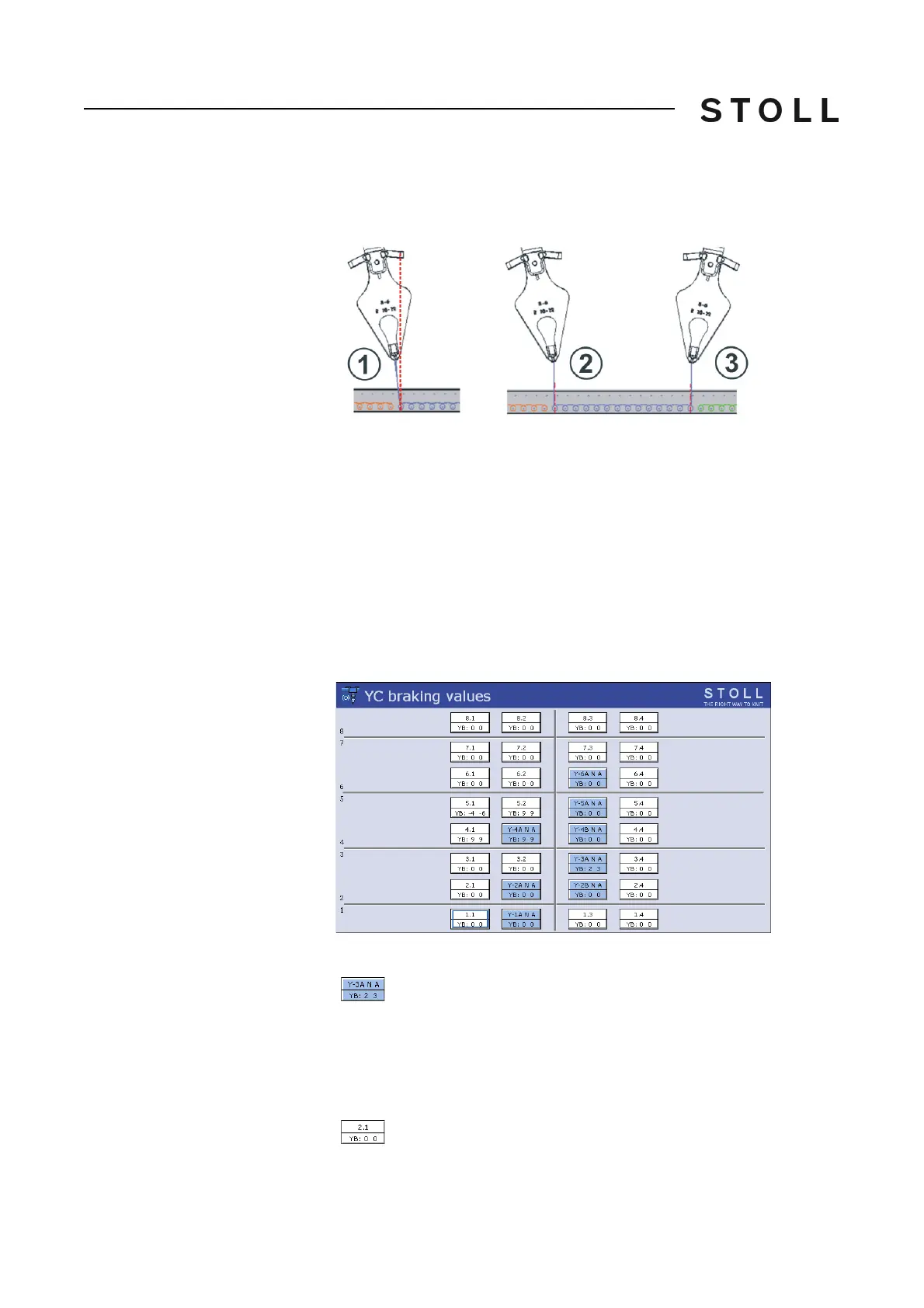
5. Check the stopping position of the different yarn carriers.
6. If the stopping position is wrong correct the braking value for the yar
n
carrier.
7. Call up the "Yarn carrier" window.
8. Call up the "Yarn carrier
braking
values" window.
Yarn carrier braking values window
"Yarn carrier braking values" window
9. Tap on the corresponding yarn carrier.
1
Wrong stopping
position
2
Correct stopping position (left color field edge)
The yarn is located vertically, at the left of the needle
center.
3
Correct stopping position (right color field edge)
The yarn is located vertically, at the righ
t of the
needle center.
Yarn carrier designation (Y-3A)
(Sintral numbering)
Display of the yarn carrier type (N)
Display of the yarn type (A)
Braking value (YB)
left: 2, right: 3
The yarn carrier is present (is not used in the current knitting
program)



 To Next Page