241
Adjusting knitting machine 4
Advanced adjustments
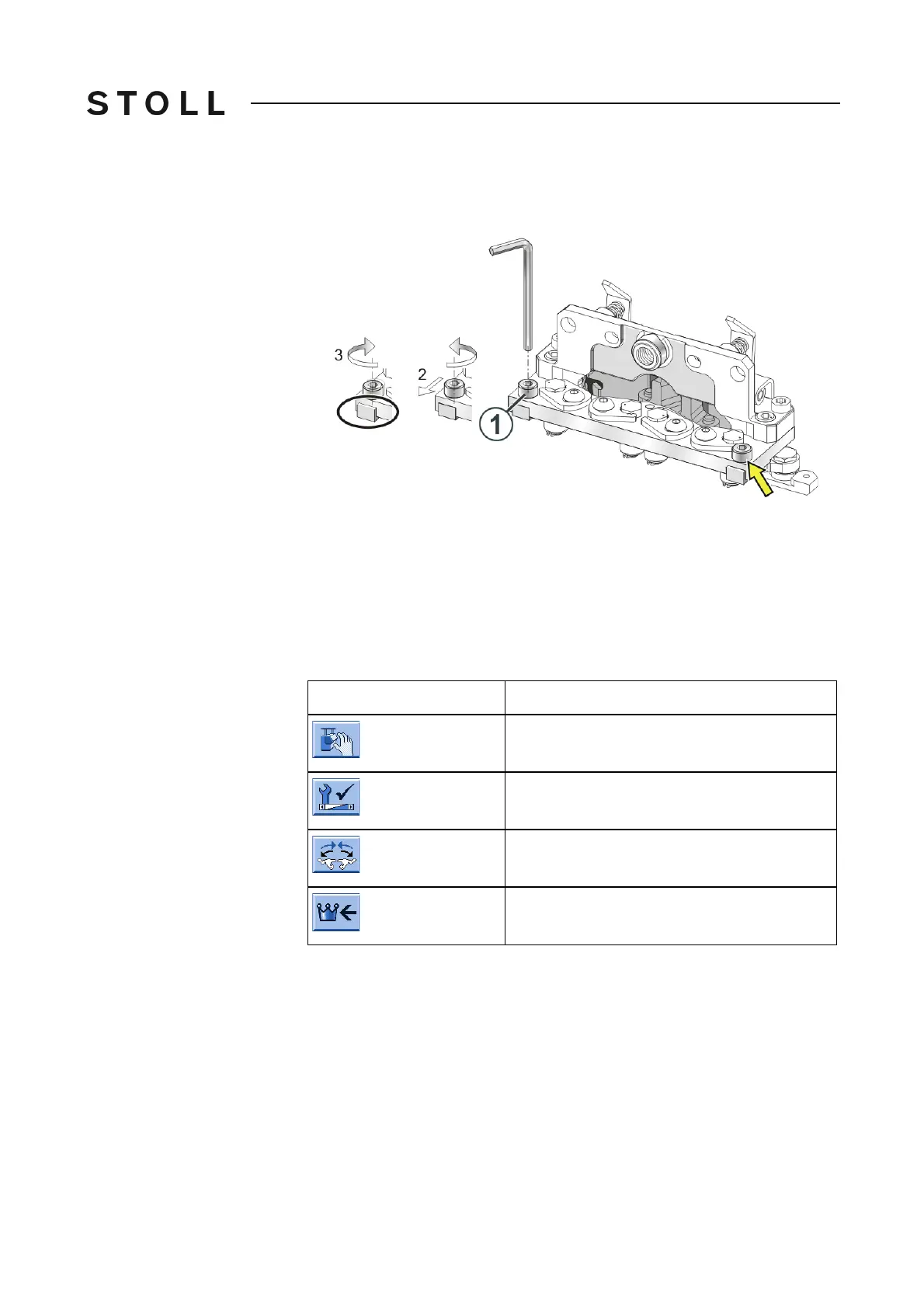
CMS 530 Change the opening angle of the float slider:
1. Loosen the screw (1) with an Allen key (SW 3).
2. Using the Allen key move the screw and with it the float
slider downward.
The end of the float slider protrud
es from the base plate.
3. Tighten the screw (1).
4. Repeat the process on the other side of the holdi
ng-down jack control.
5. Repeat this operation with all the holding
-down jack controls of the
machine.
CMS 822
Keys for opening the holding-down jacks
Keys for opening the holding-down jacks
Change the opening angle of the float slider:
1. Program an empty row and fix the knitting
specification.
2. From the "Main menu" call up the "Manual inter
ventions" window.
3. Tap the "On" key in the "Carr.revers
.outs.n.bed" field.
4. Start the machine with the engaging rod and stop it again when the left
ca
rriage is located shortly after the left reversing position.
5. Start with the conversion of the fl
oat sliders at the left carriage.
6. Call up the "Service" menu from the "Main menu".
Key
Function
Call up "Manual interventions" window
Call up the "Service" menu
Call up the "Holding-down jack control" window
Call up "Main menu"



 To Next Page