476
8 Software - Installation and basic settings
Boot process
Configurin g network
Configuring network If you wish to connect the knitting machine with another knitting machine or a
pattern unit, you must set up and switch on the network on the knitting
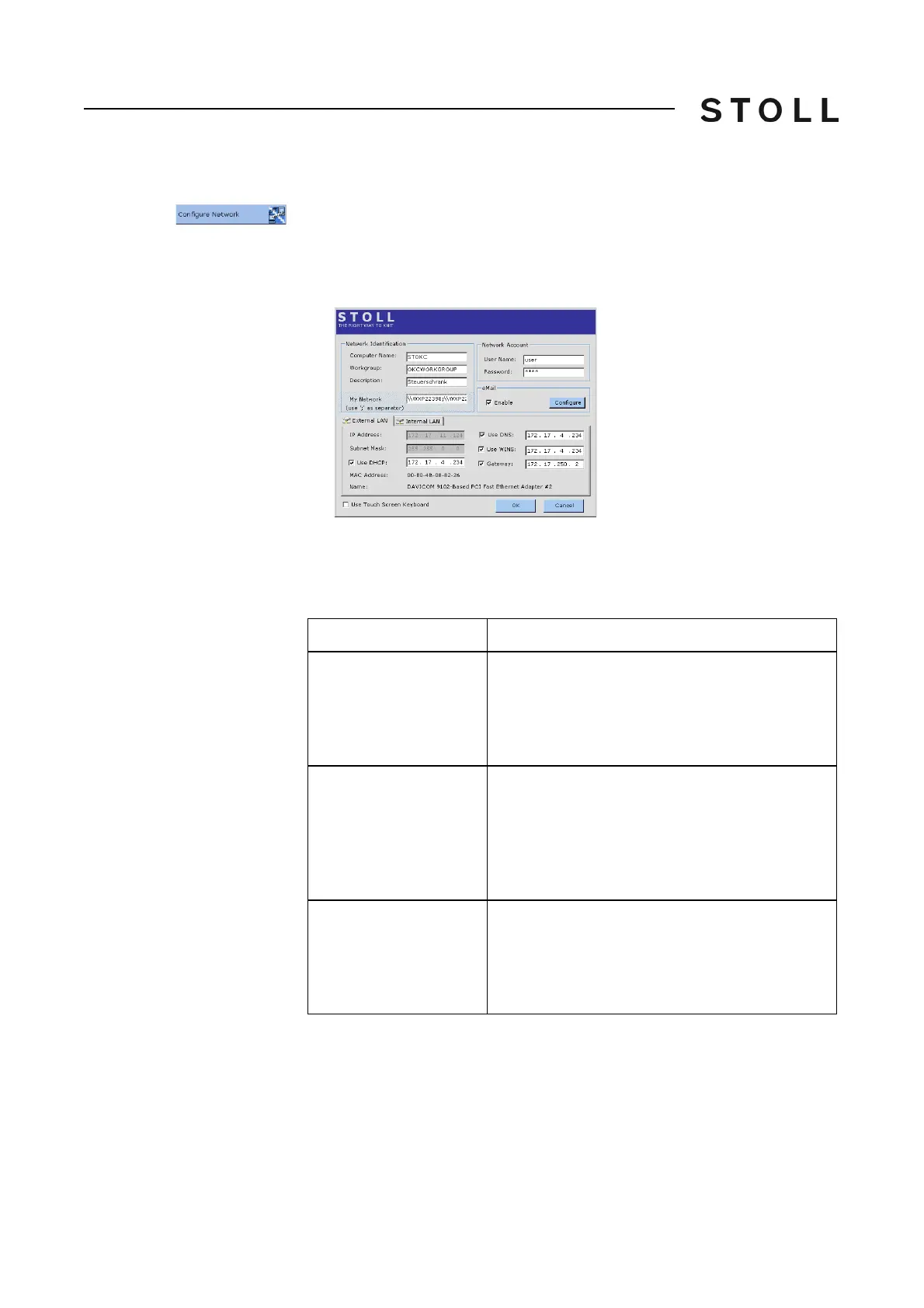
machine. The "Network Configuration" window is used for it.
➜ Tap on the "Configure Network" key.
T
he "Network Configuration" window is displayed
.
Network Configuration window
"Network Configuration" window
In this window all the necessary network parameters are entered. The values
are entered with the internal keyboard (virtual keyboard) or with an external
keyboard.
Componen ts of the Networ k Configur ation window
Label
Description
Computer Name
The input of a (machine) name is necessary in
order to enable the other network users an access
to this machine. This machine is identified with this
name in the network. Enter descriptions of this
machine in the "Description" field.
Workgroup
All knitting machines should be located in the
same "Workgroup" so that the machines can
communicate with each other. This input field
must be filled up. Ask for your corresponding Work
group name from your Network administrator in
case of a network spanning your firm/LAN.
Description
Although entering a description is optional, it does
help to identify machines more efficiently in larger
networks. e.g. Type of the machine, gauge and
other special features of the machine. This input
appears as a comment in the Windows Explorer.



 To Next Page