X35 Console General Operations
8.11
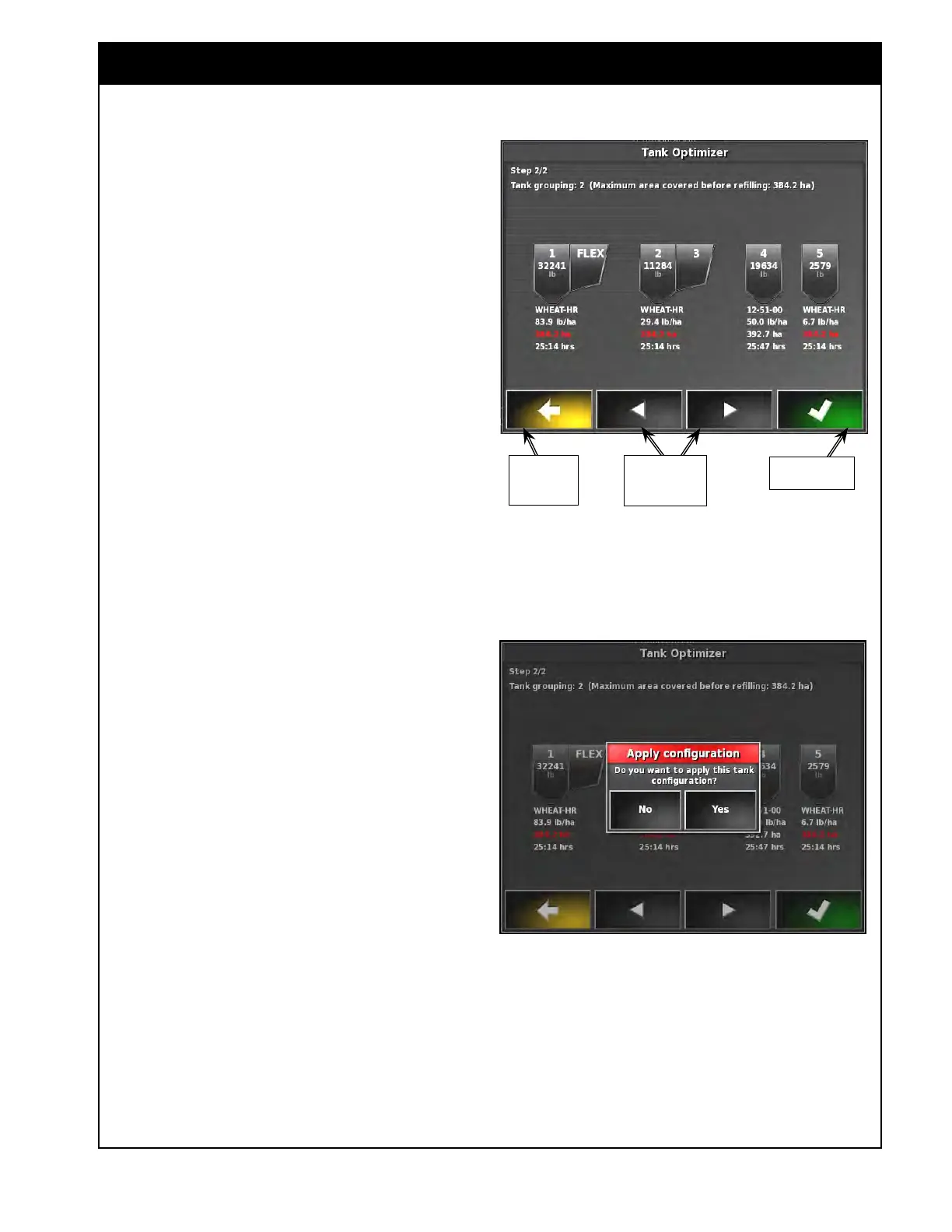
Figure 8.18 - Selecting Tank Configuration
8. Refer to Figure 8.18. Based on the provided
information, the Tank Optimizer will figure out
several tank groupings, approximate time and
maximum area covered before the refill for
each tank and application rate for each tank.
a. The smallest area coverage between the
individual tank groupings will be selected
as a Maximum area covered before
refilling for a specific configuration. The
Acre values under the tank to run out first
will be red.
b. Use the left and right arrows to switch
between all available configurations
and review the information for each
configuration.
c.
If you want to make changes in the initial
information, use the left yellow arrow to
return to the previous step.
Return To
Previous
Step
See Next/Return
to previous
configuration
Accept Current
Configuration
9. Once you find a configuration that will fit your
needs, select the green check mark to accept it.
The X35 console will ask if you would like to
apply this configuration, refer to Figure 8.19.
a If you choose to apply the configuration,
the air seeder settings will be changed
accordingly.
i. It will accept the new tank grouping.
ii. Tanks that will not apply product
will be disabled.
iii. Product and application rate will be
assigned to the tanks in the Seeder
Controller.
iv. Weights will be added to the tanks
based on 100% tank volume used
and density.
Note
Ensure you set the inter-connect covers on
the tanks accordingly to the tank grouping you
selected.
Figure 8.19 - Apply Configuration



 To Next Page