CAPINTEC, INC. CAPTUS
®
4000e
15-6 CUSTOM PROTOCOLS December 15
11. In the Select Isotope drop-down list box, select the Isotope that will be measured.
The ROIs appropriate for the selected detector and isotope will be filled in. These
ROIs may be edited or added to.
12. Select the Done button or press ALT+D to save the entries and return to the Protocol
Setup screen Figure 15-3.
13. Once all the entries have been made, select the Next button or press ALT+N on
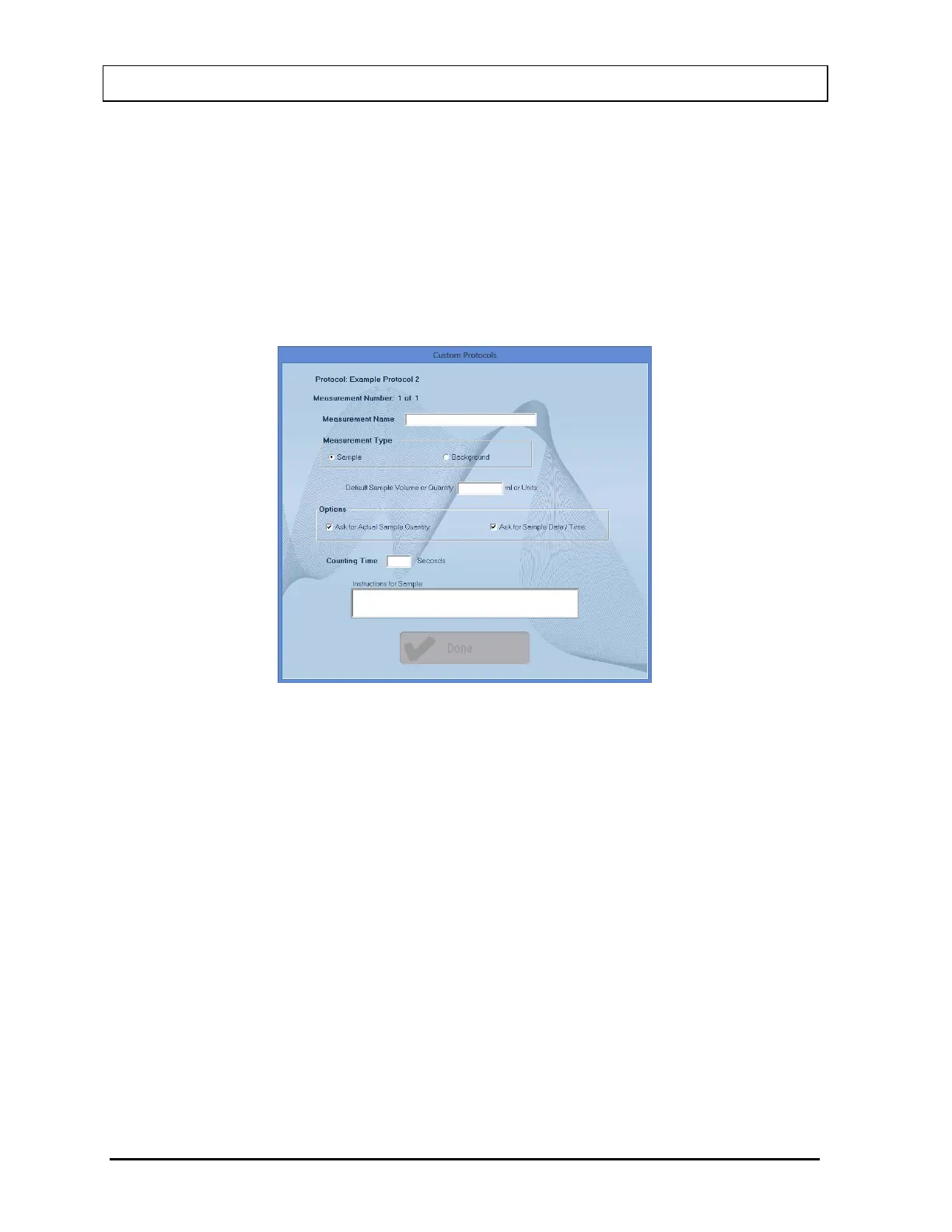
Figure 15-3. The measurement setup window for the first measurement will appear as
shown in Figure 15-6.
Figure 15-6
14. In the Measurement Name text box, input a name for the measurement (e.g. Sample
1). (32 characters max)
15. Select the appropriate radio button in the Measurement Type frame to select a
Measurement Type. The default is Sample.
16. Input the Default Sample Volume or Quantity. This field is optional. The value cannot
be entered if the Measurement Type is Background.
17. The Options frame is only active when the Measurement Type is Sample.
• Ask for Actual Sample Quantity – Check the box if the user is to input the
Sample Quantity for the measurement.
• Ask for Sample Date / Time – Check the box if the user is to input the date and
time the sample was collected.
18. In the Counting Time text box, input the counting time in seconds. (10-9,999
seconds)



 To Next Page