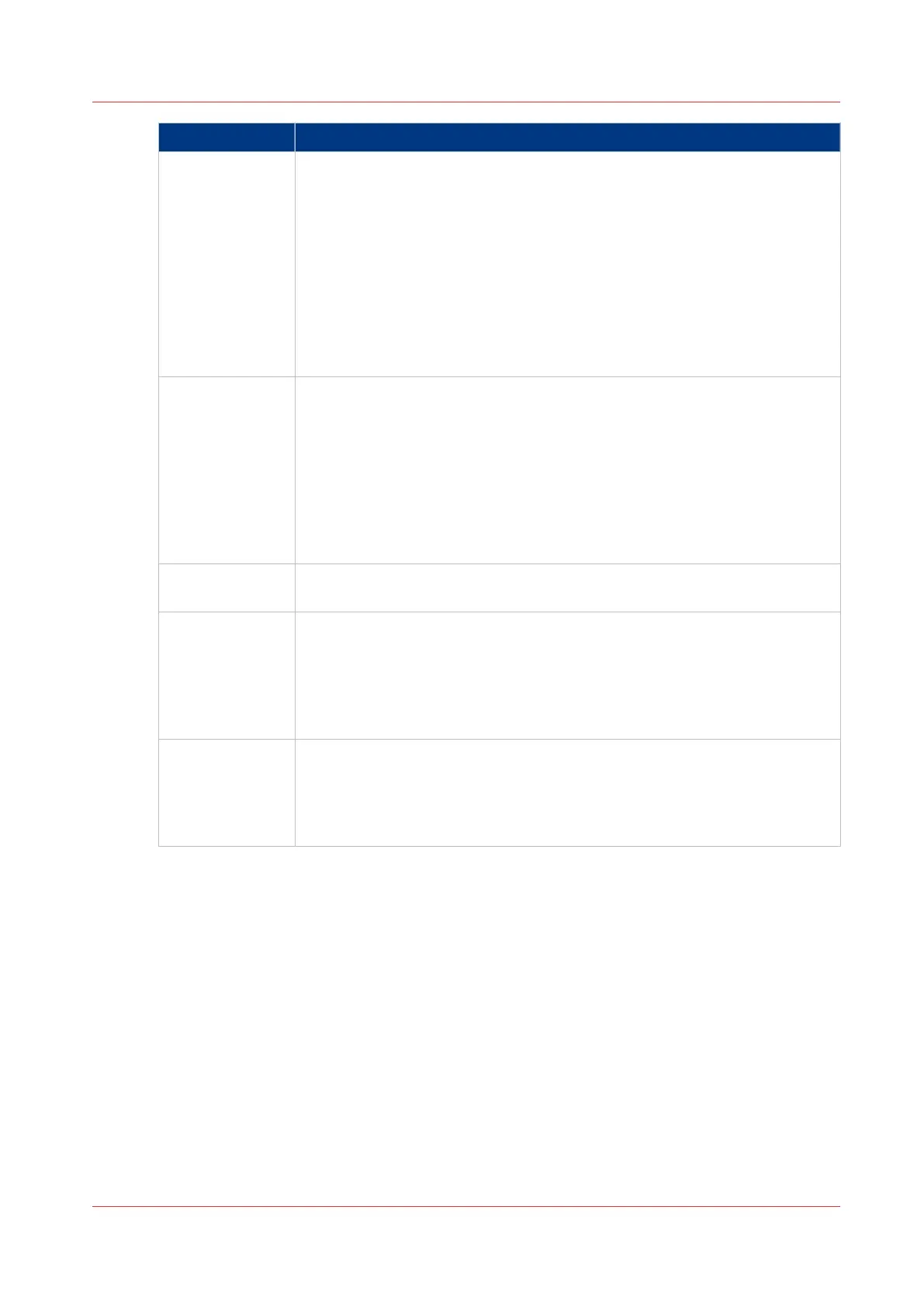
Error code Possible Causes
5, 6, 7 • Check that SMB or FTP protocol is enabled on the remote host
• Check that the customer network security policy (firewall/switch) does not
block FTP ports
• For SMB destination:
- check that the security level is set to "Normal"
- check that the remote host supports SMB1 protocol (error code: 7)
• For FTP destination: check that the FTP server is using port 21
• Check that the clock of the remote host and the clock of the printer (in
[Preferences]-[System settings]-[Regional settings]) are synchronized (the
maximum permitted time difference is 30 minutes, as documented by Mi-
crosoft).
8 • Check whether the remote username and password are correct.
• For SMB destination: Check the remote username syntax:
- For a remote host user: <hostname>\<username>
or <ip_address>\<username>
- For a domain user: <domainname>\<username>
• Check that the clock of the remote host and the clock of the printer (in
[Preferences]-[System settings]-[Regional settings]) are synchronized (the
maximum permitted time difference is 30 minutes, as documented by Mi-
crosoft).
9 • The remote destination server has reached the maximum number of con-
nections. Check with the System administrator or try again later.
10 • Check that the remote folder is correctly typed
• Check that the remote folder exists on the remote host
• For SMB destination: check that the share is correctly typed or the share
exists on the remote host
• For FTP destination: check that the remote folder has "list" permissions
for remote user
11, 12 • Check that the remote user has "write" permission on the remote share
(for SMB) and on the remote folder (for SMB and FTP)
• Check that the remote folder is not full (error code: 12)
• SMB destination: check that the remote username is correctly typed (may
happen if "guest" account is enabled on the remote host).
Test the remote scan destination
Chapter 3 - Define your workflow with Océ Express WebTools
145



 To Next Page