■
[S1], [S1+1]: Specification of folder name and file name
Setting
device
Description
S1 Specifies the number of characters in the filename of the read file. (Specify the full path.)
S1+1 to
S1+128
Specify the file to be read.
● Specify the full path, up to 256 characters including the folder name and filename
(Note 1) In the tool software FPWIN GR7, a path name (a folder name and a file name) can be entered directly
as a character constant.
(Note 2) To specify a memory area such as a data register DT, use the SSET instruction to store a path name
(a folder name and a file name) as character data.
■
[n]: Specification of number of data items to be read
Saving format Set value of [S2] Setting range of n
16-bit data U1, U2, U7, U11 0 to 65535
32-bit data U3, U4, U5, U8 0 to 32767
64-bit data U6, U9 0 to 16383
ASCII U10, U13 0 to 1999
■
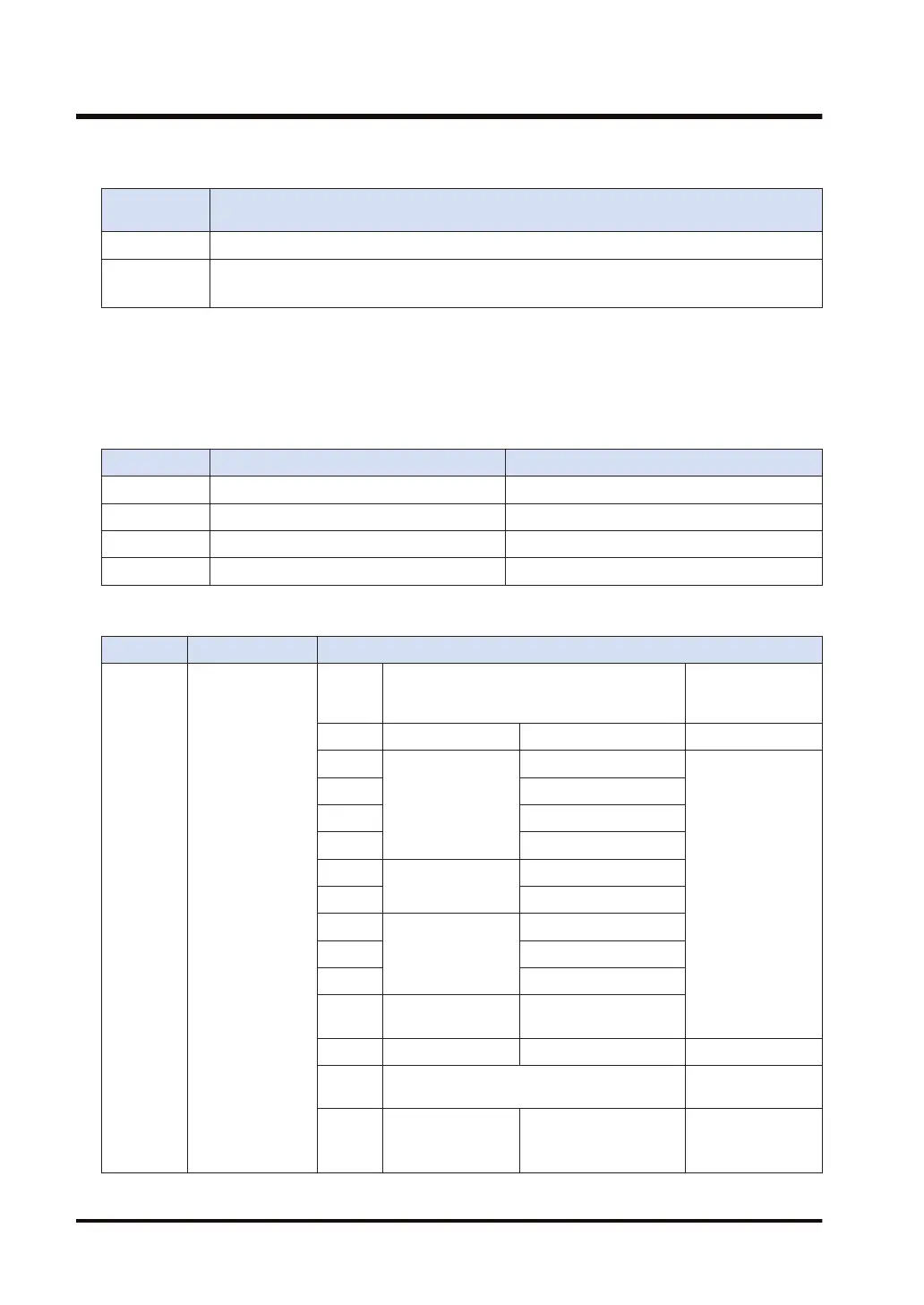
[S2] to [S2+6]: Specification of the data format for the data to be read
Operand Description Description
S2 Reading format
Set
value of
S2
Read contents Extension
U0 - - -
U1
DEC
Unsigned 16-bit integer
.CSV
(comma-separated
text)
U2 Signed 16-bit integer
U3 Unsigned 32-bit integer
U4 Signed 32-bit integer
U5
Floating point real
number
32bit
U6 64bit
U7
HEX
1 words
U8 2 words
U9 4 words
U10 ASCII
Character string (Use
NULL as a delimiter.)
U11 BIN 16bit .BIN
U12
Reserved for system
Reserved for
system
U13 ASCII
Character string (Do not
use NULL as a
delimiter.)
.CSV
(comma-separated
text)
18.4 CRD (File Data Read Instruction)
18-20 WUME-FP7CPUPGR-12


 To Next Page
 Loading...