88A-4
WIRING HARNESS
Front bumper wiring: Removal - Refitting
88A
REMOVAL
I - REMOVAL PREPARATION OPERATION
a Position the vehicle on a two-post lift (see Vehicle:
Towing and lifting) (02A, Lifting equipment).
a Switch off the ignition.
a Disconnect the battery (see 80A, Battery, Battery:
Removal - Refitting, page 80A-2) .
a Remove the front bumper (see Front bumper as-
sembly: Exploded view) (55A, Exterior protection).
II - REMOVAL OPERATION
a
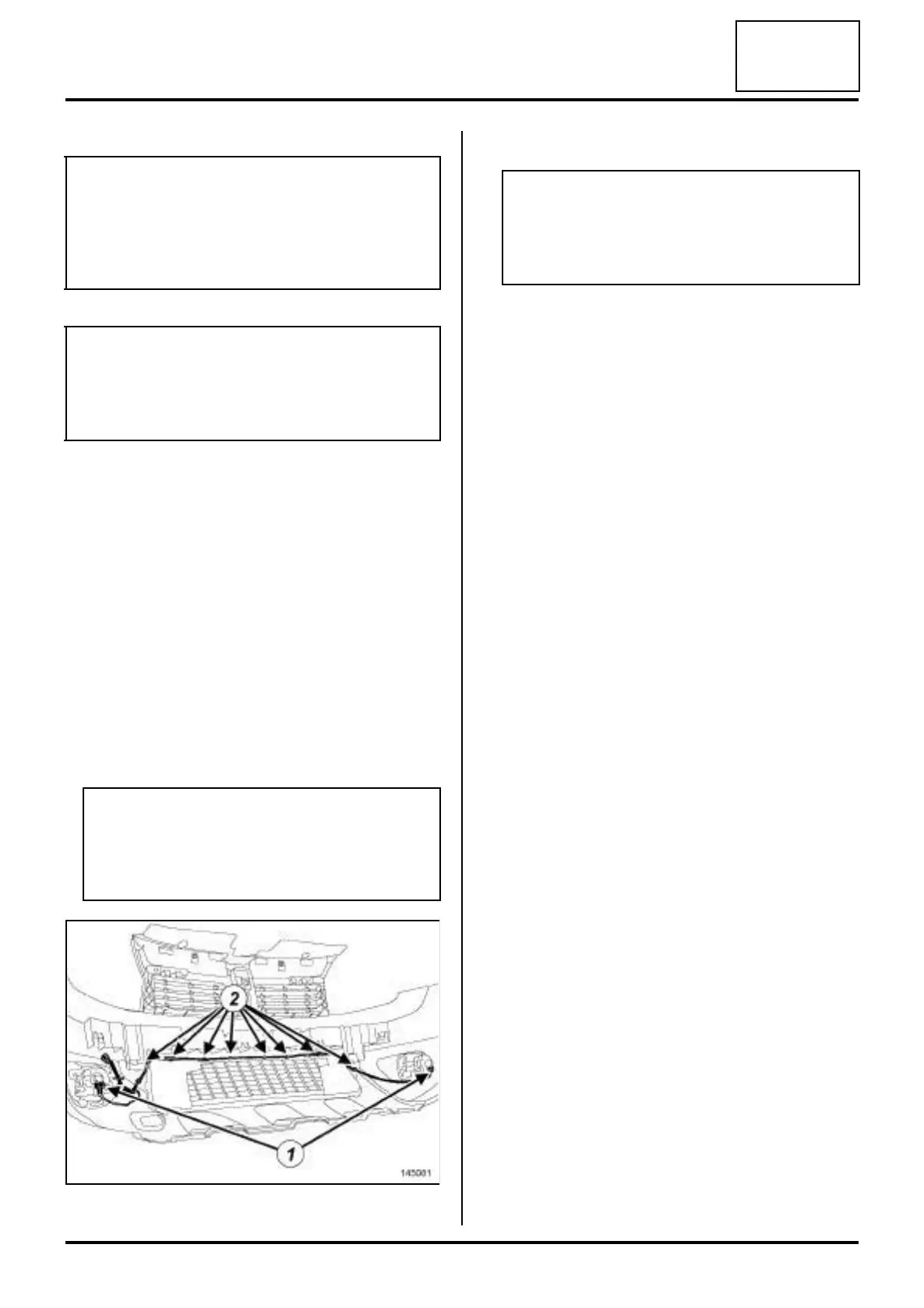
a Disconnect the front fog light connectors (1) .
a Unclip the front bumper wiring at (2) .
a Remove the front bumper wiring.
REFITTING
I - REFITTING PREPARATION OPERATION
a If replacing with more complete wiring, immobilise
the unused connectors (see Connector: Sealing
and locking) (Technical Note 6015A, 88A, Wiring).
II - REFITTING OPERATION
a Proceed in the reverse order to removal.
a Connect the battery (see 80A, Battery, Battery: Re-
moval - Refitting, page 80A-2) .
III - CHECKING AFTER REPAIR
a Switch on the ignition.
a Check the operation of all front bumper electrical
components.
IMPORTANT
To avoid all risk of damage to the systems, apply
the safety and cleanliness instructions and opera-
tion recommendations before carrying out any
repair (see 88A, Wiring harness, Wiring: Precau-
tions for the repair, page 88A-3) .
WARNING
To avoid damaging the connectors, consult the dis-
connection procedures (see Connector: Discon-
nection and reconnection) (Technical Note
6015A, 88A, Wiring).
WARNING
To prevent any risk of noise, premature wear,
short circuits, etc. after the refitting operation,
mark the wiring routing and how to connect the
connectors.
145081
WARNING
To prevent any damage during the removal oper-
ation, check that the wiring is free from its mount-
ings (retaining clip, plastic clip, adhesive tape,
connector, etc.).











 To Next Page