13B-5
DIESEL INJECTION
Diesel injection computer: Removal - Refitting
K9K
13B
There are two ways to do this (see Fault finding - Re-
placement of components) (13B, Diesel injection):
- an automatic method which can be used if it is possi-
ble to read the information contained in the old com-
puter,
-a manual method which is to be used if it is not possi-
ble to read the information contained in the old com-
puter.
REMOVAL
I - REMOVAL PREPARATION OPERATION
a Remove the battery (see Battery: Removal - Refit-
ting) (80A, Battery).
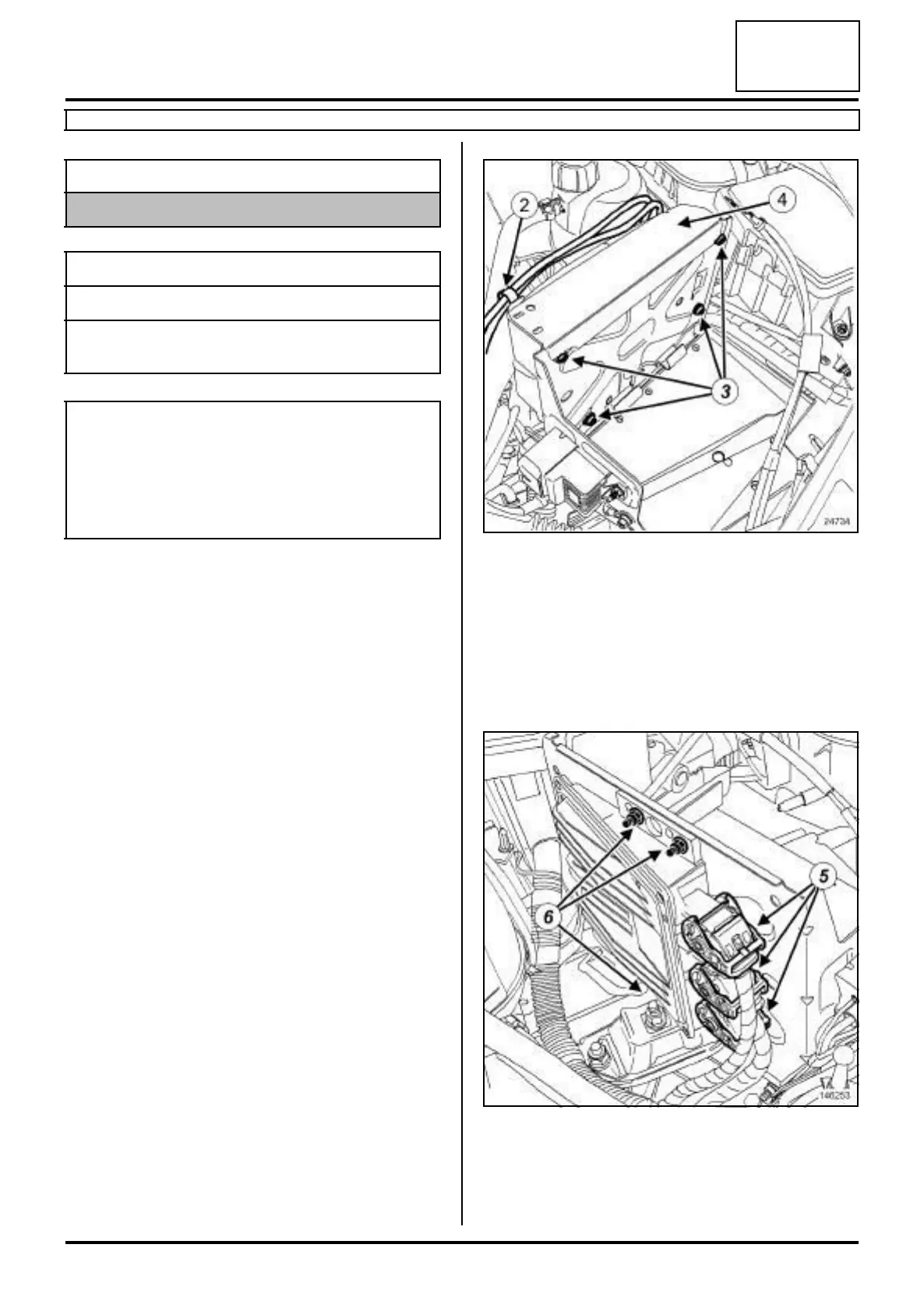
a Unclip the positive terminal wiring (2) .
a Remove:
- the bolts (3) from the injection computer protector,
- the injection computer protector (4) .
II - REMOVAL OPERATION
a Remove the injection computer nuts (6) .
a Disconnect the three connectors (5) from the injec-
tion computer.
a Remove the injection computer.
Equipment required
Diagnostic tool
Tightening torquesm
injection computer nuts 8 N.m
injection computer pro-
tector bolts
8 N.m
Note:
When programming, reprogramming or replacing
the computer, it is necessary to program the new
computer with the C2I parameters (injector flow cor-
rection) and the engine adaptives using the Diag-
nostic tool.
24734
146253












 To Next Page