80A-2
BATTERY
Battery: Removal - Refitting
80A
REMOVAL
I - REMOVAL PREPARATION OPERATION
a Switch off the ignition.
II - OPERATION FOR REMOVAL OF PART
CONCERNED
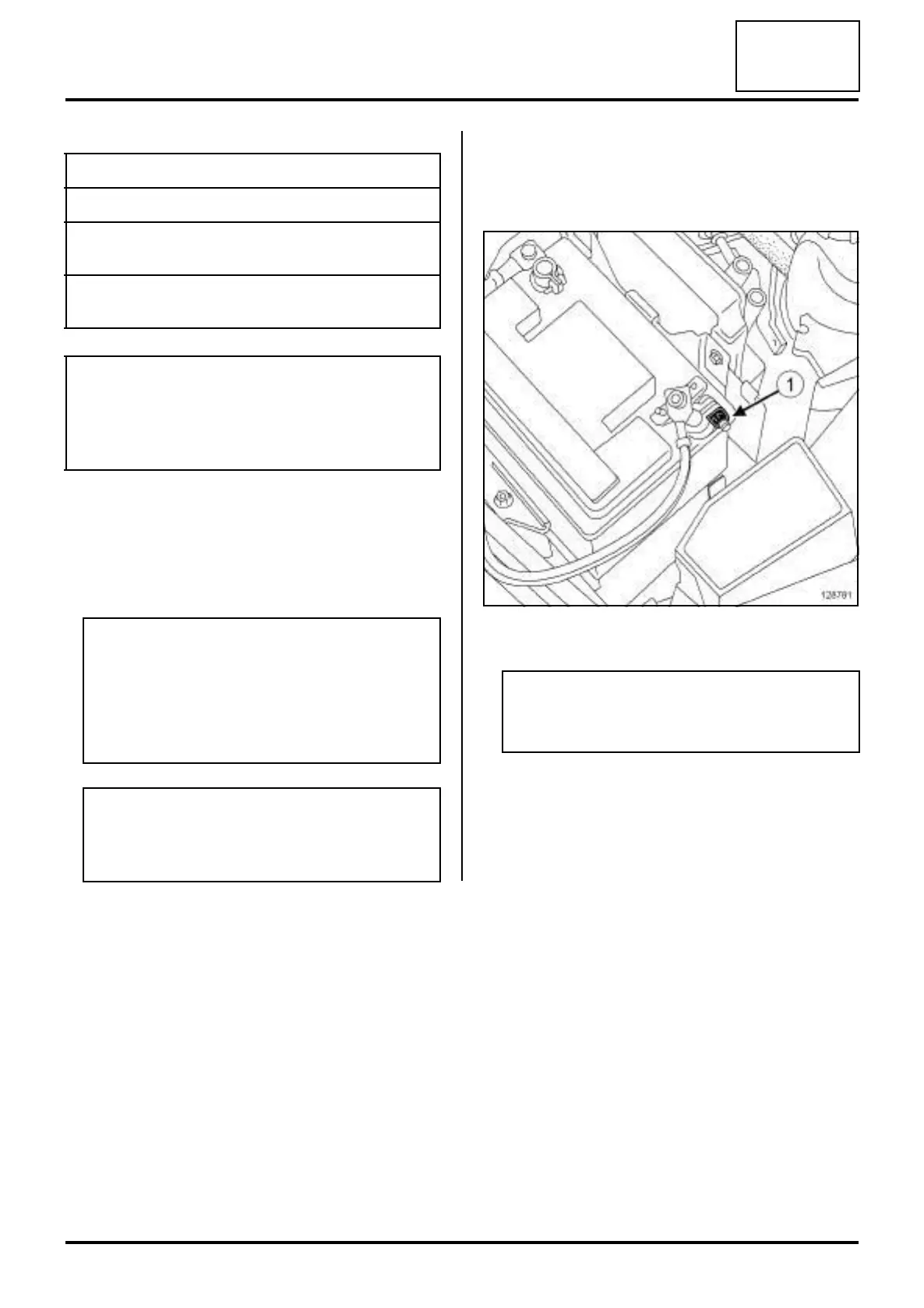
1 - DISCONNECTING
a Undo the negative battery terminal nut (1) .
a Remove the negative battery terminal.
Tightening torquesm
battery bracket bolt 12 Nm
bolt on the positive bat-
tery terminal
6 N.m
negative battery termi-
nal nut
6 N.m
IMPORTANT
Consult the safety and cleanliness advice and oper-
ation recommendations before carrying out any
repair (see 80A, Battery, Battery: Precautions for
the repair, page 80A-1) .
WARNING
Before disconnecting the battery:
-wait for the motor-driven fan assembly to stop,
-wait for the computer to finish saving (1
minute).
WARNING
The visual indicator cannot be considered reli-
able in After-Sales; do not use it to determine the
state of the battery.
128781
Note:
Mark the position of the negative battery termi-
nal.












 To Next Page