13.2
SEL-400 Series Relays Instruction Manual Date Code 20171006
SELOGIC Control Equation Programming
SEL
OGIC Control Equation Setting Structure
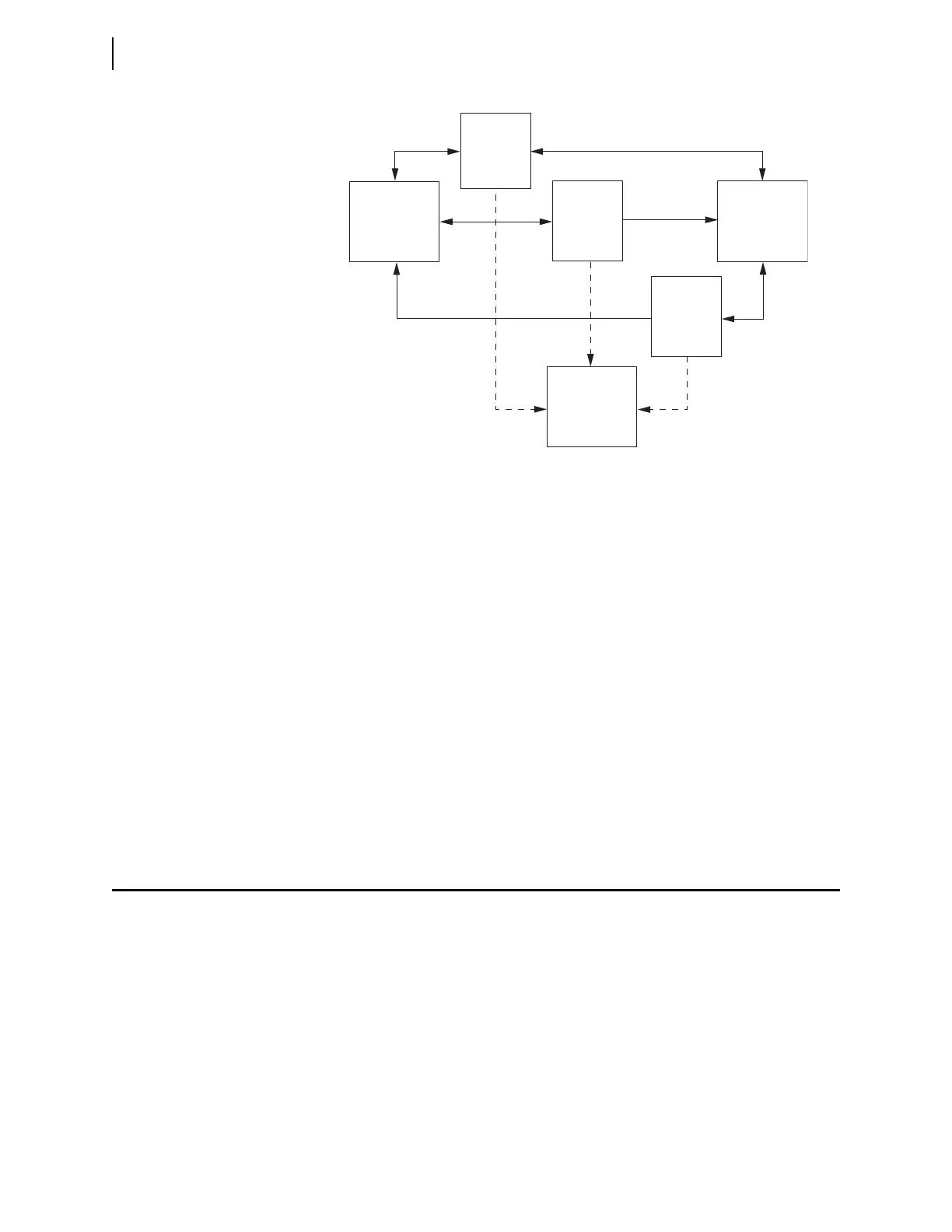
Figure 13.1 illustrates how the SEL-400 series relays keep protection and auto-
mation programming separate while still exchanging information. The arrows
indicate data flow between components. The Relay Word Bits and Analog Quan-
tities are visible to protection, automation, and output programming. Protection
programming uses the Relay Word Bits, Analog Quantities, Protection Variables,
and Automation Variables as inputs, but only writes and stores information to the
Protection Variables. Similarly, automation programming uses data from all parts
of the relay, but only stores data in the Automation Variables.
The Output SEL
OGIC control equation settings use the Relay Word Bits, Analog
Quantities, Protection Variables, and Automation Variables to control outputs and
other information leaving the relay. Use the output settings to create a custom
combination of the results of protection and automation operations. For example,
an OR operation will activate an output when protection or automation program-
ming results necessitate activating the output. You can use more complicated
logic to supervise control of the output with other external and internal informa-
tion. For example, use a command from the SCADA master to supervise auto-
mated control of a motor-operated disconnect in the substation.
SELOGIC Control Equation Setting Structure
SEL-400 series relays use SELOGIC control equations in three major areas. First,
you can customize protection operations with SEL
OGIC control equation settings
and freeform programming. Second, there is a freeform programming area for
more sophisticated automation SEL
OGIC control equation programming. Third,
there is a fixed area for relay output programming. The SEL
OGIC control equa-
tion programming areas are shown in Figure 13.2. There are also a small number
of fixed SEL
OGIC control equations in other settings areas including front-panel
settings that allow you to customize relay features not directly related to protec-
tion or automation.
Figure 13.1 Protection and Automation Separation
Protection
SEL
OGIC
Control Equation
Programming
Relay Word
Bits/
Analog
Quantities
Protection
Boolean/
Math
Variables
Output
SEL
OGIC
Control Equation
Settings
Automation
SEL
OGIC
Control Equation
Programming
Automation
Boolean/
Math
Variables



 To Next Page