X35 Console General Operations
8.17
4. Calibrate the metering augers:
a.
Make sure that for all tanks to be calibrated,
the respective tank buttons are ON, as
previously selected for priming the meters.
b. Turn the Master Switch ON to start the
calibration.
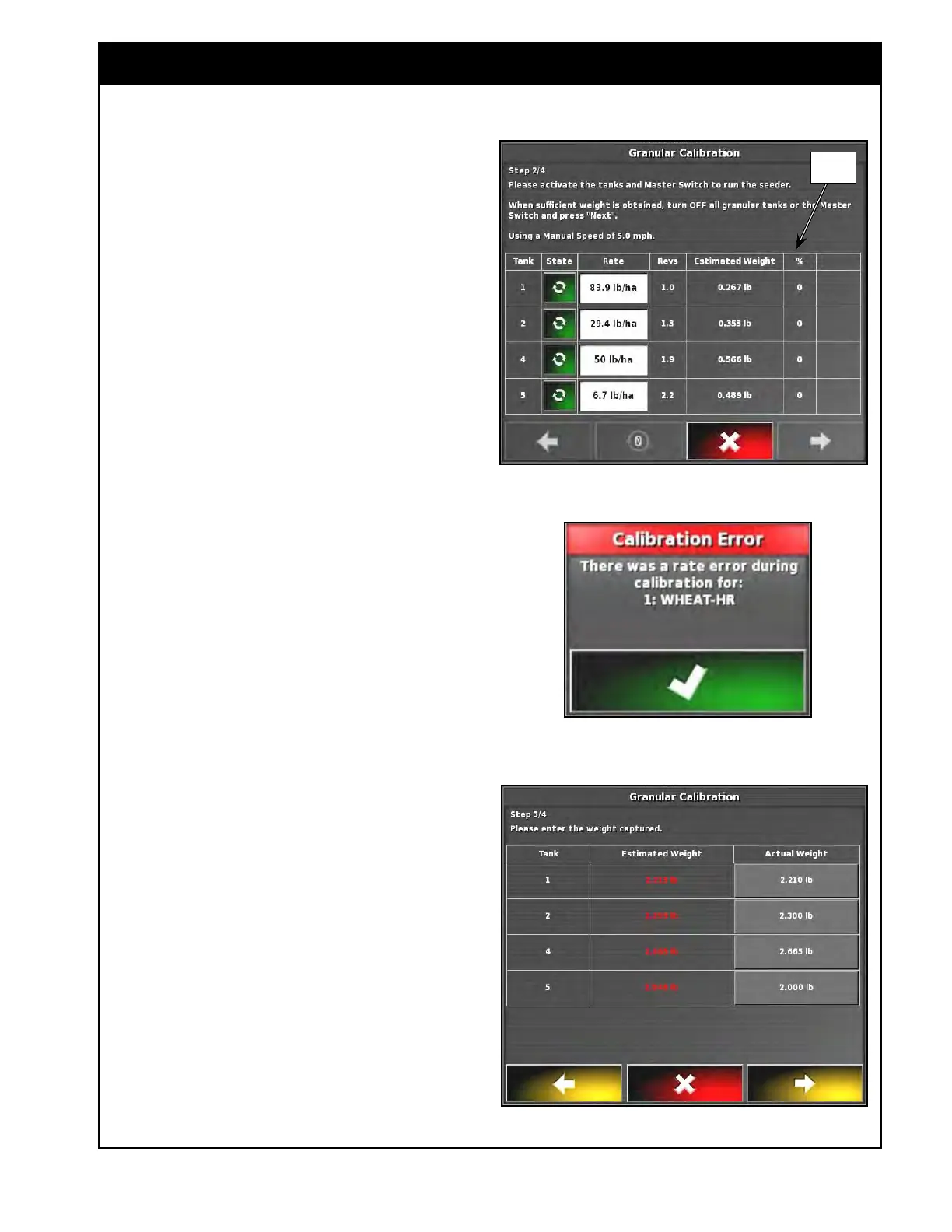
c. As the calibration pails get full, use the
tank buttons to turn OFF those meters,
allowing others to keep filling, You can
also switch off all tanks using the master
switch.
i.
During the calibration, the auger
shaft revolutions and expected
weight will be accumulated on the
X35 console for each meter, refer to
Figure
8.30.
Important
Collect a minimum 20 lb (9 kg) sample for each
metering auger being calibrated. The larger the
sample the more accurate the calibration.
Note
If during calibration any of the activated meter
motor valves are at Minimum PWM of 15% or
Maximum PWM of 95% (refer to Figure 8.30),
the Calibration Error alarm will pop up, refer to
Figure 8.31. You will not be able to achieve your
requested rate.
Select a different final drive range and re-
calibrate that meter. A Calibration Error message
would also appear if the requested rate was not
maintained during calibration or if you stop and
restart a meter during calibration. If you ignore
the alarm, the estimated weight will be highlighted
in red for tanks that had an error.
5. Turn the Master Switch Off.
6. Weigh each sample and return to the cab to
enter weights.
a.
Touch the right yellow arrow to move to
the next screen.
7. Enter the weights for each tank in the “Actual
W
eight” column (Figure 8.32) and proceed to
the next step.
Figure 8.32 - Calibration Wizard - Enter Weights
Figure 8.30 - Performing Calibration
PWM
Figure 8.31 - Calibration Error



 To Next Page