Troubleshooting Infrastructure Modules
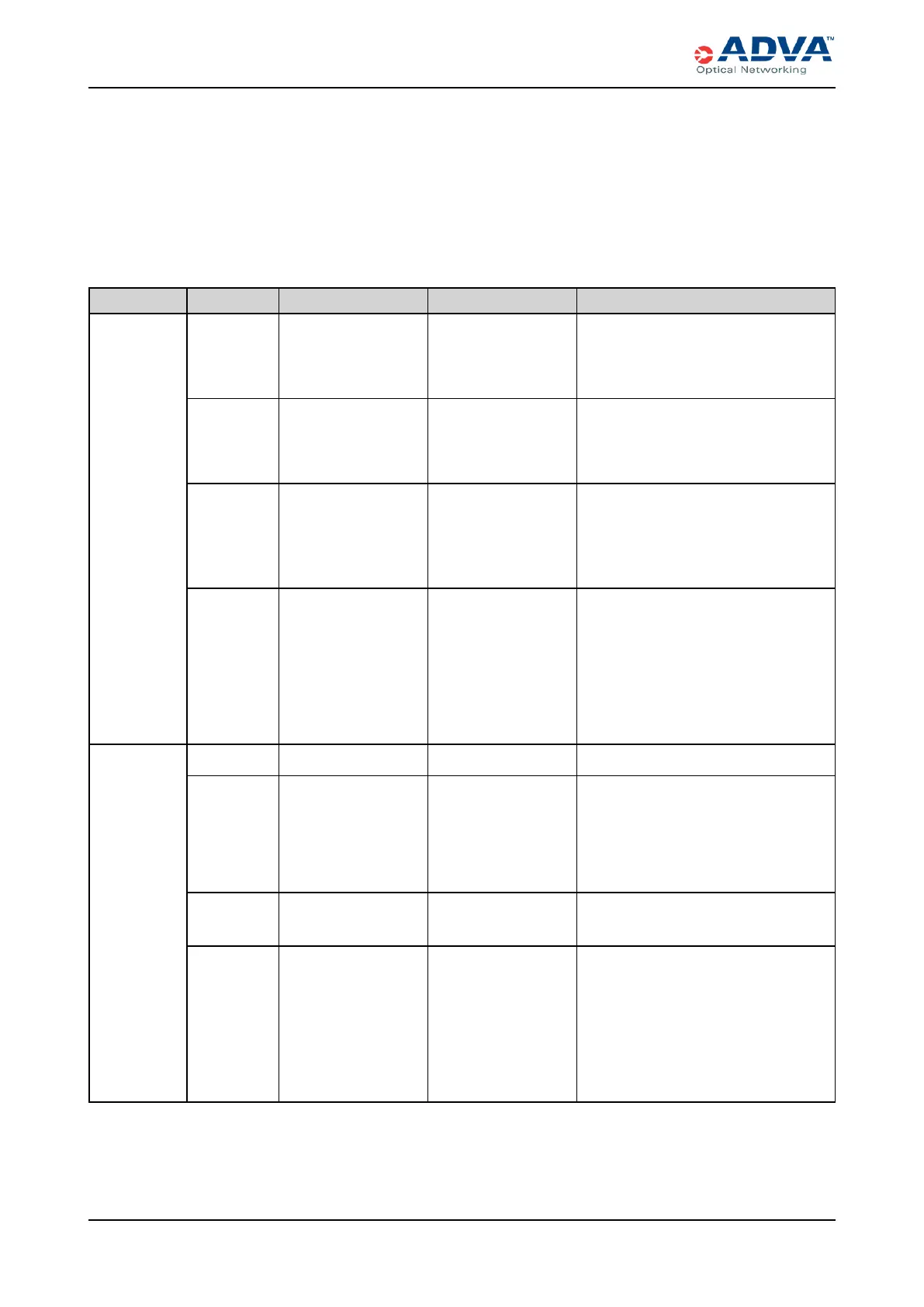
Shelf LEDs
There are two shelf LEDs:
l Alarm — Indicates the highest severity of all alarms raised in the shelf.
l State — Indicates abnormal conditions, such as power loss or operating without PSM
redundancy.
Label Color Status Probable Cause Troubleshooting Steps
Alarm
Green On steadily No equipment or
facility alarms are
raised for the
modules in this shelf.
No action is required.
Yellow On steadily The modules in this
shelf have minor
equipment or facility
alarms.
View the current alarms in the
management software, and then see
the appropriate software guide to
resolve the alarm(s).
Red On steadily The modules in this
shelf have critical
and/or major
equipment or facility
alarms.
View the current alarms in the
management software, and then see
the appropriate software guide to
resolve the alarm(s).
Dark (unlit) Off Shelf power loss.
1. Verify that the power cables are
properly connected to the PSMs
and deliver the required power.
2. Ensure that the PSMs are
operating properly.
3. If the LEDremains off, contact
ADVA Optical Networking.
State
Green On steadily Normal operation. No action is required.
Yellow On steadily No power
redundancy or
thermal abnormal
condition.
1. Ensure that multiple PSMs are
installed and operating properly.
2. Verify that the air filter is clean
and unobstructed.
3. Inspect the fans.
Red On steadily Fan or PSMfailure.
1. Inspect the fans.
2. Inspect the PSMs.
Dark (unlit) Off Shelf power loss.
1. Verify that the power cables are
properly connected to the PSMs
and deliver the required power.
2. Ensure that the PSMs are
operating properly.
3. If the LEDremains off, contact
ADVA Optical Networking.
Table 106: Shelf LEDStatus
367 FSP 3000R7 High-Density Subshelf Guide - R17.2 - Issue:B



 To Next Page