Connecting ACPower to theSH4R and SH4R-2 Shelf
Connecting ACPower to theSH4R and SH4R-
2 Shelf
ELECTRIC VOLTAGEWARNING
Before connecting the ACpower cable, ensure that power is
removed from the dedicated AC supply circuit.
ADVA Optical Networking strongly recommends using a straight
ACpower cable with a PSM-AC4 only if the rack is deeper than 600
mm.
This procedure assumes that:
l The shelf is properly grounded and mounted in the rack;
l The PSM-AC4s or PSM-AC5s are securely installed in the shelf; and
l You have the ACpower cable specific to your country and it was
provided by ADVA Optical Networking.
1. Verify that you are properly grounded with an anti-static wrist strap or heel strap
connected to the grounded ESD jack.
2. If the dedicated ACpower source outlet has a power switch, set it to the OFF (0)
position.
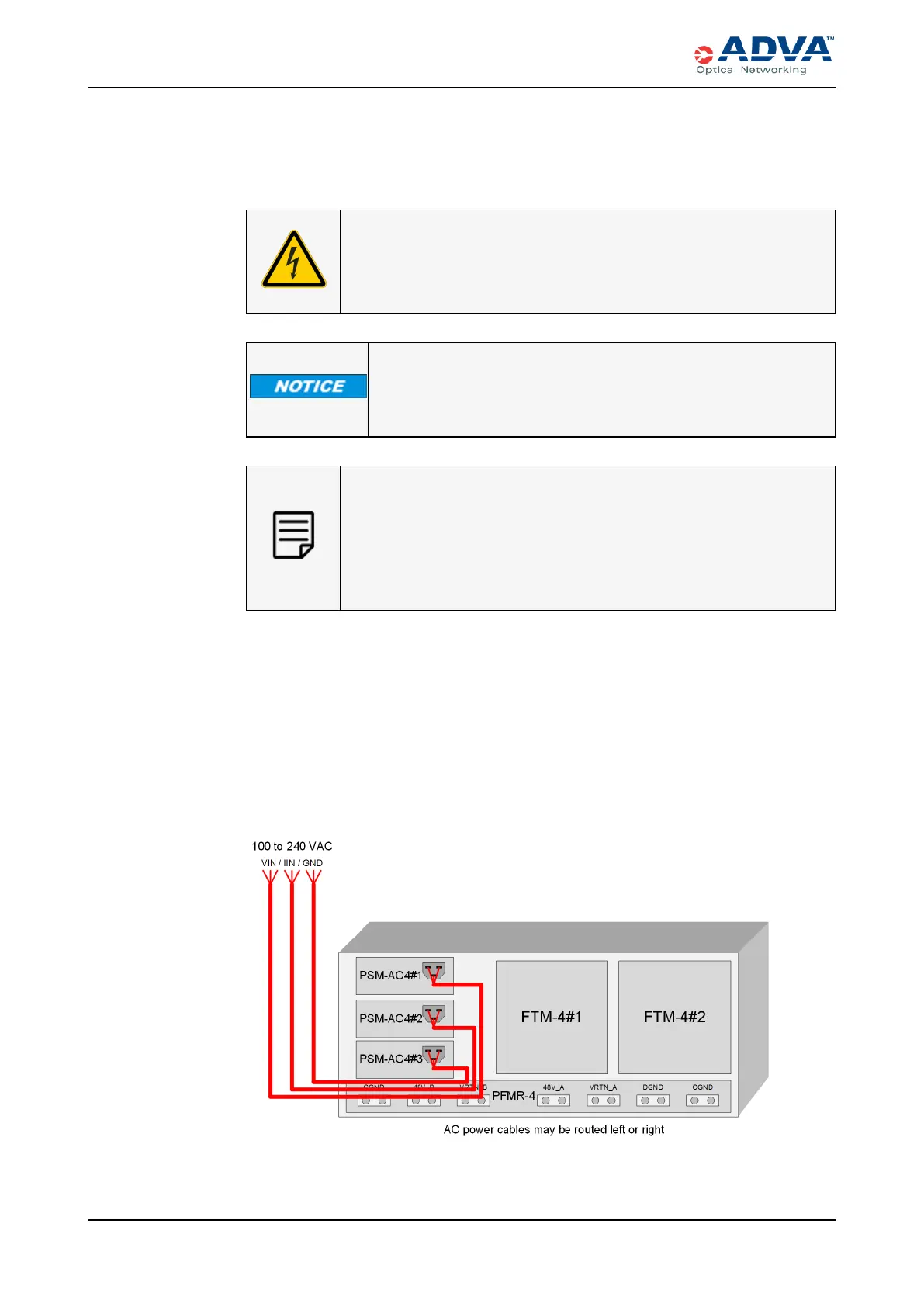
3. For the shelf that you want to power, determine which redundant, load-sharing mode
configuration you want to support. These figures detail the supported AC power
wiring configurations.
Figure 106: 2+1 Configuration Wiring - PSM-AC4
337 FSP 3000R7 High-Density Subshelf Guide - R17.2 - Issue:B



 To Next Page