KRONE ISOBUS Terminal
132
Pos: 48.82 /BA/Inf o-Center/CCI-I SOBUS-Terminal/CCI-Pr ess-Wickelvorric htung/Hauptmenüs/ Hauptmenü 1 Einstellungen/ Menü 1-2-6 Korrektur Befüllung @ 298\mod_14128 39685441_78.doc x @ 2337375 @ 3 @ 1
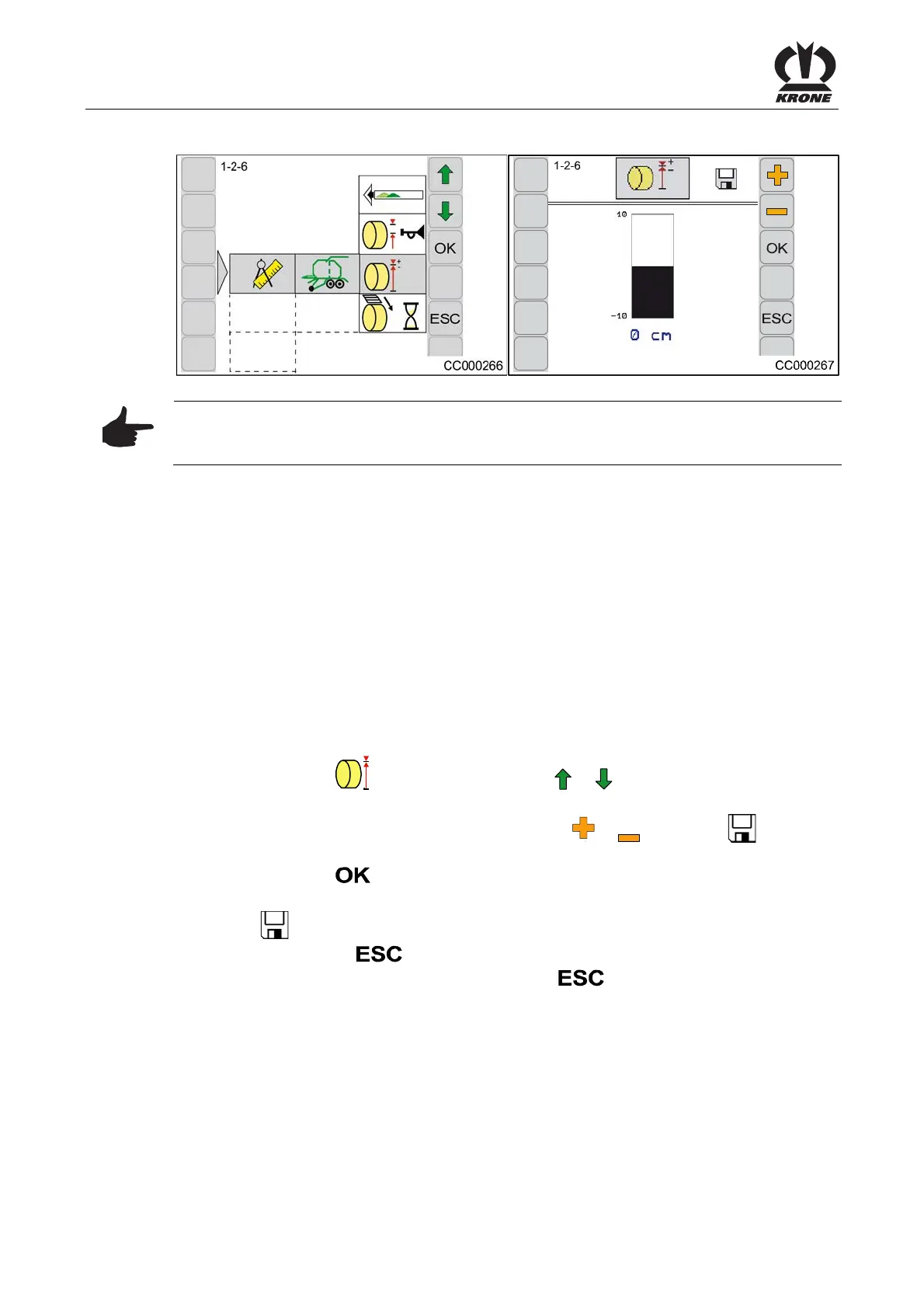
8.7.5 Menu 1-2-6 Filling Correction
Fig. 94
Note
If the bale size is not reached or if it is too high, the bale can be corrected in a predefined range
via menu 1-2-6 “Filling Correction”.
The values can be corrected in the following ranges:
Comprima CV150 XC/CV210 XC
Bale size: -10cm to +10 cm
Calling the menu
Main menu 1-2 “Setting Baler" is called.
Example for the correction of bale diameter:
The set target diameter is 108 cm.
If the actual bale diameter is only 100 cm (the set target diameter is 108 cm), a correction value
of + 8 cm must be set.
This means:
Correction value = bale diameter - target diameter
• Select menu 1-2-6
+
-
by pressing function key or , the symbol is highlighted in
grey.
• Increase or reduce the desired value via function key
or , the symbol in the
upper line disappears
• Press function key
The display shows menu 1-2-6 “Filling Correction”.
The symbol
in the upper line indicates that the displayed value is saved.
• Pressing function key
closes the called up menu
• The basic screen is called by pressing function key
longer
Pos: 48.83 /Layout Module /---------------Seitenumbruch---------------- @ 0\mod_1196175311226_0. docx @ 4165 @ @ 1







 To Next Page