KRONE ISOBUS Terminal
177
Pos: 48.187 /BA/Inf o-Center/CCI-I SOBUS-Terminal/CCI- Press-Wickelvorric htung/Hauptmenüs/ Hauptmenü 4 Service/Gefahr enhinweis Handbedi enung ohne SA @ 53\mod_12904 09747968_78.doc x @ 509309 @ 33 @ 1
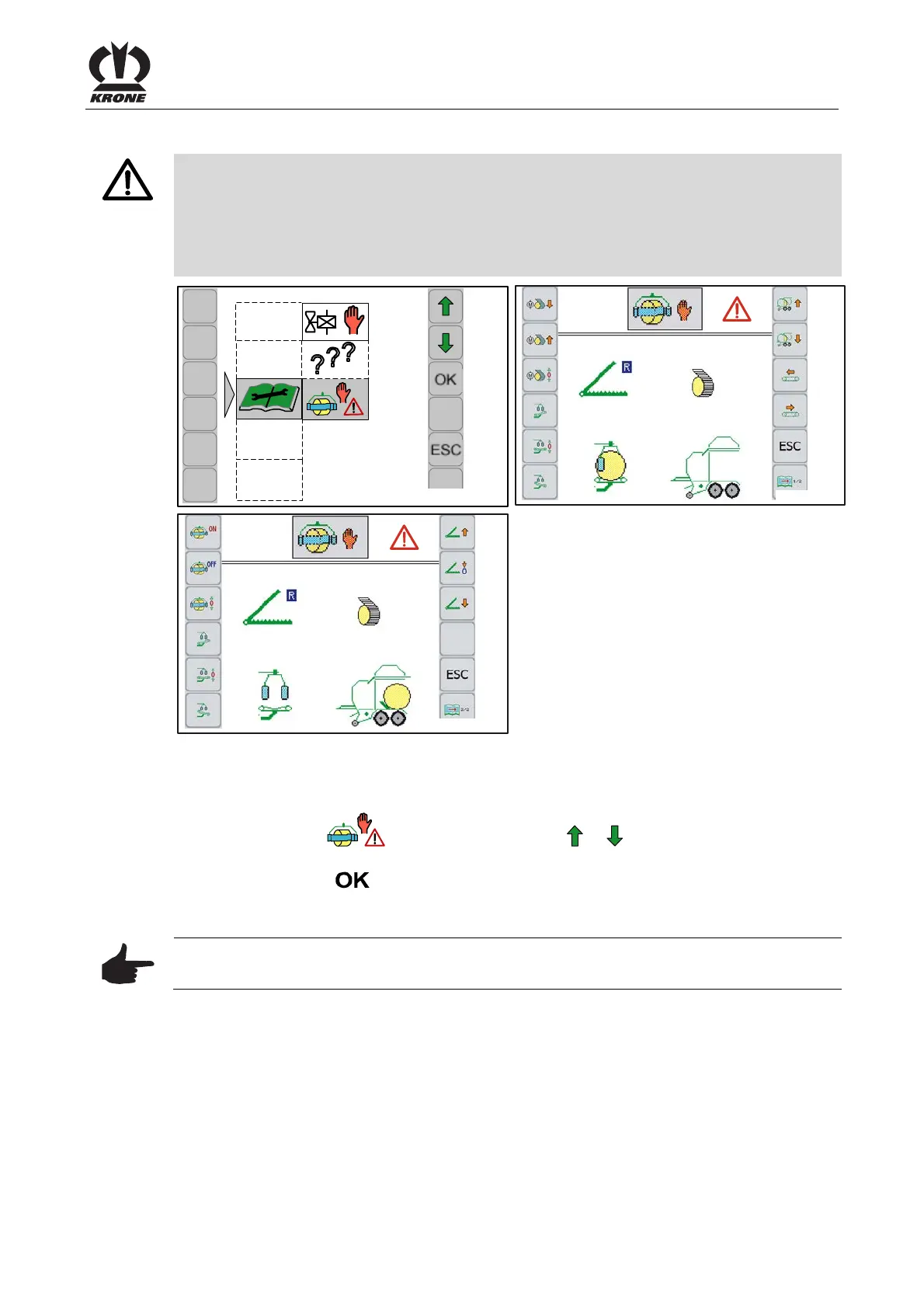
8.13.5 Menu 4-9 Manual operation without confirmation prompt
Danger! – Unexpected actions on the machine.
Effect: Danger to life or serious injuries, machine damages.
• The person performing must know, which machine parts are activated via manual operation
without confirmation prompt. If necessary, the set machine parts have to be secured
against inadvertent lowering
• There must be no persons, animals and objects in the danger zone.
Pos: 48.188 /BA/Inf o-Center/CCI-I SOBUS-Terminal/CCI- Press-Wickelvorric htung/Hauptmenüs/ Hauptmenü 4 Service/Menü 4- 9 Abbildungen @ 53\mod_128 9988459203_78.doc x @ 507915 @ @ 1
CC000296
4-9
?
?
?
CC000305
4-9-1
CC000304
4-9-2
Fig. 133
Pos: 48.189 /BA/Inf o-Center/CCI-I SOBUS-Terminal/CCI- Press-Wickelvorric htung/Hauptmenüs/ Hauptmenü 4 Service/Menü 4- 9 aufrufen @ 53\mod_1290 409917328_78.doc x @ 509336 @ @ 1
Displaying the menu
Call the „Service“ main menu 4.
• Select menu 4-9 (
) by pressing function key or , the icon is shown in reverse
colours.
• Press function key
The display shows the menu 4-9 “Manual operation without confirmation prompt”.
Note
All menu items listed in main menu 3 „Manual operation“ can be called.
Possible status messages for manual operation without confirmation prompt, see
chapter “Status messages”.
Pos: 48.190 /Layout Mod ule /---------- -----Seitenumbruc h------------- --- @ 0\mod_1196175311226_ 0.docx @ 4165 @ @ 1







 To Next Page