KRONE ISOBUS Terminal
147
Pos: 48.110 /BA/Inf o-Center/CCI-I SOBUS-Terminal/CCI- Press-Wickelvorric htung/Hauptmenüs/ Hauptmenü 3 Handbedienung/ Menü 3-1 Handbedienun g Presse_CF/CV XC @ 233\mod_139 3925331717_78.doc x @ 1857235 @ 33 @ 1
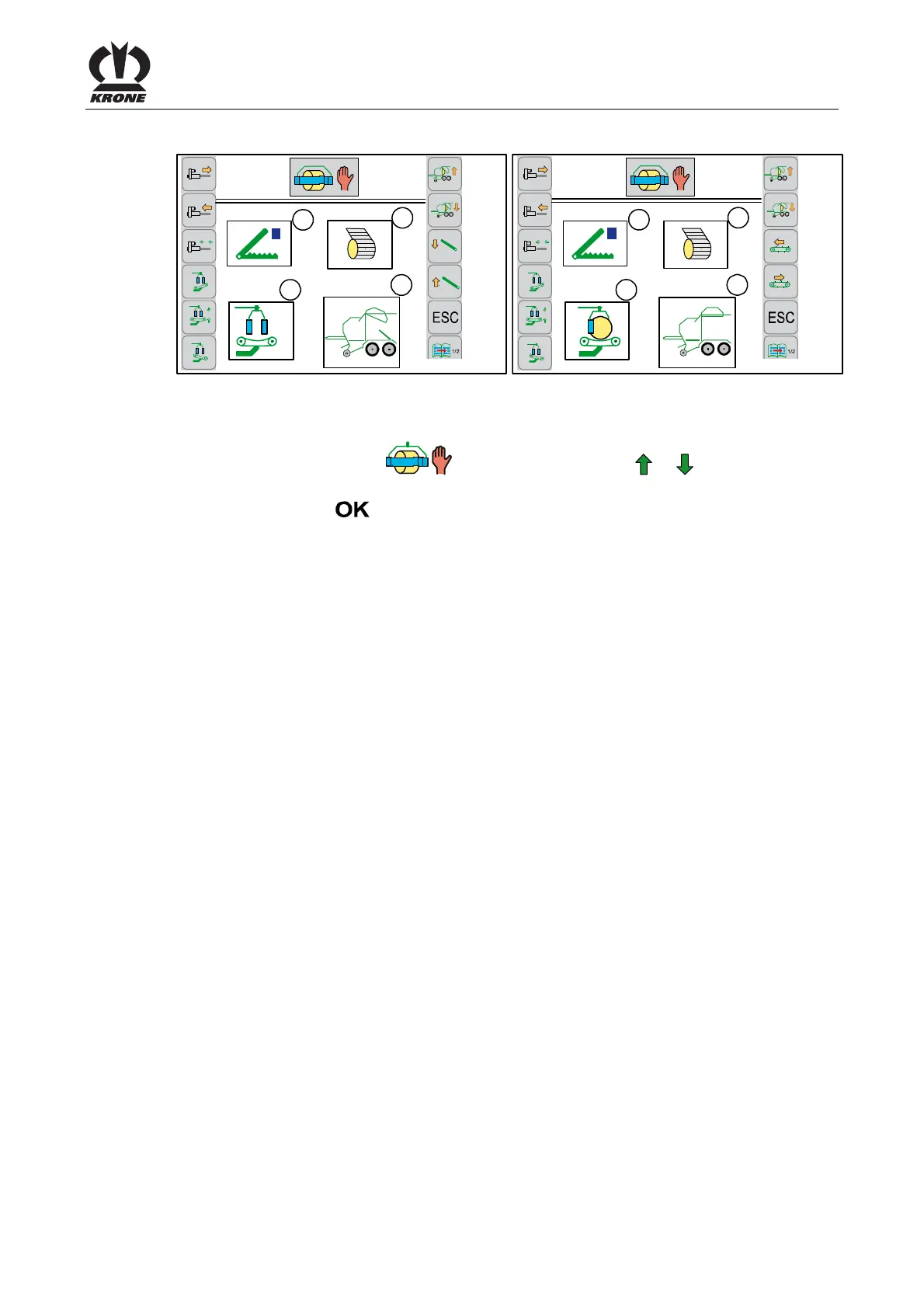
8.10.1 Menu 3-1 „Manual operation baler"
4
3
1
2
0
0
R
CC000283_1
3-1
4
3
1
2
0
0
R
CC000282_1
3-1
Fig. 109 Comprima CF155XC/CV210XC Comprima CV150XC
Calling the menu
Main menu 3 "Manual operation" is called
• You can select menu 3-1 (
) by pressing function key or . The symbol is
highlighted in grey.
• Press function key
.
Show in the display
(1)
= Display wrapping arm/swivel table
(2)
= Display net motor
(3)
= Bale chamber and lifter display
(4)
= Holding arms display
Pos: 48.111 /Layout Mod ule /---------- -----Seitenumbruc h------------- --- @ 0\mod_1196175311226_ 0.docx @ 4165 @ @ 1







 To Next Page