KRONE ISOBUS Terminal
182
Pos: 48.202 /BA/Inf o-Center/CCI-I SOBUS-Terminal/CCI- Rundballenpressen/ Hauptmenüs/Hauptmenü 7/ Menü 7-1-1 „Tag-Nacht Umschaltung“ ohne Hellig keit @ 212\mod_1389776 201032_78.docx @ 17418 04 @ 33 @ 1
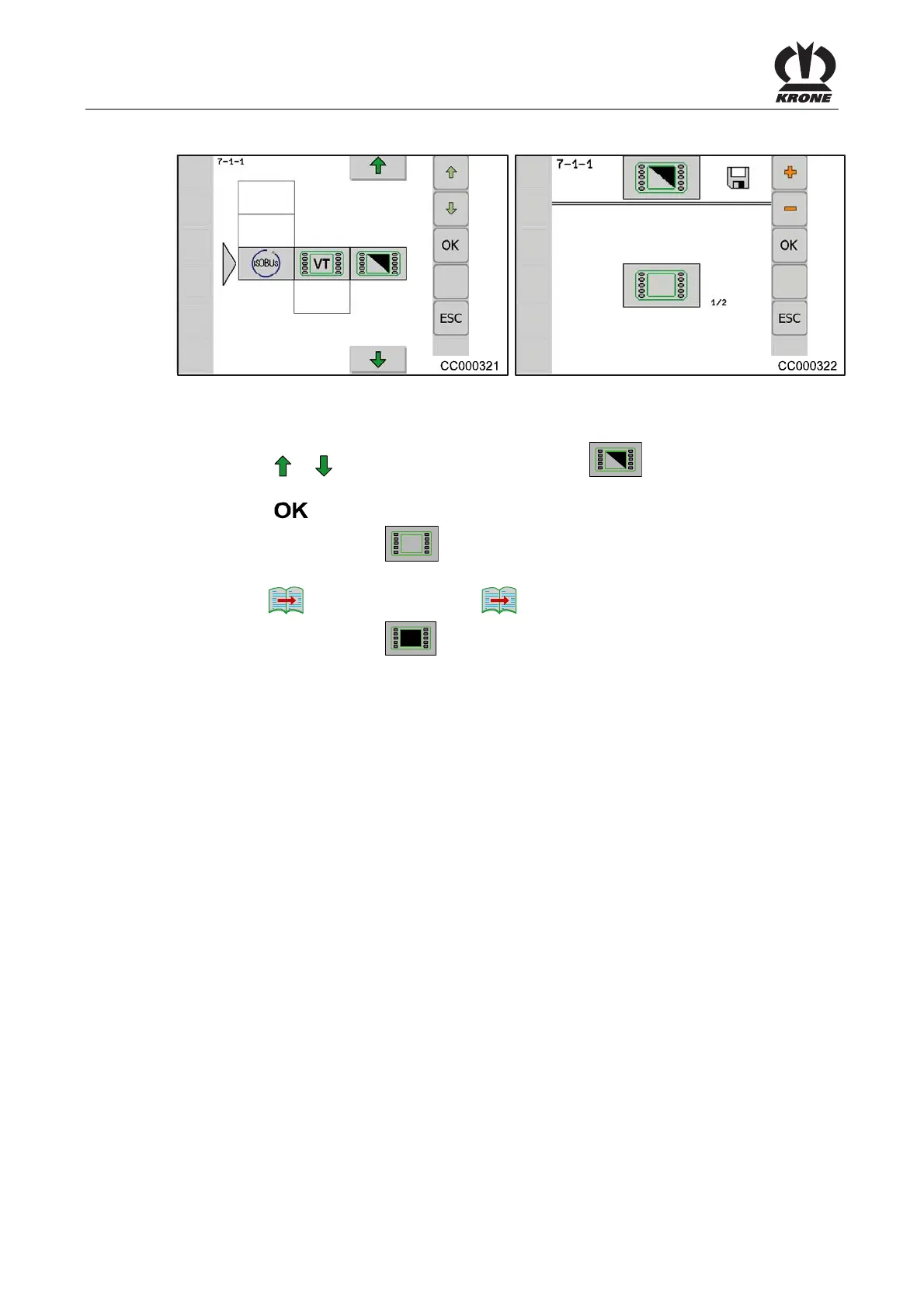
8.16.2 Menu 7-1-1 Select day/night display lighting
Fig. 138
The "Select day/night display lighting" menu can be used to adjust the brightness of the display.
Menu 7-1 "Virtual terminal (VT)" is opened.
• Press the
or function button to select menu 7-1-1 ; the icon is highlighted in
colour
• Press the
function button
The display shows the screen
1/2 "Day lighting" in menu 7-1-1 "Select day/night display
lighting".
• Press the
1/2
button to switch to the
2/2
screen
The display shows the screen
2/2 "Night lighting" in menu 7-1-1 "Select day/night
display lighting".
Pos: 48.203 /Layout Mod ule /---------- -----Seitenumbruc h------------- --- @ 0\mod_1196175311226_ 0.docx @ 4165 @ @ 1







 To Next Page