KRONE ISOBUS Terminal
155
Pos: 48.128 /BA/Inf o-Center/CCI-I SOBUS-Terminal/CCI- Press-Wickelvorric htung/Hauptmenüs/ Hauptmenü 3 Handbedienung/ Menü 3-2 Handbedienun g Wickler CV210 @ 61\mod_129 9067361118_78.doc x @ 569770 @ 22 @ 1
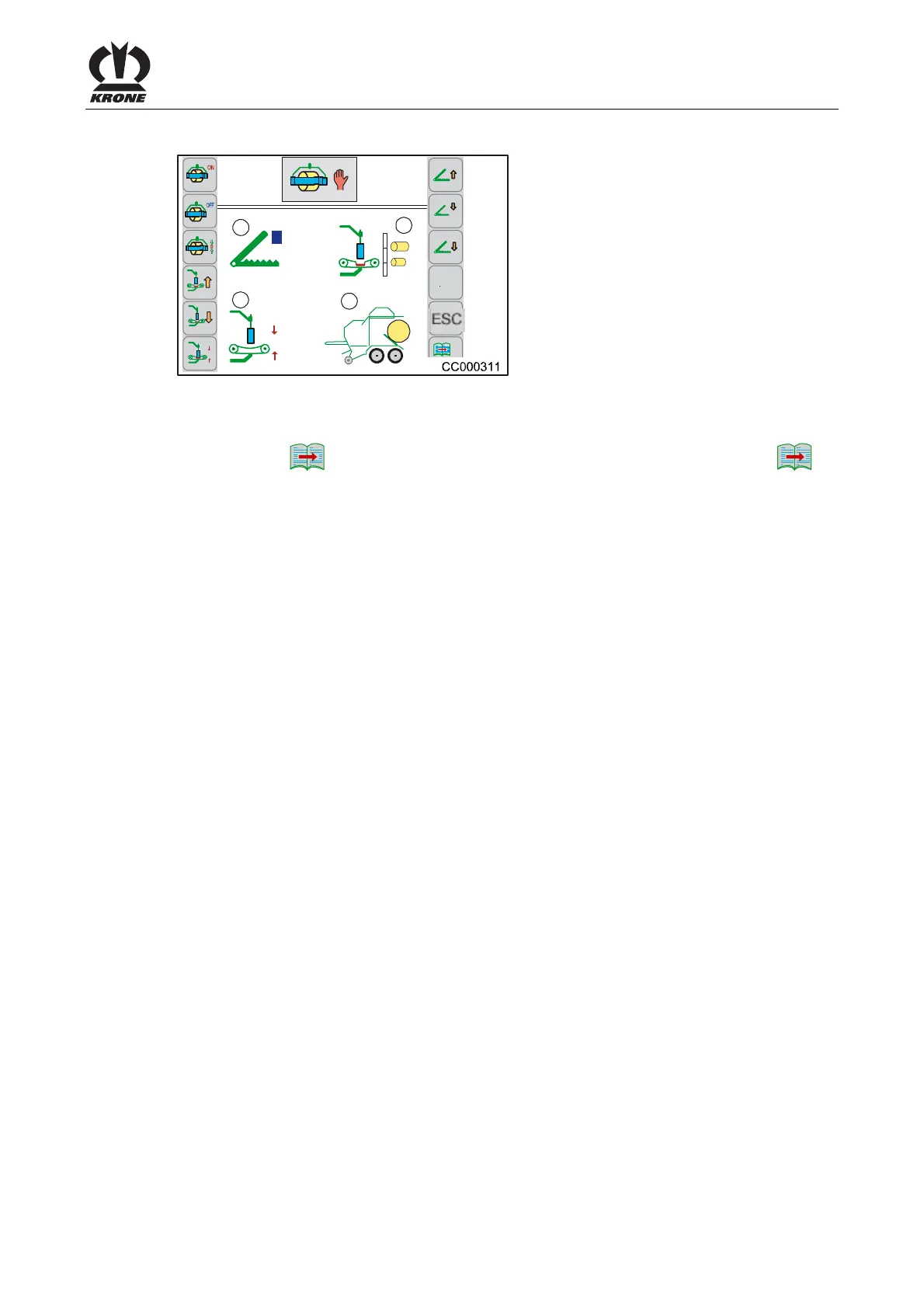
8.12 Menu 3-2 „Manual Operation Wrapping Arm" CV 210
R
4
2
1
3
0
0
0
2/2
Fig. 117
Calling the Menu
Menu 3-1 "Manual Operation Baler" is called.
• Activate the
1/2
key to change to menu 3-2 "Manual Operation Wrapping Arm".
2/2
Displays in the Display
(1)
= Wrapping arm display
(2)
= Height wrapping arm display
(3)
= Bale chamber and lifter display
(4)
= Holding arms display
For Possible Status Messages Window 3 (Bale Chamber) See Chapter “Status
Messages”.
Pos: 48.129 /Layout Mod ule /---------- -----Seitenumbruc h------------- --- @ 0\mod_1196175311226_ 0.docx @ 4165 @ @ 1







 To Next Page