Connecting AC and DCPower to theSH4R and SH4R-2 Shelf
4. If the dedicated ACpower source outlet has a power switch, set it to the OFF (0)
position.
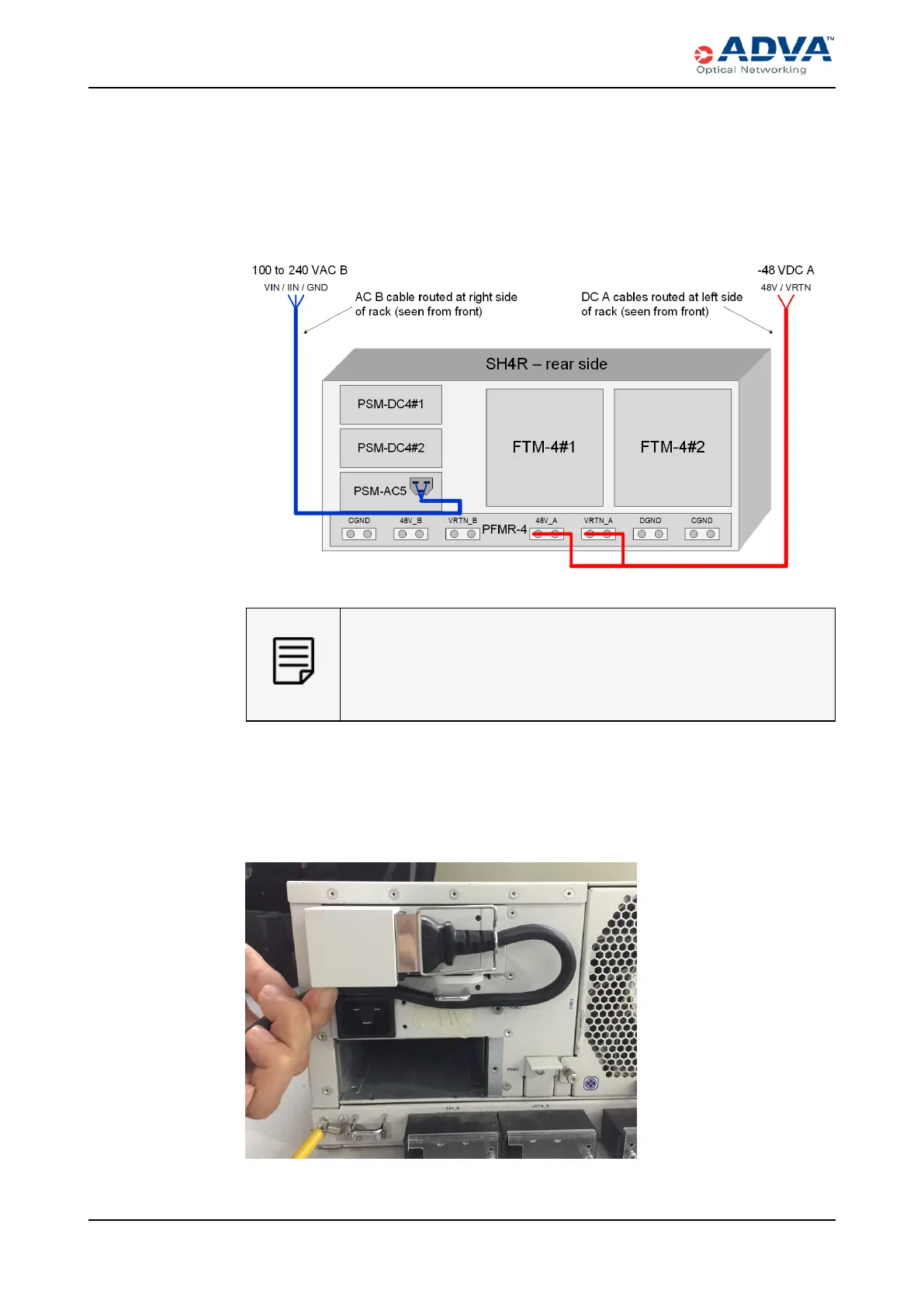
5. For the shelf that you want to power, determine which redundant, load-sharing mode
configuration you want to support. This figure details the supported AC/DC power
wiring configuration.
Figure 109: 2+1 Configuration Wiring - PSM-DC4/PSM-AC5
For a 1+1 configuration, leave the middle slot (PSM2) empty. See Power
for more information.
For system cooling, you must install an appropriate slot cover in the
empty PSM slots.
6. Connect the ACpower connections:
a. Insert the AC power coupler into the receptacle on the PSM-AC5.
b. Secure the power cable with the cord clip and carefully route the cable as shown
in this figure.
341 FSP 3000R7 High-Density Subshelf Guide - R17.2 - Issue:B



 To Next Page