116 01-6203-01R3, CG Drives & Automation
6.4.2. Stopping performance
In the default setting, the motor is brought to a standstill after a stop command with
standard ramp. Alternatively, coasting or ramping down with quick stop ramp can be
selected.
Details
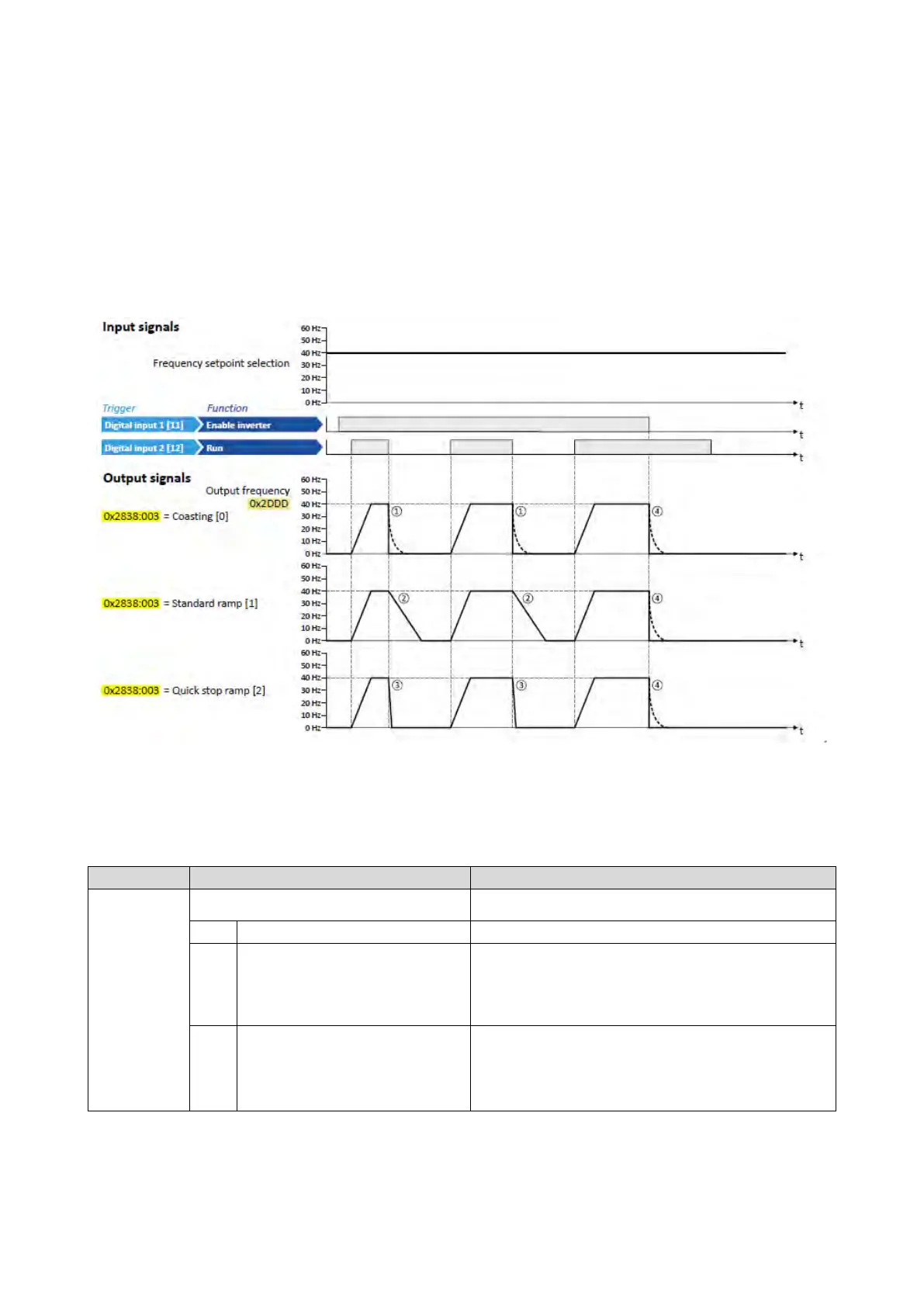
The stop method can be selected in 0x2838:003 (P203.03). The following diagram
demonstrates the different stop methods:
①
Stop method = "Coasting [0]": The motor is coasting.
②
Stop method = "Standard ramp [1]": The motor is brought to standstill with a deceleration time 1 (here: 10 s).
③
Stop method = "Quick stop ramp [2]": The motor is brought to a standstill with the deceleration time for quick stop (here: 1 s).
④
If "Enable inverter" is set to FALSE, the inverter is disabled. The motor becomes torqueless and coasts to standstill depending on the
mass inertia of the machine (irrespective of the set stop method).
Name / value range / [default setting]
(P203.03)
Start/stop configuration: Stop method
(Start/stop confg: Stop method)
Behaviour after the "Stop" command.
The motor becomes torqueless (coasts down to standstill).
The motor is brought to a standstill with deceleration time 1 (or
deceleration time 2, if activated).
•
Deceleration time 1 can be set in 0x2918 (P221.00).
•
Deceleration time 2 can be set in 0x291A (P223.00).
Frequency limits and ramp times
100
2
Quick stop ramp
The motor is brought to a standstill with the deceleration time set for
the "Quick stop" function.
•
Deceleration time for quick stop can be set in 0x291C (P225.00).
•
The "quick stop" function can also be activated manually, for
instance
via a digital input.
Quick stop
103



 To Next Page