296 01-6203-01R3, CG Drives & Automation
10.8. Favorites
In order to gain quick access using »Emotron Easy starter« or the keypad, frequently used
parameters of the inverter can be defined as "Favorites".
• »Emotron Easy starter« provides quick access to the "Favorites" via the Favorites tab.
• On the keypad, the "Favorites" can be found in group 0.
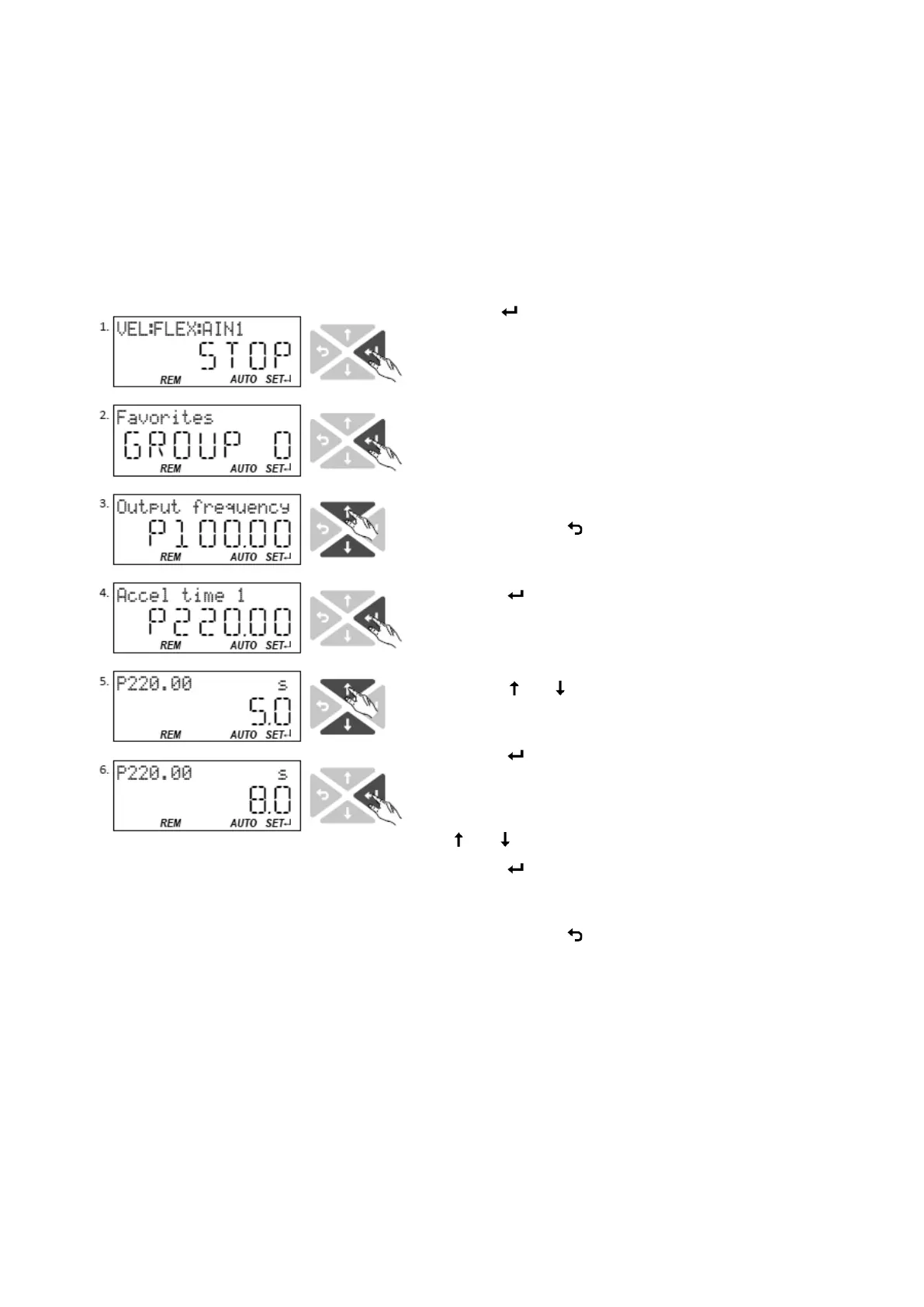
10.8.1. Accessing the "Favorites" with the keypad
3. Use the key in the operating
mode to navigate to the
parameterisation mode one
level below.
You are now in the group level.
All parameters of the inverter
are divided into different groups
according to their function.
Group 0 contains the
"Favorites".
Note: By using the
key you
can navigate one level upwards
again anytime.
4. Use the
key to navigate to
one level below.
You are now in the parameter
level of the group selected.
5. Use the
and navigation
keys to select the desired
parameter.
6. Use the
key to navigate to
one level below. You are now
in the editing mode.
7. Set the desired value using the
and navigation keys.
8. Use the
key to accept the
changed setting. The editing
mode is exited.
Note: By using the
key you
can exit the editing mode
without accepting the new
setting (abort).



 To Next Page