EasyManua.ls Logo

Emotron VS10 - Function Assignment of the Inputs and Outputs

Emotron VS10
528 pages
Print Icon
To Next Page IconTo Next Page
To Previous Page IconTo Previous Page
Loading...
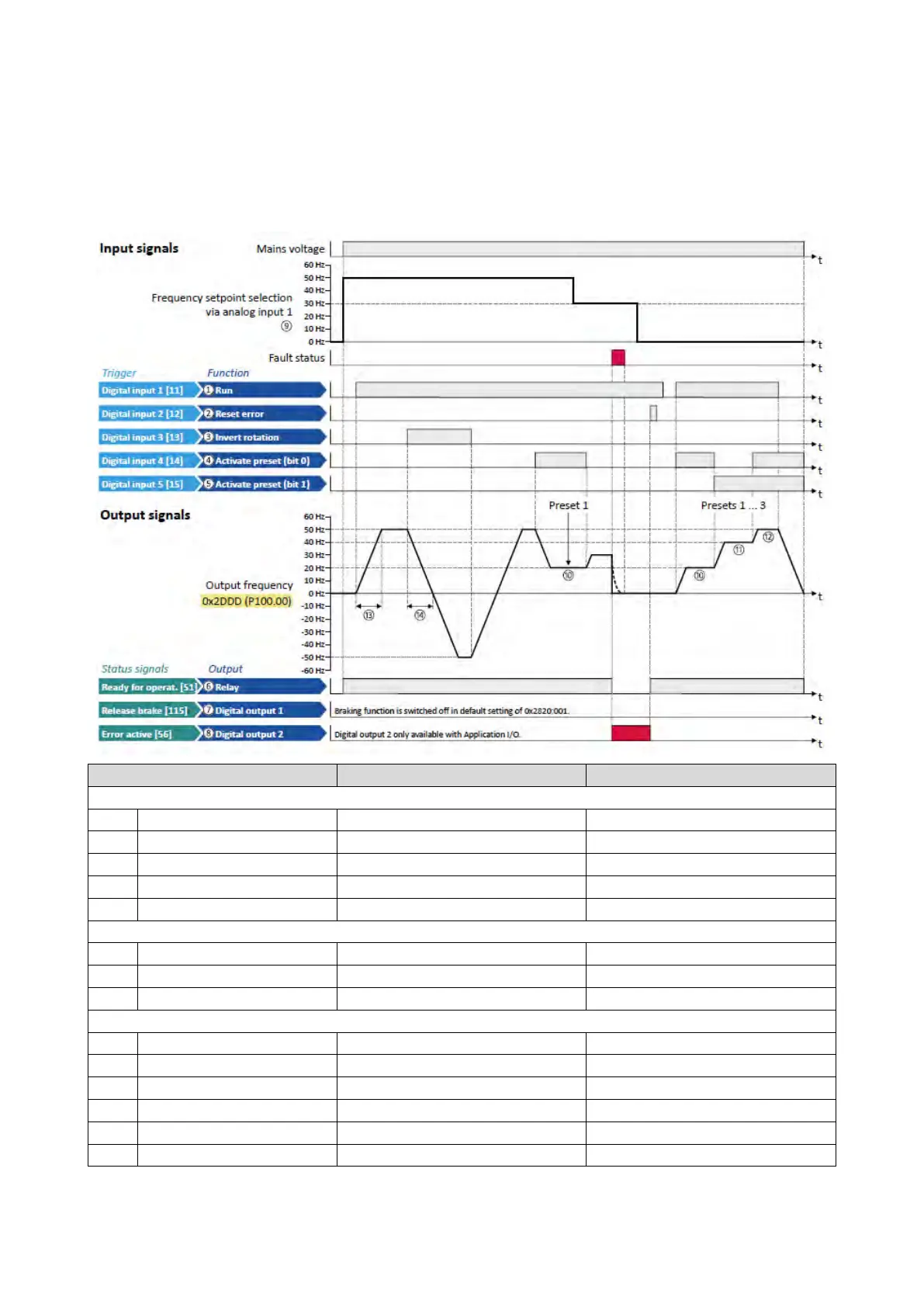
4.3.4. Function assignment of the inputs and outputs
The inverter control can be adapted individually to the respective application. This is
basically effected by assigning digital control sources ("triggers") to functions of the
inverter.
By default, the inverter can be controlled via the I/O terminals as follows:
Parameter
Name
Default setting
Control functions
0x2631:002 (P400.02) Run Digital input 1 [11]
0x2631:004 (P400.04)
Reset fault
Digital input 2 [12]
0x2631:013 (P400.13)
Invert rotation
Digital input 3 [13]
0x2631:018 (P400.18)
Activate preset (bit 0)
Digital input 4 [14]
0x2631:019 (P400.19)
Activate preset (bit 1)
Digital input 5 [15]
Configuration of digital outputs
0x2634:001 (P420.01)
Relay
Ready for operation [51]
0x2634:002 (P420.02)
Digital output 1
Release holding brake [115]
0x2634:003 (P420.03)
Digital output 2 (only for application I/O)
Error active [56]
Settings for the frequency setpoint
0x2860:001 (P201.01) Frequency control: Default setpoint source Analog input 1 [2]
0x2911:001 (P450.01)
Frequency setpoint presets: Preset 1
20 Hz
0x2911:002 (P450.02)
Frequency setpoint presets: Preset 2
40 Hz
0x2911:003 (P450.03)
Frequency setpoint presets: Preset 3
50 Hz
0x2917 (P220.00)
Acceleration time 1
5.0 s
0x2918 (P221.00) Deceleration time 1 5.0 s

Table of Contents

Other manuals for Emotron VS10

Related product manuals