6.5. Frequency limits and ramp times
The frequency range can be limited by setting a minimum and maximum frequency. For
the frequency setpoint, two different ramps can be parameterised. Change-over to ramp 2
can be carried out manually or automatically.
Details
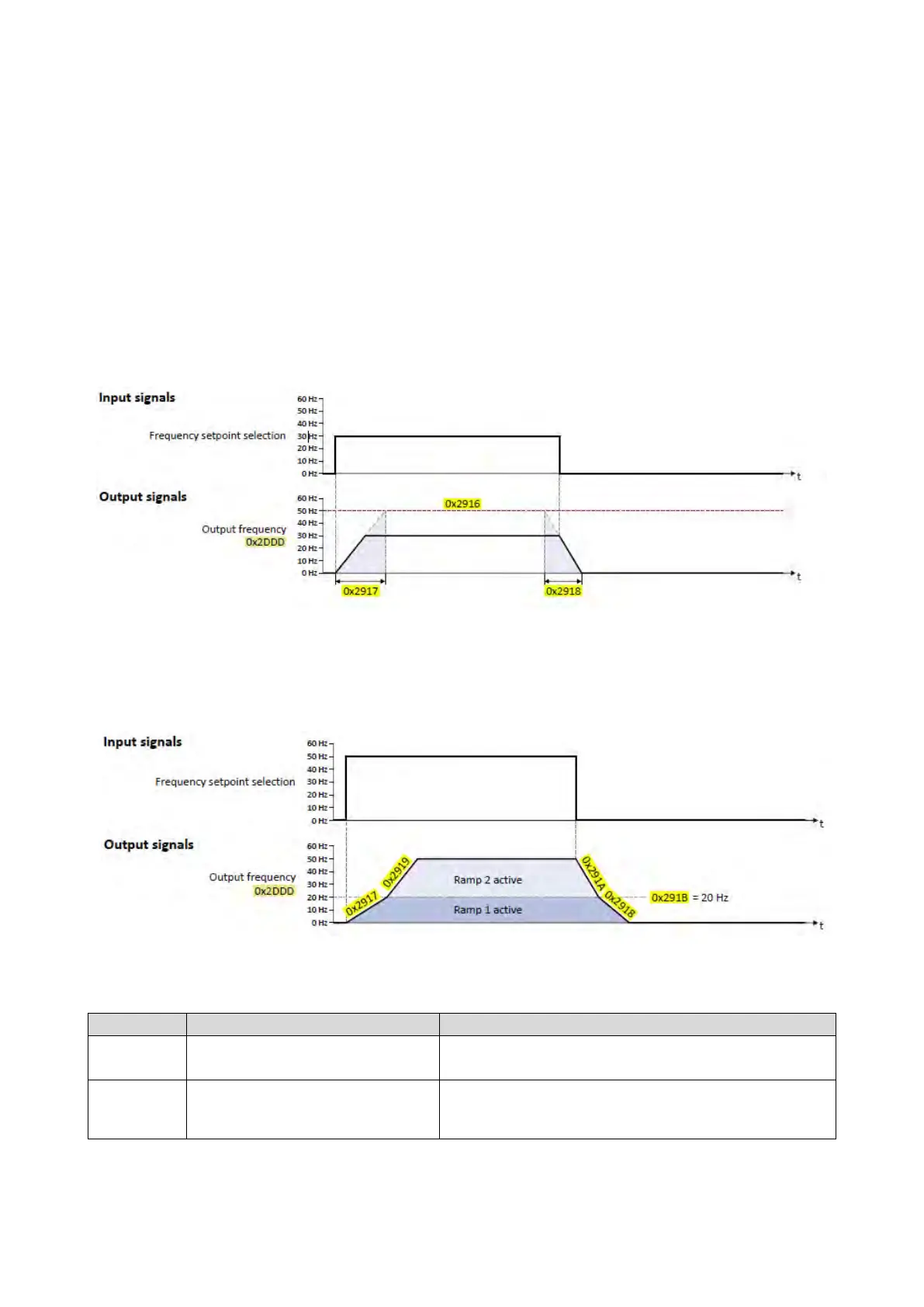
The frequency setpoint is internally led via a ramp generator.
• The acceleration time set in 0x2917 (P220.00) refers to an acceleration from standstill
to the maximum frequency set in 0x2916 (P211.00). At a low setpoint selection, the
real acceleration time decreases accordingly.
• The deceleration time set in 0x2918 (P221.00) refers to the deceleration of the set
maximum frequency to standstill. In case of a lower actual frequency, the actual
deceleration time is reduced accordingly.
Automatic/manual change-over to ramp 2
• For ramp 2, the acceleration time 2 set in 0x2919 (P222.00) and the deceleration time
2 set in 0x291A (P223.00) apply.
• The change-over to ramp 2 is effected automatically if the frequency setpoint (absolute
value) ≥ auto-changeover threshold 0x291B (P224.00).
•
The "Activate ramp 2" function serves to manually activate the acceleration time 2 and
the deceleration time 2.
Activating ramp 2 manually
404
Name / value range / [default setting]
(P210.00)
(Min. frequency)
0.0 ... [0.0] ... 599.0 Hz
Lower limit value for all frequency setpoints.
0x2916
(P211.00)
Maximum frequency
(Max. frequency)
Device for 50-Hz mains: 0.0 ... [50.0] ... 599.0 Hz
Device for 60-Hz mains: 0.0 ... [60.0] ... 599.0 Hz
Upper limit value for all frequency setpoints.



 To Next Page