428 01-6203-01R3, CG Drives & Automation
12.9.2. Example 2: Activation via command (immediately)
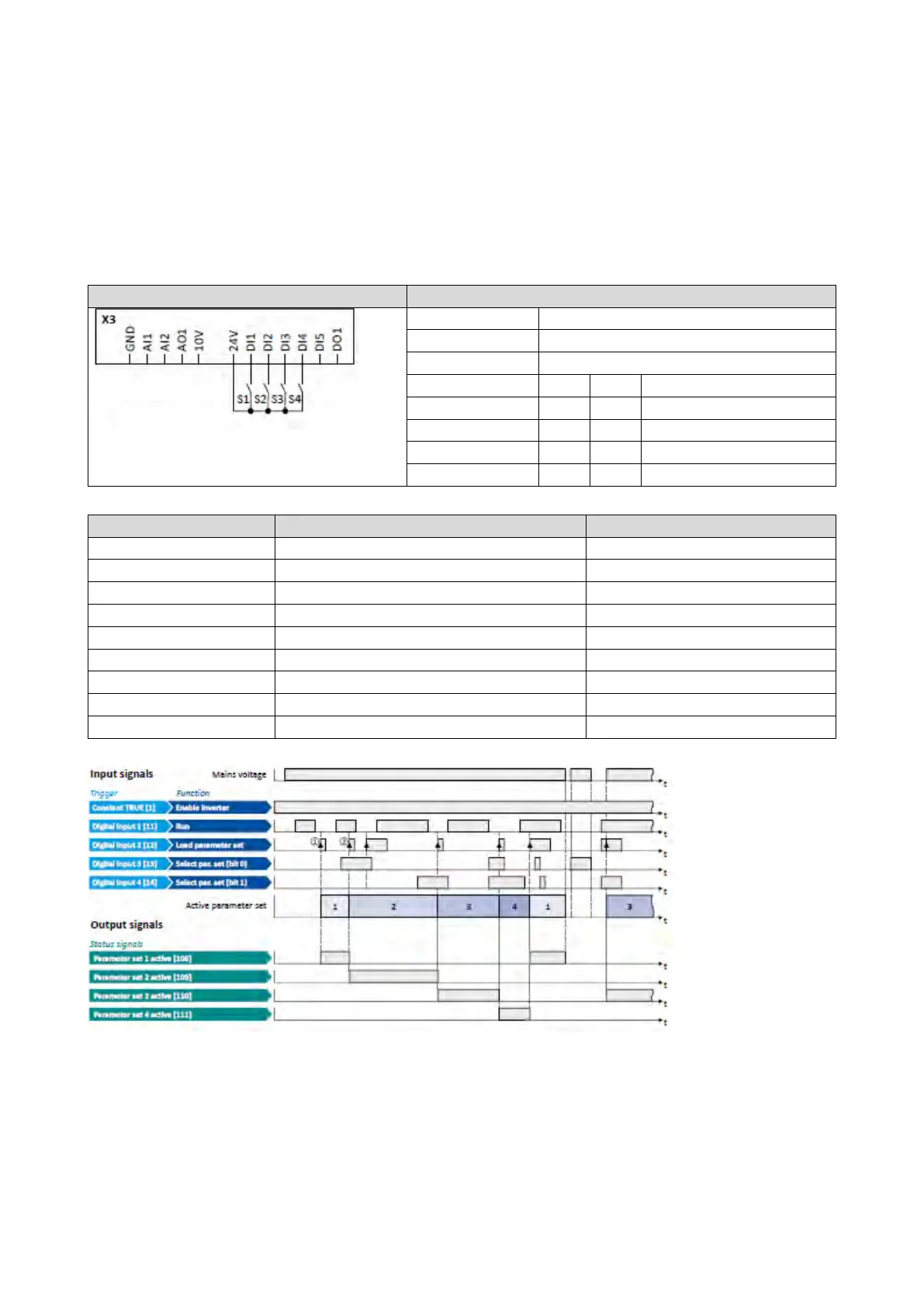
Activation method 0x4046 (P755.00) = "Via command (immediately) [1]":
• Switches S3 and S4 serve to select the parameter set (see the following table).
• Switch S2 activates the change-over. Since the change-over is activated with a rising
edge, a button (normally-open contact) can be used instead of a switch.
• Change-over takes place immediately, even if the motor is started (switch S1 closed).
Switch S1 Run
On
Off
Parameter set 2
On
On
Parameter set 4
0x2631:004 (P400.04)
Reset fault
Not connected [0]
Select parameter set (bit 0)
Select parameter set (bit 1)
0x2824 (P200.00)
Control selection
Flexible I/O configuration [0]
Activation of parameter set
Via command (immediately) [1]
The
status
signals can be assigned to digital outputs.
Configuration of digital outputs
429
① The change-over is activated with the "Load parameter set" function (FALSE/TRUE
edge).
② Change-over is also possible if the inverter is enabled and the motor is started.



 To Next Page