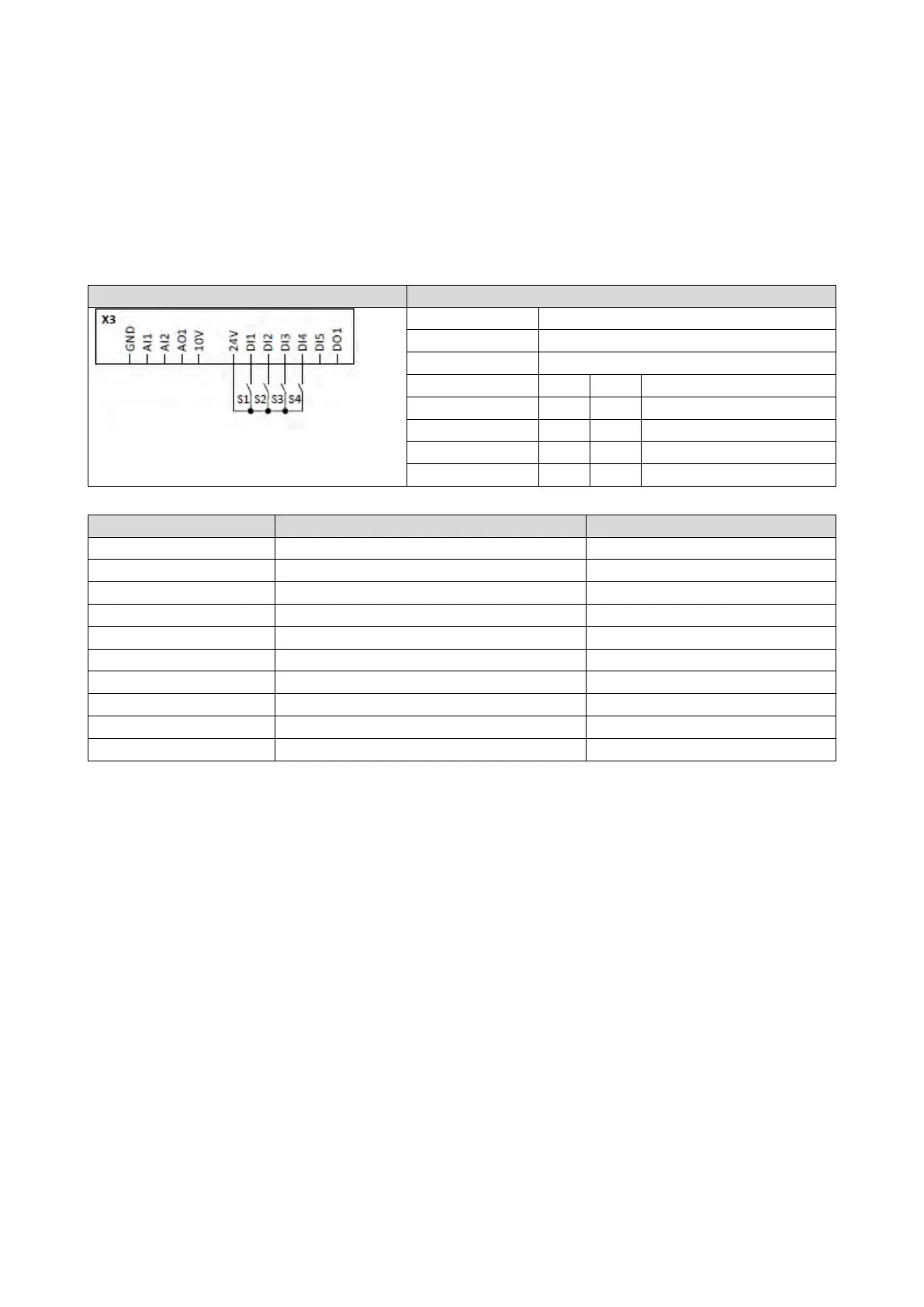
12.9.3. Example 3: Activation if the selection is changed (only if the inverter is disabled)
Activation method 0x4046 (P755.00) = "If the selection is changed (disable required) [2]":
• Switches S3 and S4 serve to select the parameter set (see the following table). At the
same time, the change-over is activated by a status change of the selection inputs.
• Change-over is only possible if the motor is not started (switch S1 open).
• Switch S2 ("Load parameter set") is ignored in this configuration.
Switch S1 Run
Load parameter set (is ignored in this configuration)
Parameter set selection and activation at the same time:
On
Off
Parameter set 2
On
On
Parameter set 4
0x2631:004 (P400.04)
Reset fault
Not connected [0]
Select parameter set (bit 0)
0x2631:042 (P400.42)
Select parameter set (bit 1)
Digital input 4 [14]
Flexible I/O configuration [0]
Activation of parameter set
If the selection is changed (disable required) [2]



 To Next Page