378 01-6203-01R3, CG Drives & Automation
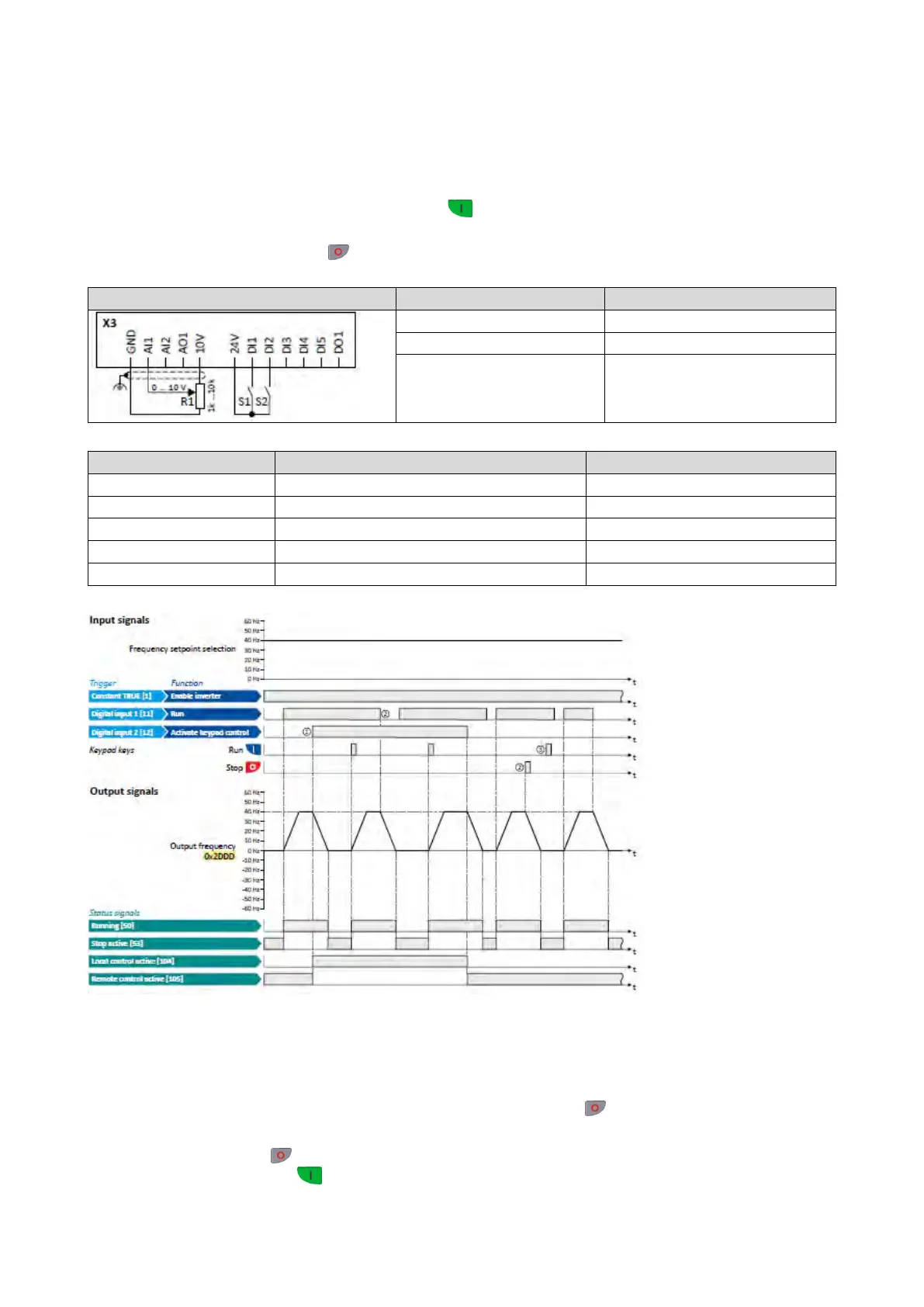
12.1.1. Example 1: Change-over from terminal control to keypad control
• The control is executed primarily via the I/O terminals: Switch S1 serves to start and
stop the motor.
• Switch S2 serves to optionally change over to local keypad control. In case of activated
keypad control, the motor can only be started via the
keypad key. However, the
condition is that switch S1 is closed.
• If switch S1 is opened again or the
keypad key is pressed, the motor is stopped
(irrespective of the active control source).
Frequency setpoint selection
0x2631:004 (P400.04)
Reset fault
Not connected [0]
Flexible I/O configuration [0]
The status signals
can
be assigned to digital outputs.
Configuration of digital outputs
429
① When changing over to another control source, the motor is first stopped with the
stop method set in 0x2838:003 (P203.03).
② The motor will also be stopped if the "Run" function is deactivated or the
keypad
key is pressed (irrespective of the active control source).
③ After stopping with the
keypad key and before a renewed start command from
another control source, the
key on the keypad must be pressed to cancel the
keypad stop again ("KSTOP").



 To Next Page