294 01-6203-01R3, CG Drives & Automation
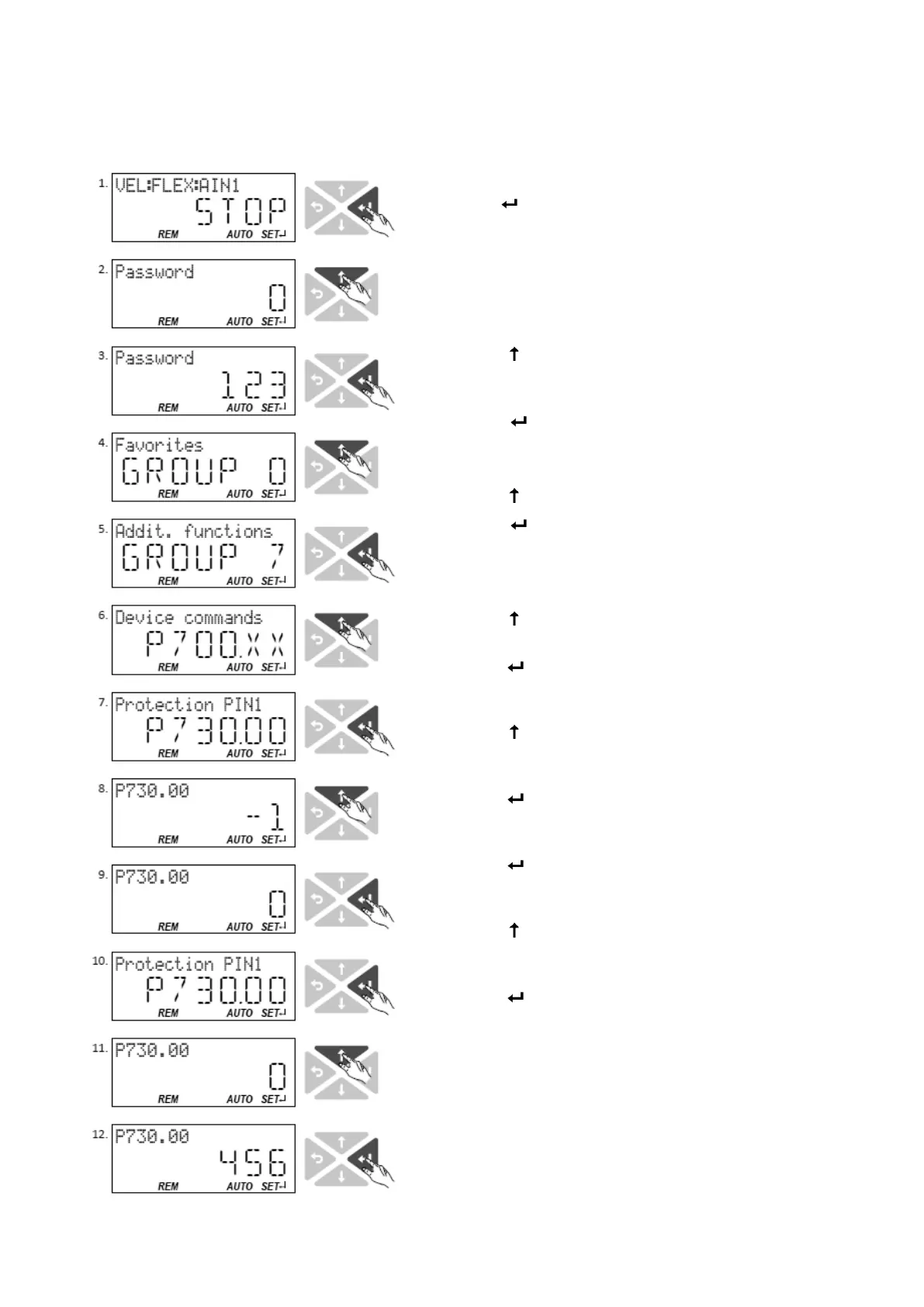
In the following example, PIN1 is changed from "123" to "456". For this purpose, the
defined PIN must first be deleted by the setting "0".
Change defined PIN1:
8. Use the
key in the operating
mode to navigate to the
parameterisation mode one
level below.
Since the access protection is
active, the input dialog for the
PIN is displayed.
9. Use the
navigation key to
set PIN "123" to remove the
access protection temporarily.
10. Use the
key to accept the
entered PIN.
You are now in the group level.
11. Use the
to select group 7.
12. Use the
key to navigate to
one level below.
You are now in the parameter
level of the group selected.
13. Use the
to select the
P730.00 parameter.
14. Use the
key to navigate to
one level below. You are now
in the editing mode.
15. Use the
key to set PIN1 to
the value "0". This setting first
deletes PIN1.
16. Use the
key to accept the
changed setting. The editing
mode is exited.
17. Use the
key to navigate
again one level below to the
editing mode.
18. Use the
navigation key t set
the previously deleted PIN1 to
the new value "456".
19. Use the
key to accept the
changed setting. The editing
mode is exited.
Note: The configured access
protection only gets effective
after the parameter group is
quit.



 To Next Page