314 01-6203-01R3, CG Drives & Automation
Settings required for the "parameter change-over" function
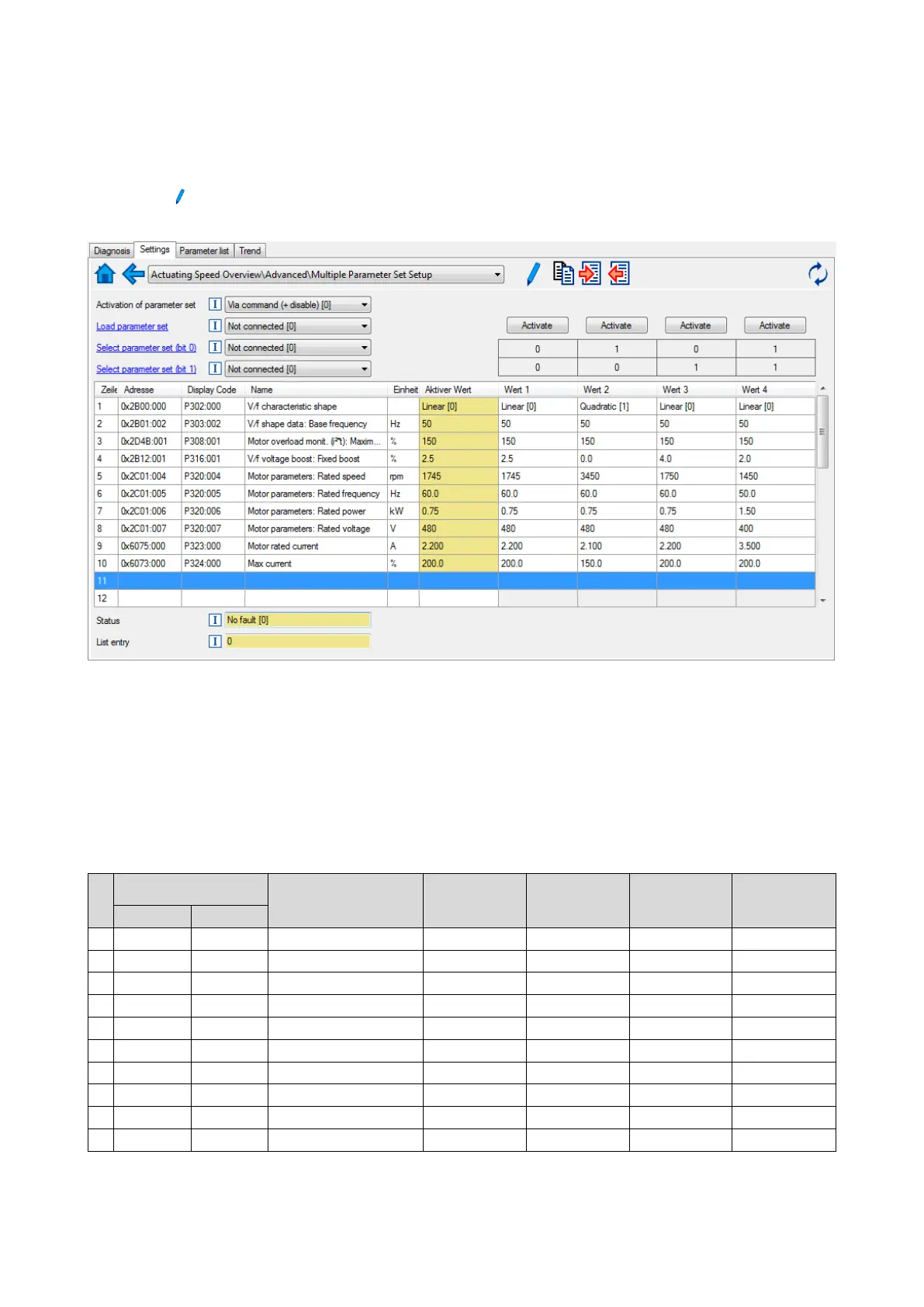
The easiest way to make the required settings is via the parameterisation dialog in the
»Emotron Easy starter«:
1. Click the
button to first select the 10 relevant parameters.
2. Set values for motor M1 ... M4 in the corresponding fields:
In case of a direct setting in the parameters of the "parameter change-over" function:
• The addresses must be set with the following format: 0xiiiiss00 (iiii = index
hexadecimal, ss
= subindex hexadecimal). The keypad serves to select the desired parameter from a
list.
• The values for the motors must be set as integer values. The integer value results from
the multiplication of the actual setting value by the factor of the respective parameter.
In the , the factor for each parameter must be given.
The following table shows the required settings:
Address
0x4041:x (PAR 750/x)
0x4042:x
(PAR 752/x)
0x4043:x
(PAR 753/x)
0x4044:x
(PAR 754/x)
0x4045:x
(PAR 755/x)
2
0x2B010200
721486336
Base frequency
60
60
60
50
Maximum utilisation [60 s]
7
0x2C010600
738264576
Rated power
75
75
75
150



 To Next Page