78 01-6203-01R3, CG Drives & Automation
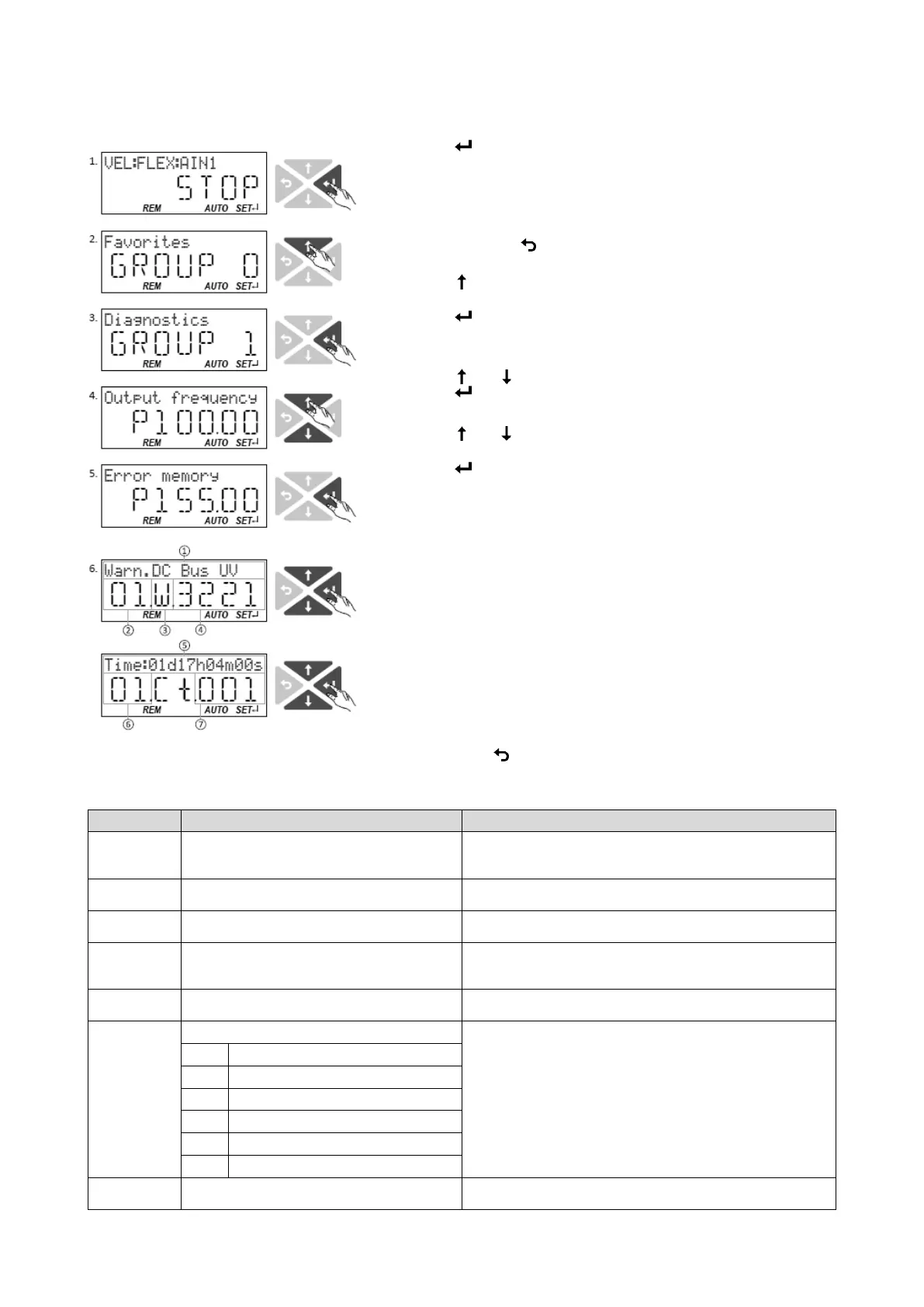
Accessing the error history buffer with the keypad
1. Use the key in the operating mode to navigate to the
parameterization mode one level below.
You are now in the group level. All parameters of the
inverter are divided into different groups according to
their function.
Note: By using the
key you can navigate one level
upwards again anytime.
Use the navigation key to select group 1
("Diagnostics").
Use the
key to navigate to one level below.
You are now in the parameter level of the group
selected.
Use the
and
select the P155.00 parameter.
Use the key to navigate to one level below.
You are now in the error history buffer.
Use the
and
navigation keys you can now scroll
through the error history buffer entries.
Use the key, you can switch over the display.
Information displayed (page 1):
② No. of the entry (01 = latest event)
③ Response (W = warning, T = trouble, F = fault)
Information displayed (page 2):
⑥ No. of the entry (01 = latest event)
⑦ Counter for successive, identical events
By using the
key you can exit the error history buffer again.
Name / value range / [default setting]
0x2006:000
(P155.00)
Error history buffer: Keypad display (Fault memory:
Error memory)
Display of the error history buffer on the keypad.
Error history buffer: Maximum number of messages
Read only
Display of the maximum number of messages which can be stored in
the history buffer (from subindex 6).
Error history buffer: Latest message
Read only
Display of the subindex of the most recent message.
Error history buffer: Latest acknowledgement
message
0 = delete all entries in the error history buffer.
Error history buffer: New message
Read only
Reserved for future extensions.
0x2006:005 Error history buffer: Buffer overflow 0 ... [1] ... 65535 Bit 0 ... bit 4 = 0.
Bit 5 = 1 ≡ overflow (after recording the 33rd event in the error history
buffer.
Bit 4 Mode selection
Error history buffer: Message 0
Read only
Error history buffer entry 01 (latest event)



 To Next Page