REV 0, June 2005 Page 69
Operation Manual SUPREMA
4. Operation of the System
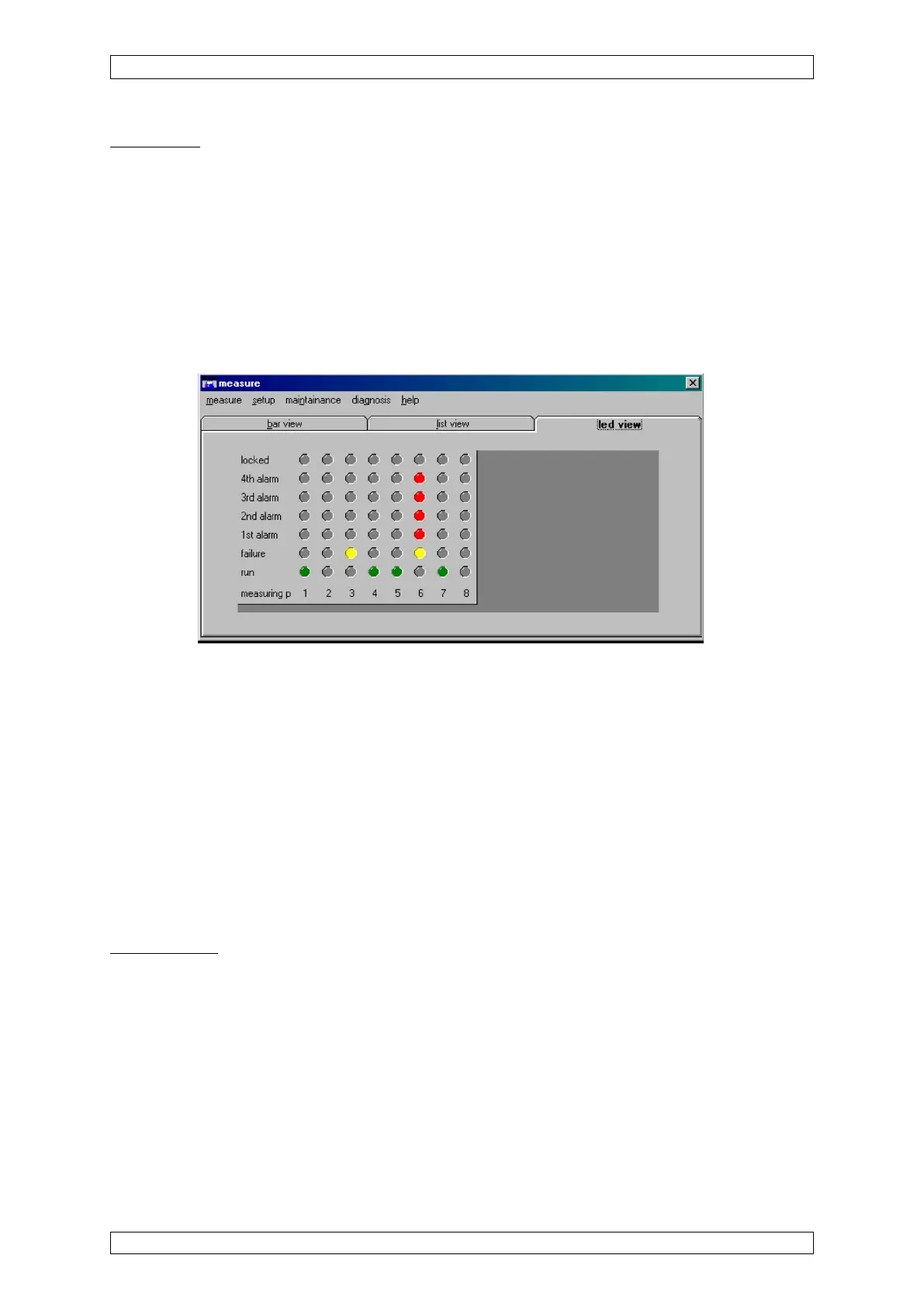
LED display
This display shows the status values of the inputs as LED’s. Each LED column has the
corresponding input number under it.
Off: not locked, no alarm, no failure, no measurement mode
Green: measurent mode
Yellow: inhibited, failure
Red: alarm
Below any LED-culomn the number of the Measure point belongs to is shown. If an input is not
yet configured, no LEDs are displayed in that column.
Figure 4-21: LED display
Setup
From the “Setup” menu in the “Measure” window, the operator can set parameters for inputs
(measure points) and relay outputs, as well as system parameters. The menu item includes
three sub-menu items:
• Measure point
• Relay output
• System settings
When one of these items is selected, the “Setup” window opens, containing all of the menus
for setting parameters.
Measure point
This menu contains all of the parameters that describe an input. The parameter values for
inputs can be viewed and changed here.
The measure points menu is divided into three submenus:
• Information
• Sensor data
• Alarms



 To Next Page