2.3
Date Code 20171006 Instruction Manual SEL-400 Series Relays
PC Software
QuickSet Setup
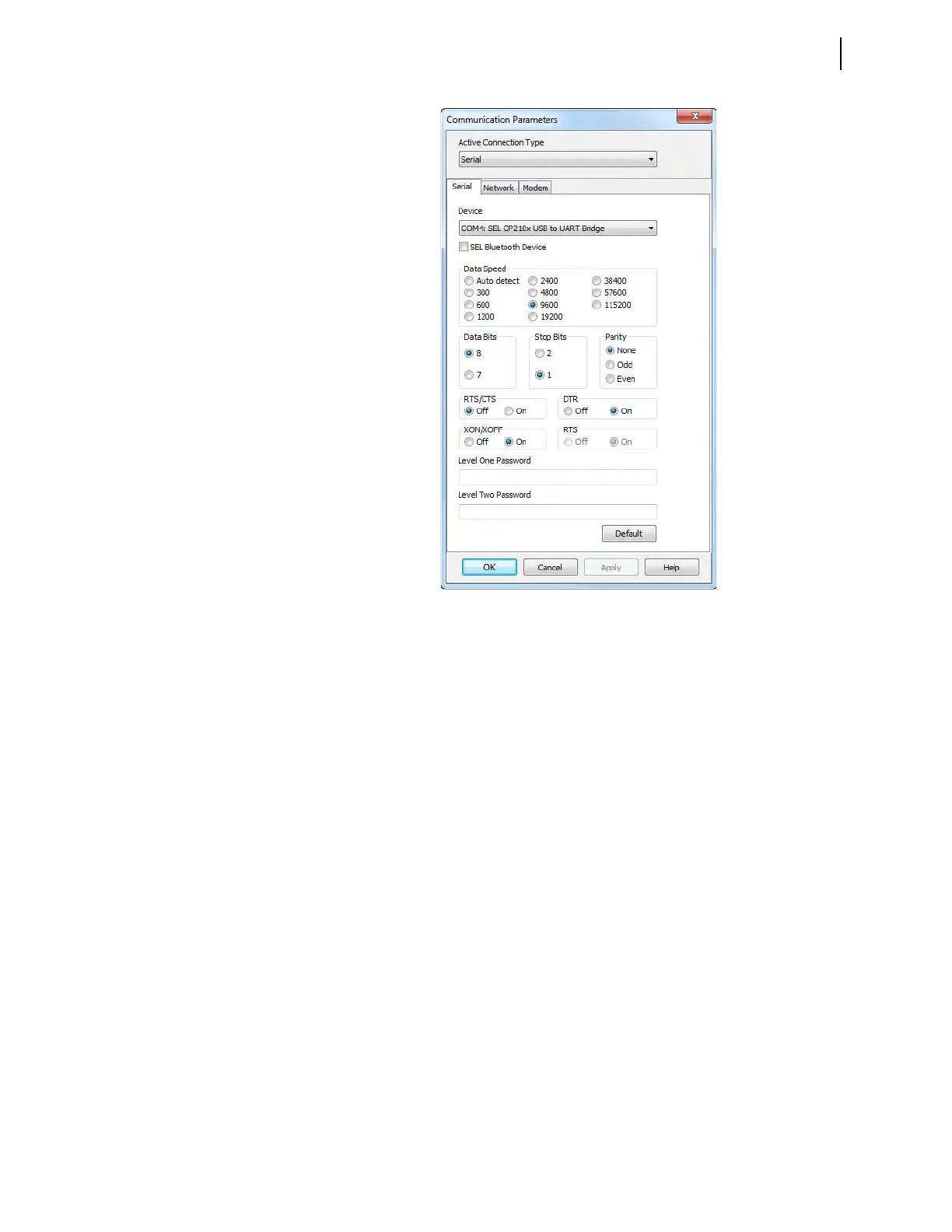
You can use serial communication via relay Ports 1, 2, 3, and F (front panel).
Figure 2.1 shows the default serial port parameters (9600, 8, N, 1).
Step 1. Enter your relay Access Level One and Access Level Two passwords
in the respective text boxes.
Step 2. If you choose a connection type from the Active Connection Type
drop-down list that is a telephone modem, enter the dial-up telephone
number in the Phone Number text box.
Ethernet Card
Use the optional Ethernet card for FTP and Telnet network communications.
FTP Setup
Step 1. Access the Network dialog box from the Active Connection Type
drop-down menu.
Step 2. Click the FTP File Transfer Option button to select FTP as the net-
work communications protocol.
Step 3. Enter the IP address of the relay Ethernet port as the Host IP address.
Step 4. Enter the FTP port number.
Step 5. Enter the relay Access Level One and Access Level Two passwords
in the respective text boxes.
See Changing the Default Passwords in the Terminal on page 3.10.
Figure 2.1 QuickSet Communication Parameters Dialog Box



 To Next Page