2.6
SEL-400 Series Relays Instruction Manual Date Code 20171006
PC Software
Settings Database Management and Drivers
Step 6. Select Copy or Move.
Step 7. Click the > button to create a new relay in the B database.
Reverse this process to take relays from the B database to the A database.
Copy creates an identical relay that appears in both databases. Move removes the
relay from one database and places the relay in another database.
Create a New Database
Step 1. To create and copy an existing database of relays to a new database,
select the File > Database Manager menu.
Step 2. Select Copy/Move Relays Between Databases on the Database
Manager dialog box.
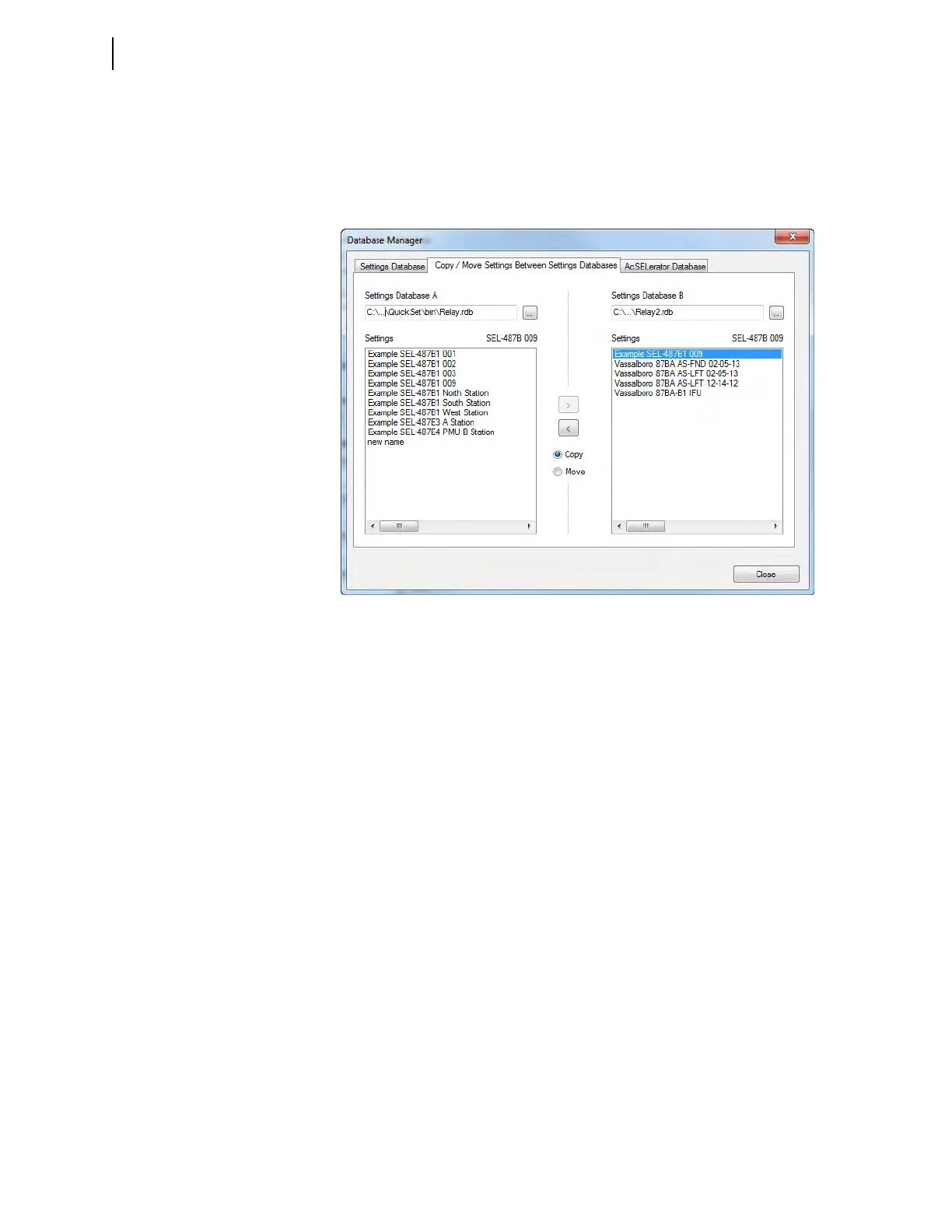
QuickSet opens the last active database and assigns it as Database A
(see Figure 2.3).
Step 3. Click on the ellipsis next to Settings Database B.
QuickSet prompts you for a file location.
Step 4. Type a new database name.
Step 5. Click Open.
Step 6. Answer Yes.
The program creates a new empty database.
Step 7. Load relays into the new database as in Copy/Move Relays Between
Databases on page 2.5.
Figure 2.3 QuickSet Database Manager Copy/Move



 To Next Page