3.39
Date Code 20171006 Instruction Manual SEL-400 Series Relays
Basic Relay Operations
Examining Metering Quantities
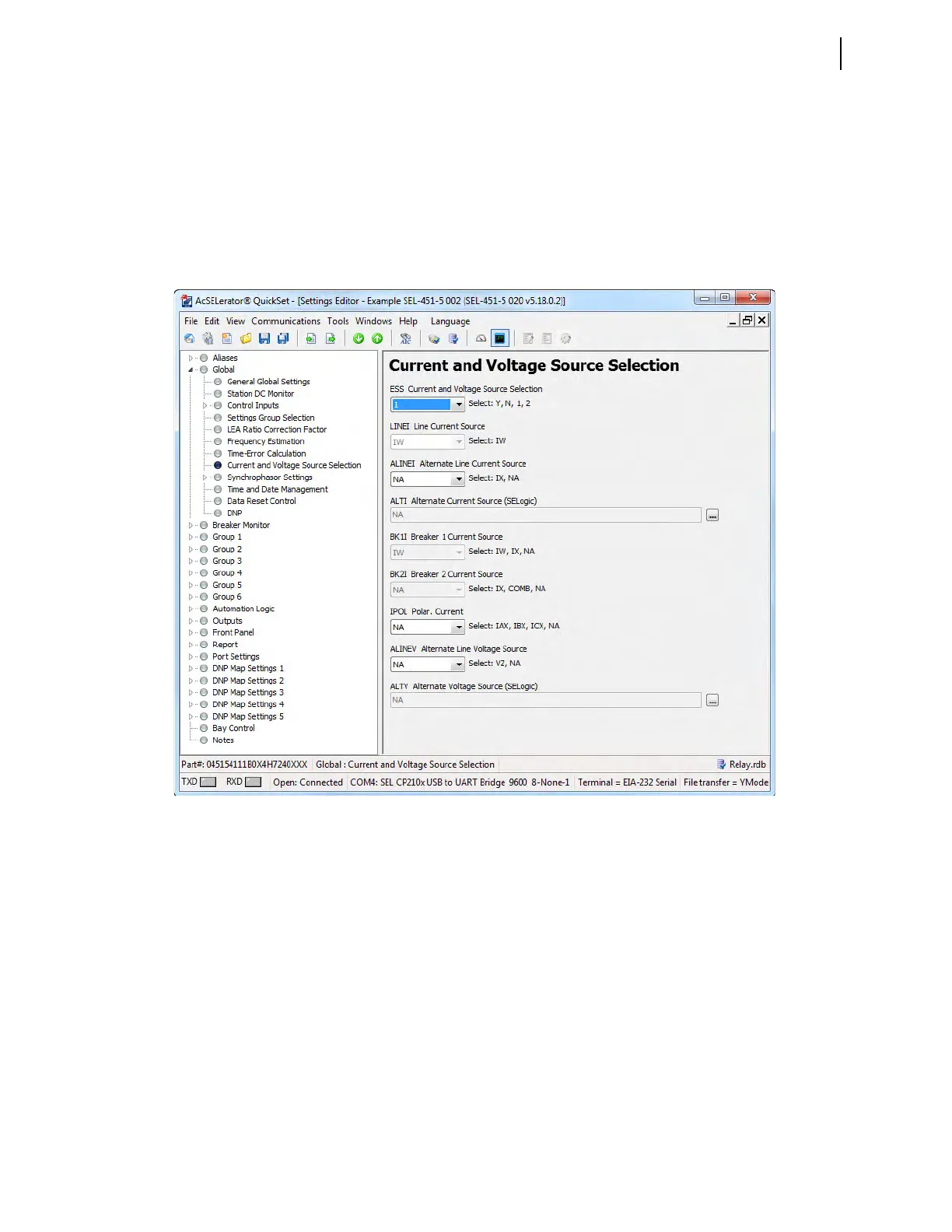
Step 3. Set a basic voltage and current configuration.
a. In the QuickSet Settings tree view, click the drop down arrow
next to Global to expand the Global branch (see Figure 3.30).
b. Click the Current and Voltage Source Selection branch.
You will see the Current and Voltage Source Selection dialog
box as shown in Figure 3.30.
c. Choose 1 from the drop-down menu under ESS Current and
Voltage Source Selection.
Step 4. Set PT and CT ratios.
a. In the QuickSet Settings tree view, click the drop down arrow
next to Group 1 to expand this branch (see Figure 3.31).
b. Click the drop down arrow next to Set 1.
c. Click Line Configuration.
You will see the Line Configuration window similar to
Figure 3.31.
d. Enter setting CTRW Current Transformer Ratio - Input W as
200, and the PTRY Potential Transformer Ratio - Input Y as
2000.
e. Save the settings and send the Group 1 settings if you change the
settings (see Step 6 and Step 7).
Figure 3.30 Global Alternate Source Selection Settings in QuickSet



 To Next Page