Please note that SecureSync utilizes the OSPF (Open Shortest Path First) and BGP (Border Gate-
way Protocol).
O S P F P r o t o c o l E X A M P L E :
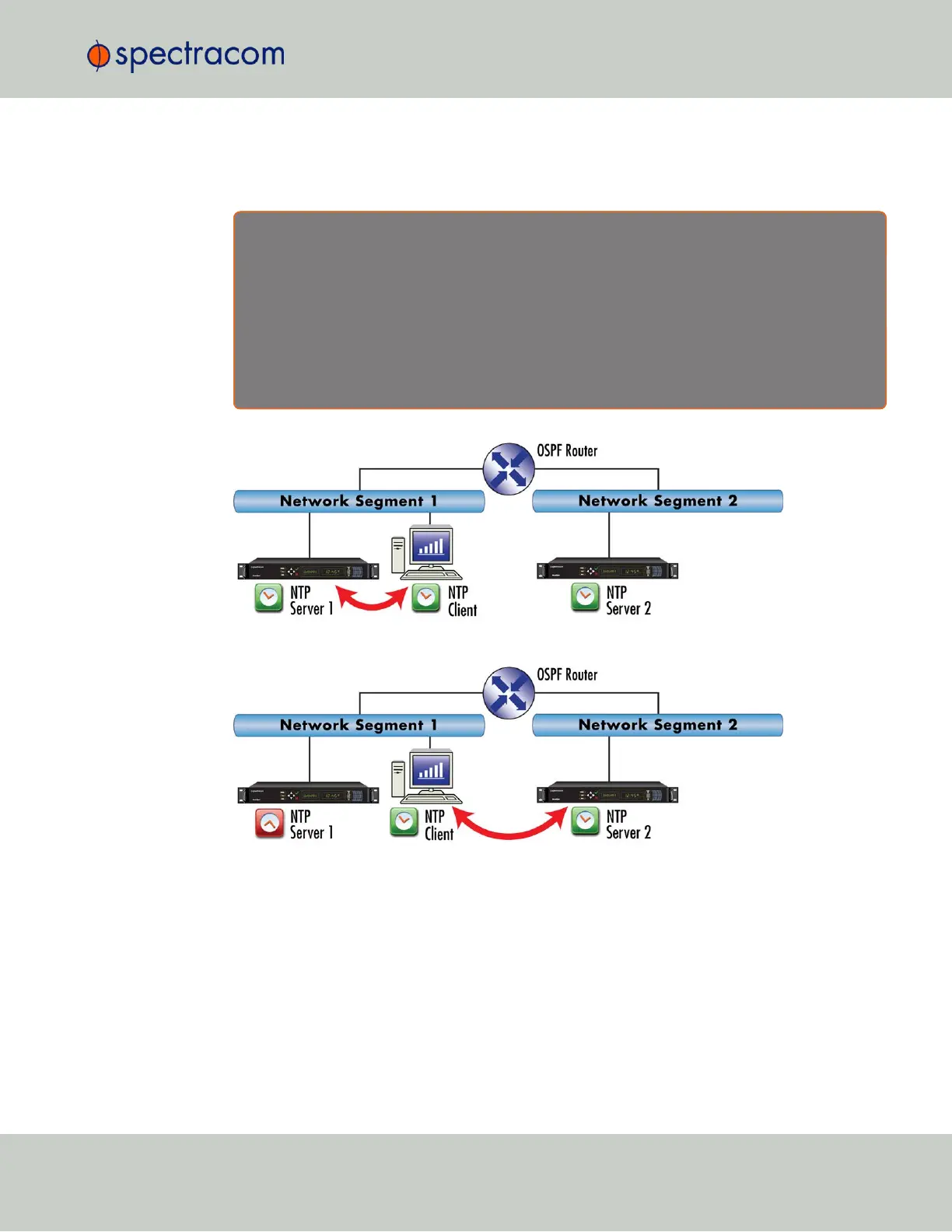
If an active SecureSync NTP server has removed itself as an available time source from the Anycast-
capable network, the OSPF router will send a request for replacement to the next nearest NTP server,
serving under the same NTPoverAnycast address.
As soon as the first SecureSync server obtains a valid reference again, it will make itself available to
the OSPF router, which will then use it as a time source again, based on the principle of shortest path
available.
Figure 2-3: All NTP Servers are synchronized
Figure 2-4: NTP Server 1 is out of sync
2.14.12.1 Configuring NTP over Anycast (General Settings)
To setup the NTP over Anycast functionality:
1.
Confirm that your existing network infrastructure is Anycast capable. Determine network
specifics, such as the Anycast address and port.
2.
In the SecureSync Web UI, navigate to MANAGEMENT > Network > NTP Setup.
2.14 Configuring NTP
CHAPTER 2 • SecureSync User Reference Guide Rev. 26
123



 To Next Page