3.2.1 System Time
Several System Time parameters can be customized:
The System Timescale can be changed.
A user-defined time can be setup for e.g., for simulation purposes, or if no external ref-
erence is available.
The battery-backed RTC time can be used as System Time, until an external reference
become available.
3.2.1.1 Configuring the System Time
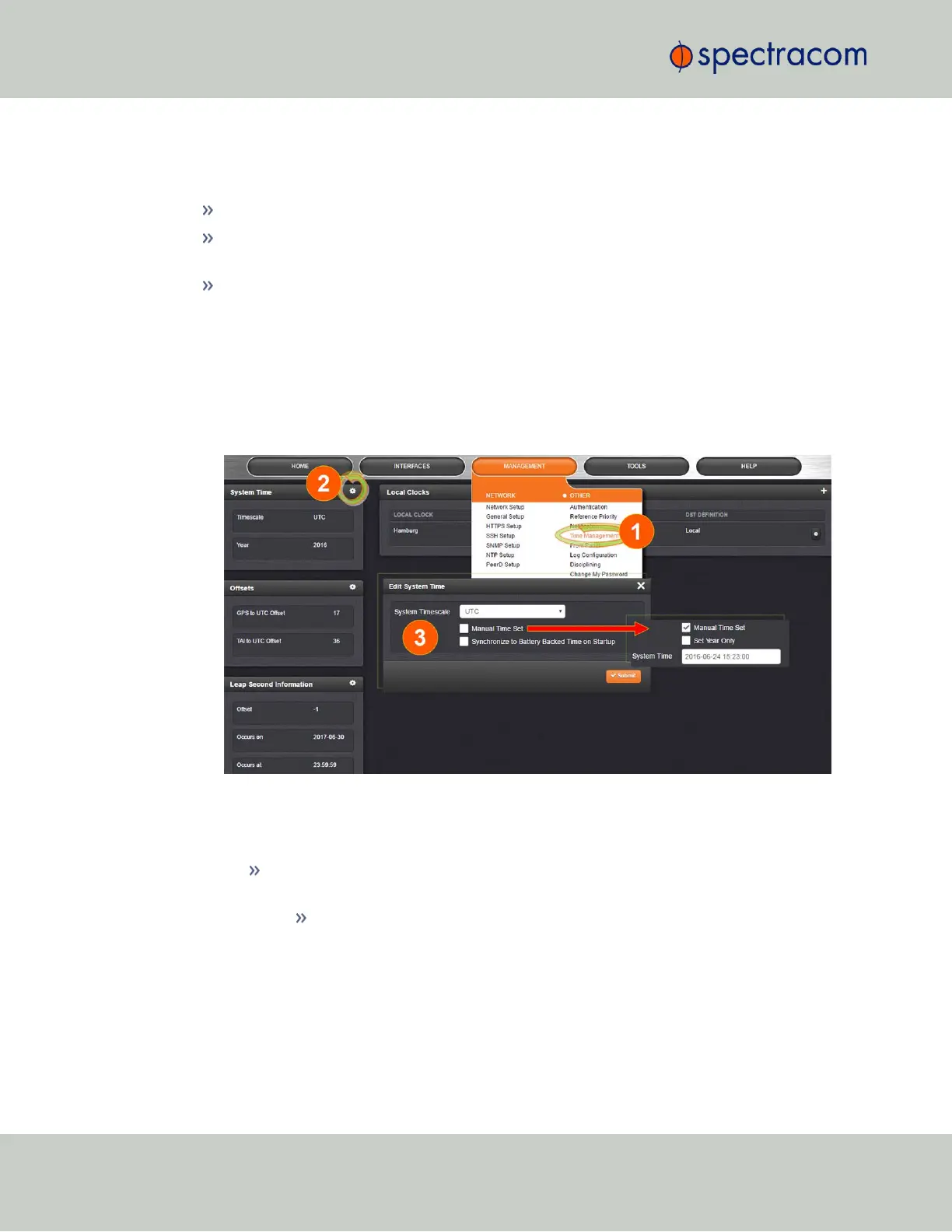
To configure the System Time:
1.
Navigate to MANAGEMENT > OTHER: Time Management.
2.
In the System Time panel located in the top-left corner of the Time Management screen,
click the GEAR icon.
3.
The Edit System Time pop-up window will display.
In the System Timescale field select a timescale from the drop-down list. The
options are:
UTC: Coordinated Universal Time (Temps Universel Coordonné); your
local time zone determines the difference between UTC and local time.
Note that UTC is not a time zone, but a time standard, i.e. it is not used
anywhere in the world as the official local time, whereas GMT (Greenwich
Mean Time) is a time zone that is used in several European and African
countries as the official local time.
148
CHAPTER 3 • SecureSync User Reference Guide Rev. 26
3.2 System Time



 To Next Page