accessible from the main “Home” menu. To navigate through the menus, use the arrow keys to
highlight a selection and then press the ENTER button.
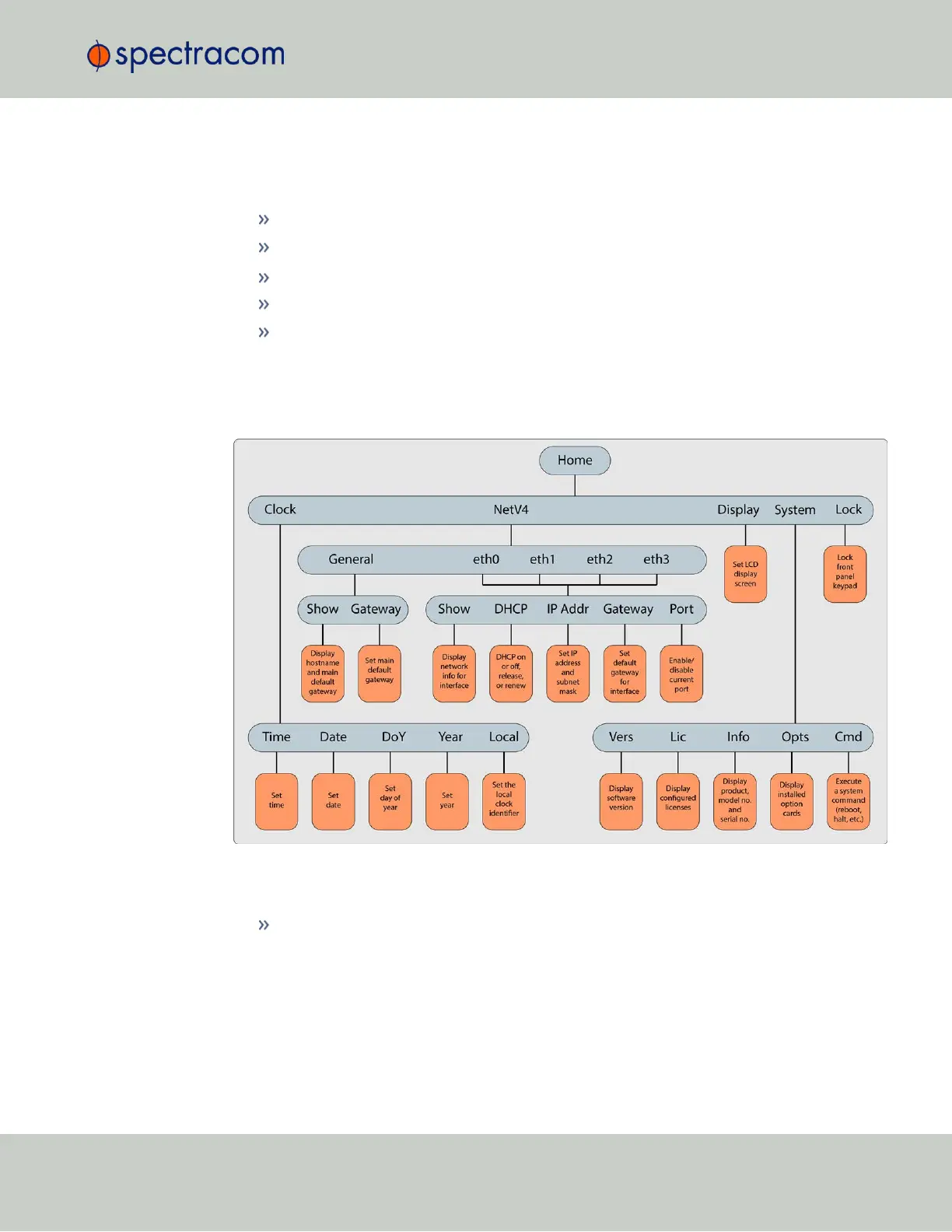
The main menu options and their primary functions are as follows:
Display: Used to configure the information display
Clock:Displaying and setting of the current date and time
System:Displaying version info, system halt and reboot, reset spadmin password
Netv4:Network interface configuration
Lock: Locks the front panel keypad to prevent inadvertent operation.
Front Panel Display: Menu Tree
The illustration below shows how the menu is organized, and which functions can be accessed
via the front panel (i.e. without using the Web UI):
Figure 1-2: Front panel menu tree
To modify a parameter:
Highlight the menu option and press the ENTER button.
“O” stands for current old setting, and “N” is the new setting.
You can only change the “N” setting.
Use the UP and DOWN arrow keys to scroll through all possible parameter values.
To edit a sequence of numbers:
1.3 SecureSync Front Panel
CHAPTER 1 • SecureSync User Reference Guide Rev. 26
5



 To Next Page