1.
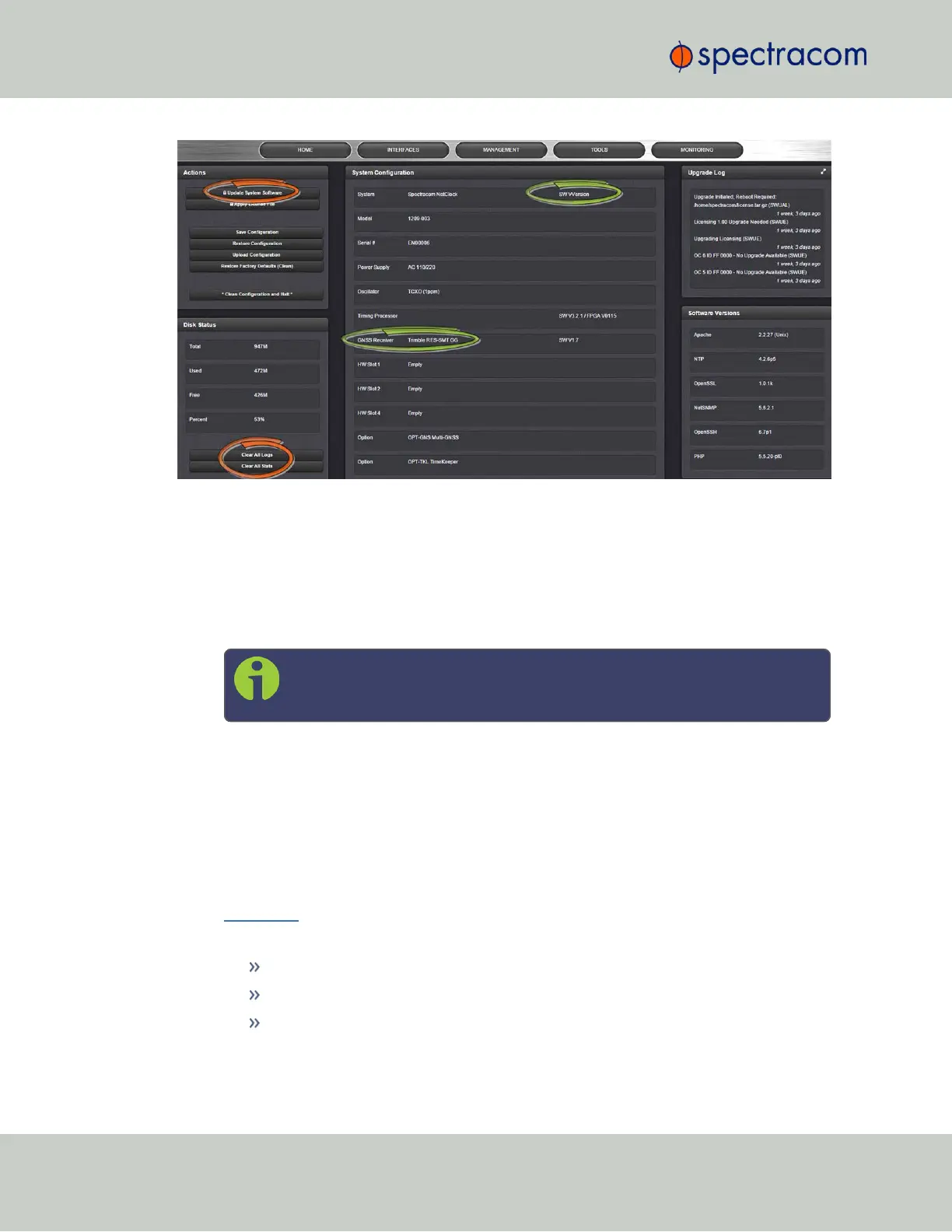
In the WebUI, under Tools > Upgrade/Backup, determine the System software version
and the type of GNSS receiver. Proceed if your existing software is V5.1.5 or higher,
AND you have a RES-SMT GG receiver.
(Otherwise, consult the above-mentioned instructions for updating SecureSync software.)
2.
Free up disk space, if needed:
Under Tools > Upgrade/Backup > Disk Status, check Percent Used: If the number is
greater than 70%, free up disk space.
Note: If required, existing logs can be archived; for details consult the
above-mentioned instructions for updating SecureSync software.)
To free up disk space:
a.
Delete old log files: Tools > Upgrade/Backup > Disk Status > Clear All Logs.
b.
Delete old statistics files: [~] > Clear All Stats.
c.
Delete previous Upgrade files: Tools > Upgrade/Backup > Actions > Update Sys-
tem > Delete Upgrade File(s). Note that Delete Upgrade File and Update System can-
not be selected at the same time.
3. Download the upgrade software bundle onto your PC.
4.
Check if you have any of the following option cards installed:
Simulcast (Model 1204-14)
PTP (Model 1204-12)
Gigabit Ethernet (Model 1204-06)
320
CHAPTER 4 • SecureSync User Reference Guide Rev. 26
4.6 Updates and Licenses



 To Next Page