Total Access 5000 Business Services Deployment Guide
2-8 65K510DEP08-1A
Ground the Chassis
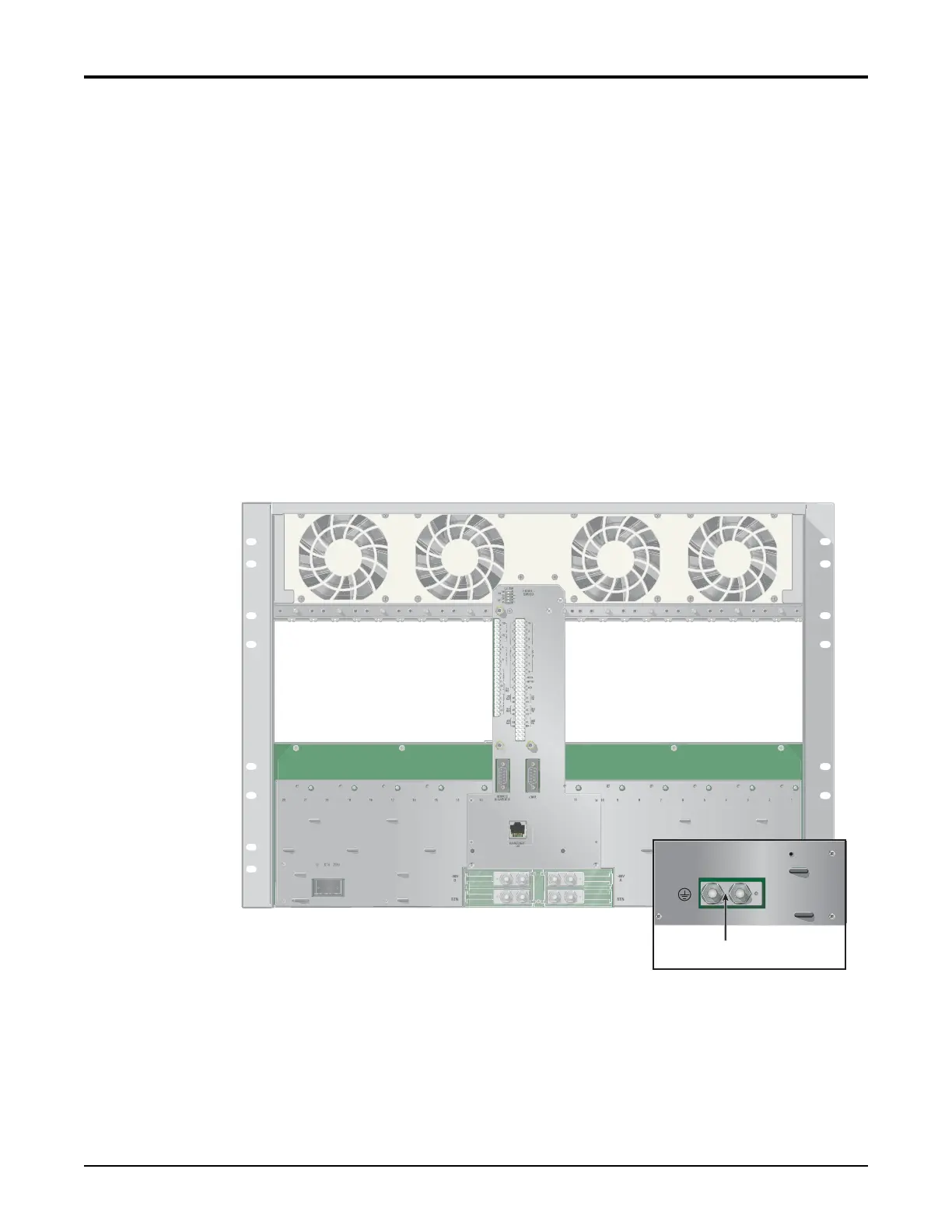
Theframegroundlugcan accommodatefrom2AWGto6AWGcopper,strandedwire.When
connectingtheframeground,useawiregaugethatisatleastaslargeagaugeasthepower
connections(seeFigure2‐5).
Tomakethegroundconnectiontothechassis,complete thefollowing:
1. Ensurethatthepowerisdisconnectedatthesource.
2. Removetheconnectionhardwarefrombothchassisgroundbolts.
3. Cleanthesurfaceofthechassisgroundingareaandapplyanappropriateantioxidant.
4. Stripthegroundwire5/8ofaninchandcrimpthechassisgroundlugtothewire.
5. Connectthegroundwireto
thechassisgroundbolts.
6. Installthelockwashersandhexnuts.
7. Torqu ethe hexnutsto24inch/pounds.
8. Securetheotherendofthegroundwiretoasuitablerackgroundaccordingtolocal
CentralOffice(CO)practices.
Figure 2-5. Chassis Rear View, Ground Lug Location
Ground



 To Next Page
 Loading...