6. In the APage Size list, select the size of the original as specified in the application.
7. In the LPaper Source list, select how paper is supplied.
8. If you have selected roll paper in LPaper Source, select the width of the loaded roll in M Roll Paper Width.
Note
• A variety of settings are available in the printer driver to suit different printing applications.
For details on available printing conditions, see "Printer Driver Settings →P.192 "
Confirming Print Settings
There are two ways to confirm the print settings, as follows.
• Checking a preview of the settings
• Checking a print preview
Checking a preview of the settings
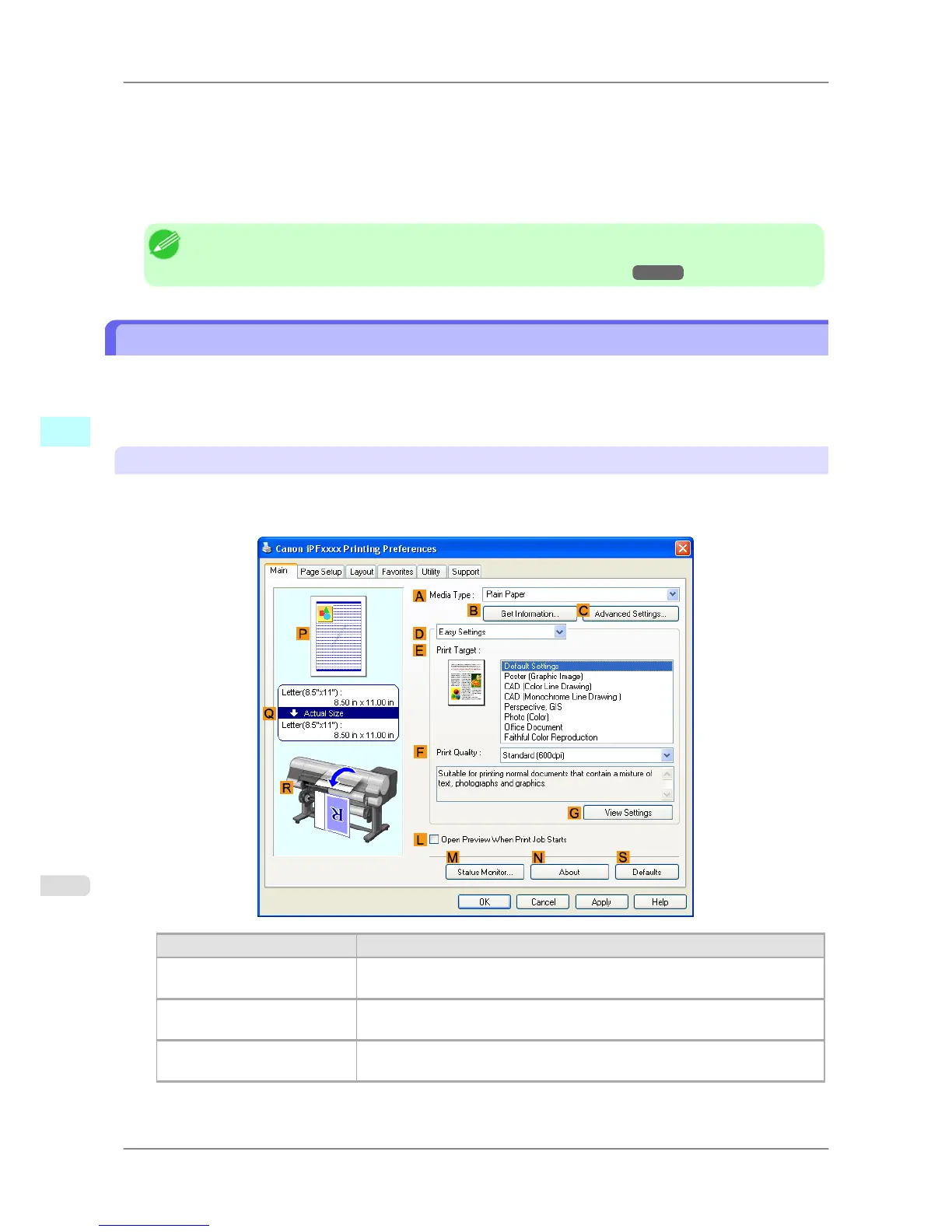
A preview of the settings is displayed on the left side of the Main, Page Setup, and Layout sheets. By checking illus-
trations and numerical values in the preview, you can confirm current settings for the page size, orientation, paper
source, layout, and so on.
Display Area Information Displayed
P Top illustrations
Illustrations indicate the orientation, page layout, borderless printing selection,
color mode, and other settings information.
Q Middle, bordered area
The page size, paper size, and method and percentage of enlargement or reduc-
tion are indicated.
R Bottom illustrations
Illustrations indicate the feed source, orientation, borderless printing selection,
and other settings information.
Windows Software
>
Printer Driver
>
Confirming Print Settings iPF825
4
196














 To Next Page