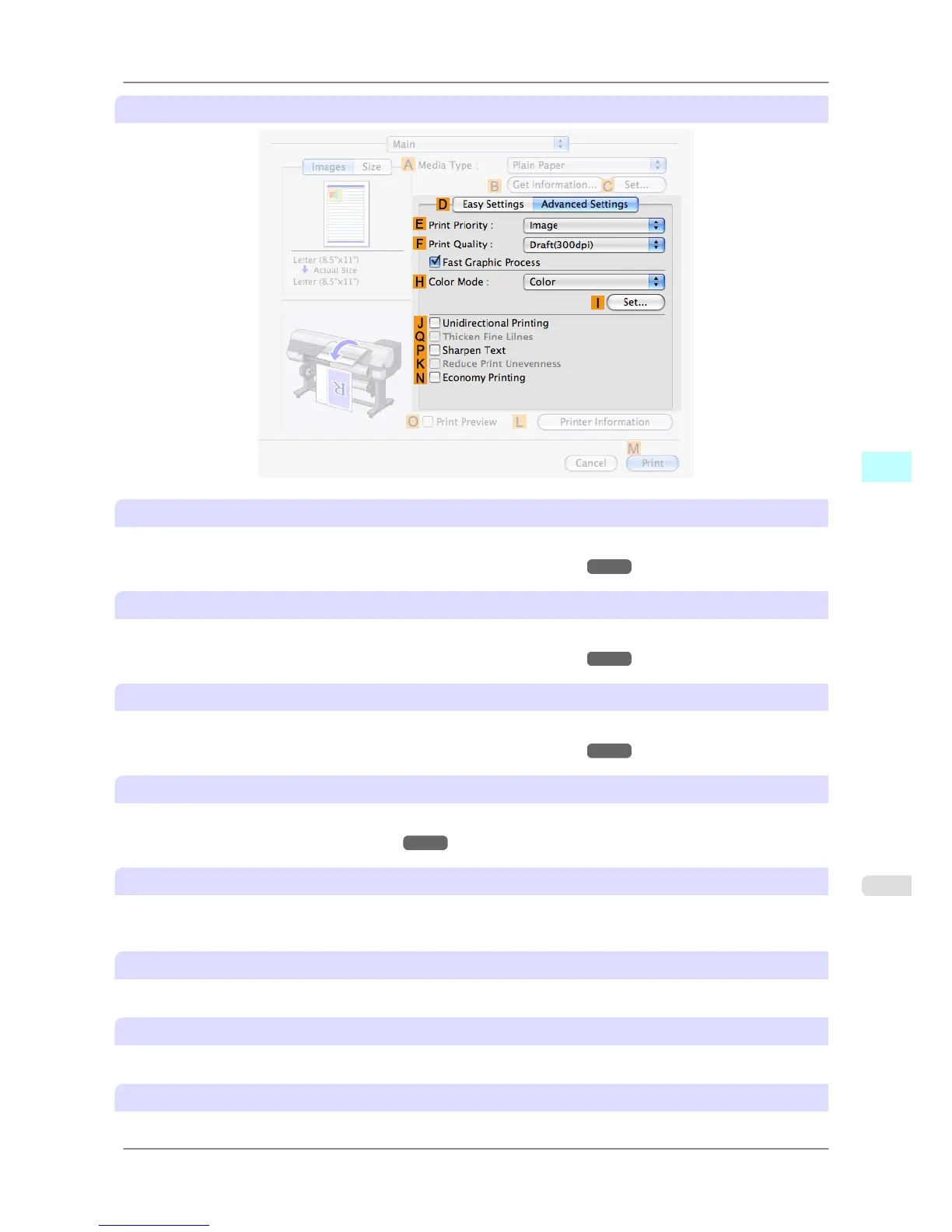
Configuration using Advanced Settings
E Print Priority
Choose the graphic elements that you want to emphasize for printing.
• Giving Priority to Particular Graphic Elements and Colors for Printing
→P.53
F Print Quality
Choose the level of print quality.
• Giving Priority to Particular Graphic Elements and Colors for Printing →P.53
H Color Mode
Choose the color mode.
• Giving Priority to Particular Graphic Elements and Colors for Printing →P.53
I Set
Click to display the Color Settings dialog box for more advanced color settings.
• Adjusting the Color in the Printer Driver
→P.44
J Unidirectional Printing
Select this checkbox to prevent problems such as misaligned lines and improve the print quality. However, the printing
speed becomes slower.
Q Thicken Fine Lines
Activate this option to print fine lines more distinctly.
P Sharpen Text
Activate this option to print text more sharply.
K Reduce Print Unevenness
Select this checkbox for two-pass printing to reduce color shading.
Mac OS X Software
>
Printer Driver
>
iPF825 Main Pane
5
413














 To Next Page