Printing using the favorite
Follow the steps below to print using the favorite you have registered.
1. Choose Print in the application menu.
2. Select
the printer in the dialog box, and then display the printer driver dialog box.(See "Accessing the Printer
Driver Dialog Box from Applications
→P.200 ")
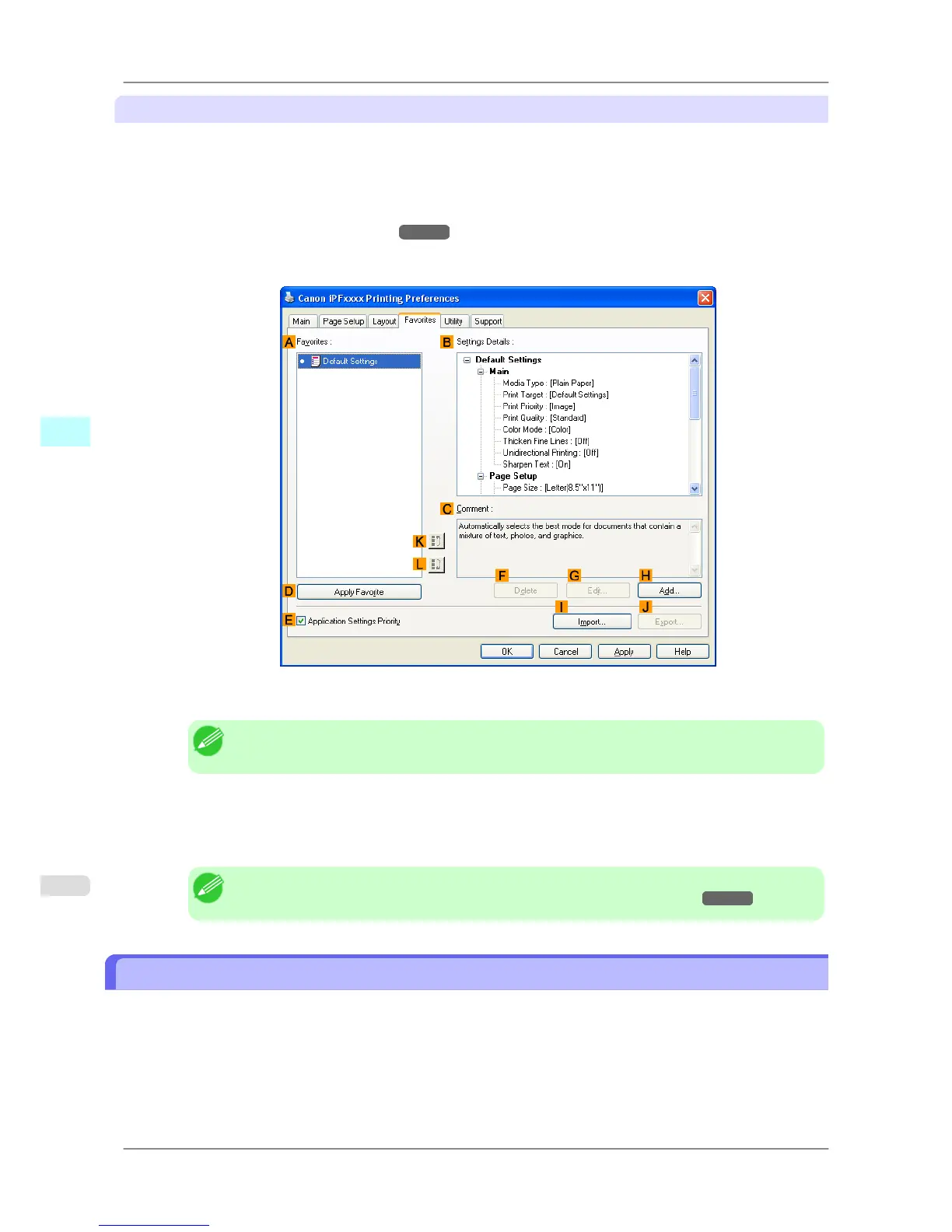
3. Click the Favorites tab to display the Favorites sheet.
4. In the AFavorites, choose the favorite you registered.
Note
• To import a favorite, click IImport and specify the favorite file.
5. Click DApply Favorite to replace the favorite settings with the current print settings.
6. Confirm the print settings and print as desired.
Note
• For instructions on confirming print settings, see "Confirming Print Settings →P.196 "
Accessing the Printer Driver Dialog Box from Applications
1. Choose Print from the File menu to display the dialog box for printing conditions.
Windows Software
>
Printer Driver
>
Accessing the Printer Driver Dialog Box from Applications iPF825
4
200














 To Next Page