I Contrast
Adjust the contrast of the darkest and lightest portions relative to each other, as desired. Increasing the IContrast
makes images sharper, and reducing the IContrast softens images.
J Saturation
Not available.
Note
• For details on settings items, see "Adjusting the Color in the Printer Driver →P.44 "
K Object Adjustment
Select this option to display the Object Adjustment dialog box, in which you can specify objects subject to color ad-
justment.
(Only supported in Mac OS X 10.3.9-10.6)
• Object Adjustment dialog box: Monochrome
→P.422
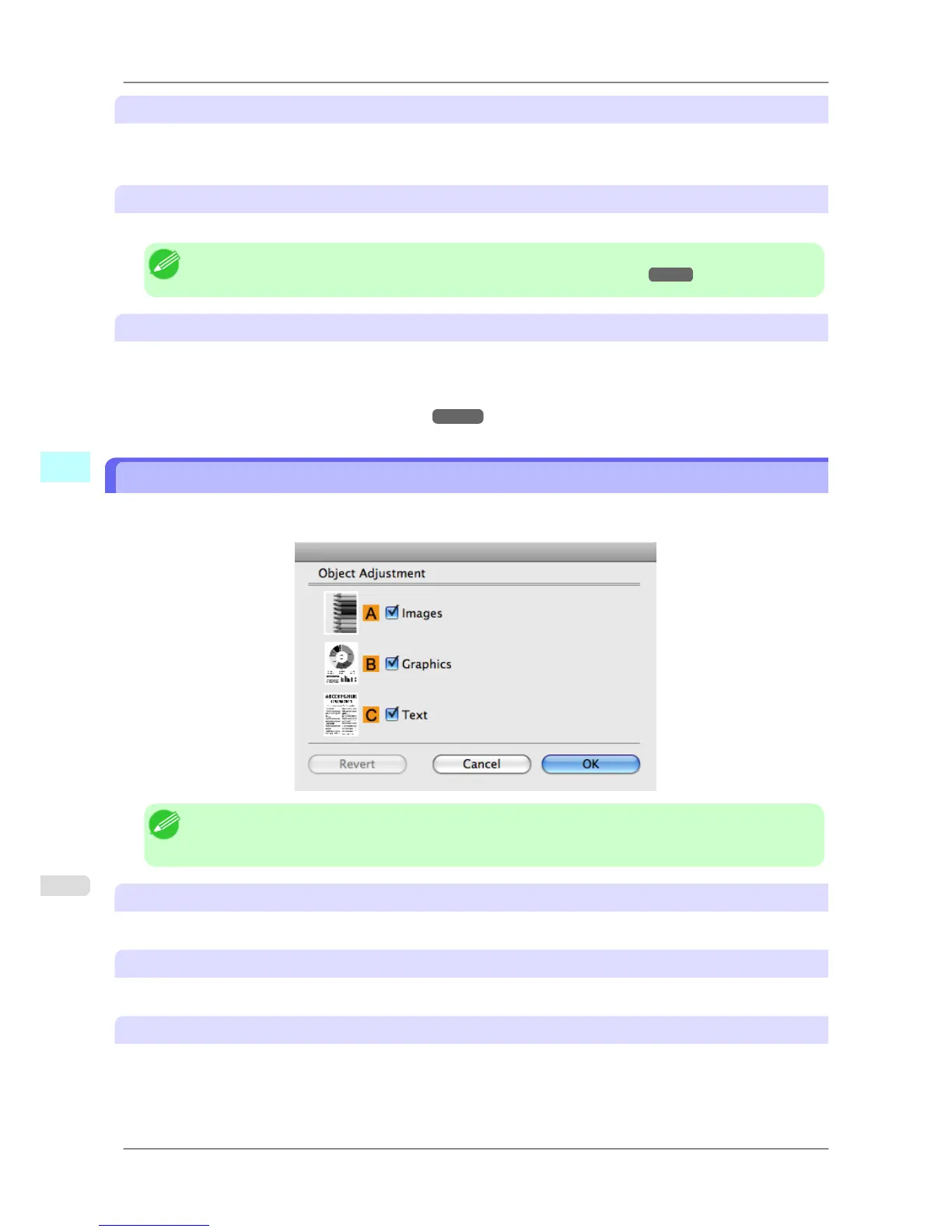
Object Adjustment dialog box: Monochrome
In the Object Adjustment dialog box, you can specify what type of print jobs to apply color adjustment to. If an origi-
nal comprises images, graphics, and text, you can specify which portion to apply color adjustment to.
Note
• To
display the Object Adjustment dialog box, click Object Adjustment on the Color Adjustment
panel.
A Images
Select this option to apply color adjustment to image areas, such as photos.
B Graphics
Select this option to apply color adjustment to graphics, such as lines and circles.
C Text
Select this option to apply color adjustment to text.
Mac OS X Software
>
Printer Driver
>
Object Adjustment dialog box: Monochrome iPF825
5
422














 To Next Page