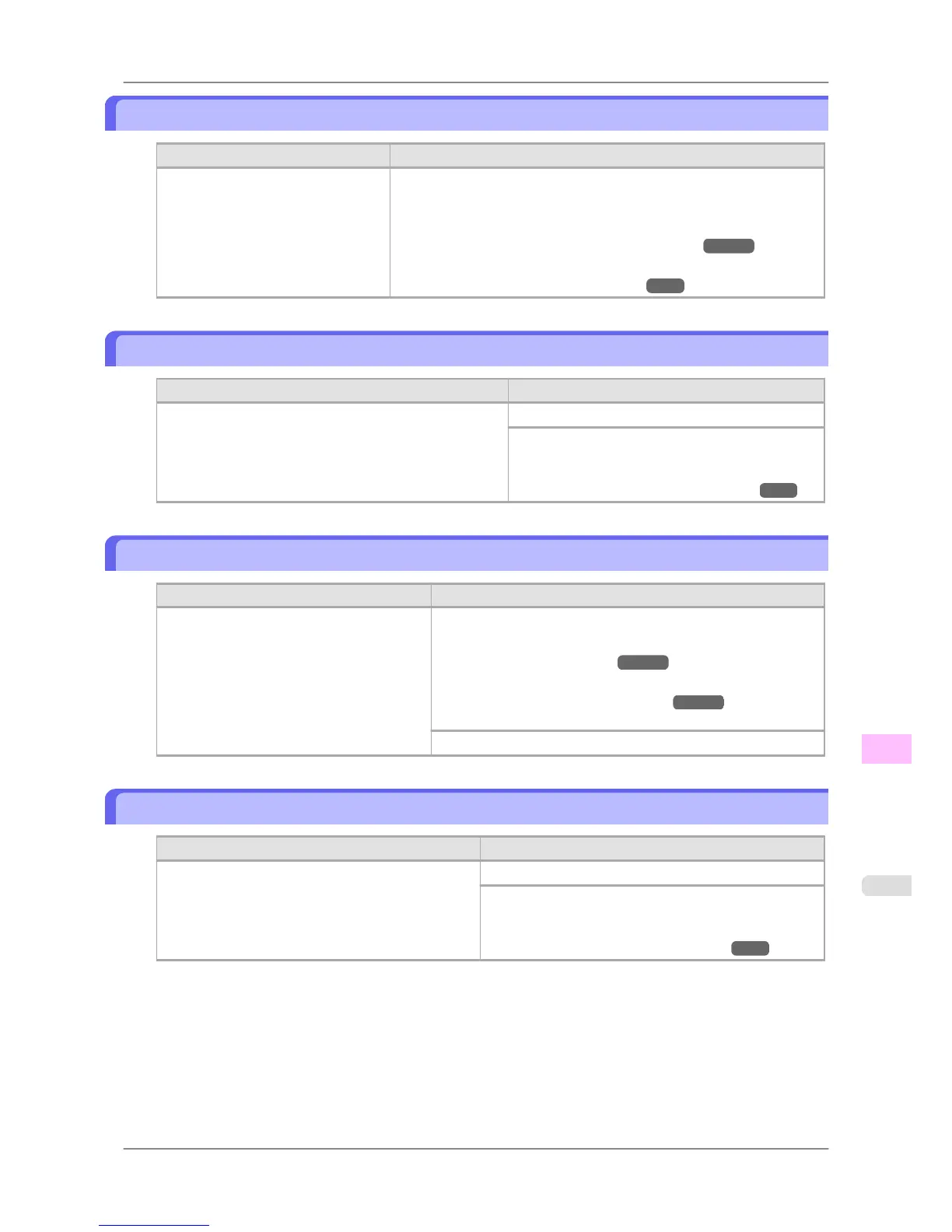
Cannot print as selected. Another roll is in use.
Cause Corrective Action
A printed document remains in the
Output Tray without being cut and a
print job was received that specifies
the other roll.
Follow these steps to load the other roll after cutting the printed document.
1. Hold down the Stop button for a second or more to cancel printing.
2. Cut the printed document.
(See "Specifying the Cutting Method for Rolls.")
→P.606
3. Load the other roll and resend the print job.
(See "Loading and Printing on Rolls.")
→P.3
Roll printing is selected.
Cause Corrective Action
You have attempted to print a test print sheet or other print-
er status information on a roll, but no roll is loaded.
Load a roll and try printing again.
To print on a sheet instead, hold down the Stop but-
ton for more than a second to cancel printing, load a
sheet, and then print.
(See "Loading and Printing on Sheets.") →P.8
Roll printing is selected, but sheets are loaded.
Cause Corrective Action
A print job for rolls was received when a
sheet is loaded.
Follow these steps to load and print on a roll.
1. Press the OK button and remove the sheet.
(See "Removing Sheets.") →P.621
2. Load a new roll.
(See "Loading Rolls in the Printer.") →P.588
The printer now starts printing the print job.
Hold down the Stop button for a second or more to cancel printing.
Roll x is selected. (x is 1 (Upper) or 2 (Lower))
Cause Corrective Action
The indicated roll is specified for a print job sent from
a computer, but that roll is not loaded.
Load the indicated roll and try printing again.
To print on a sheet instead, hold down the Stop button for
more than a second to cancel printing, load a sheet, and
then print.
(See "Loading and Printing on Sheets.") →P.8
Error Message
>
Messages regarding paper
>
iPF825 Cannot print as selected. Another roll is in use.
13
827














 To Next Page