i.
Cutter Rail
The Cutter Unit passes over this rail to cut paper.
j.
Cutter Unit
A round-bladed cutter for automatic paper cutting.
k.
Linear Scale
The linear scale serves a key role in detecting the Carriage position. Be careful not to touch this part when cleaning
inside the Top Cover or clearing paper jams.
l.
Switch
Set the switch to the side opposite ● if the edges of printed images are blurred. Set the switch to the ● side before
borderless printing. (See "Setting the Blue Switch on the Platen.") →P.804
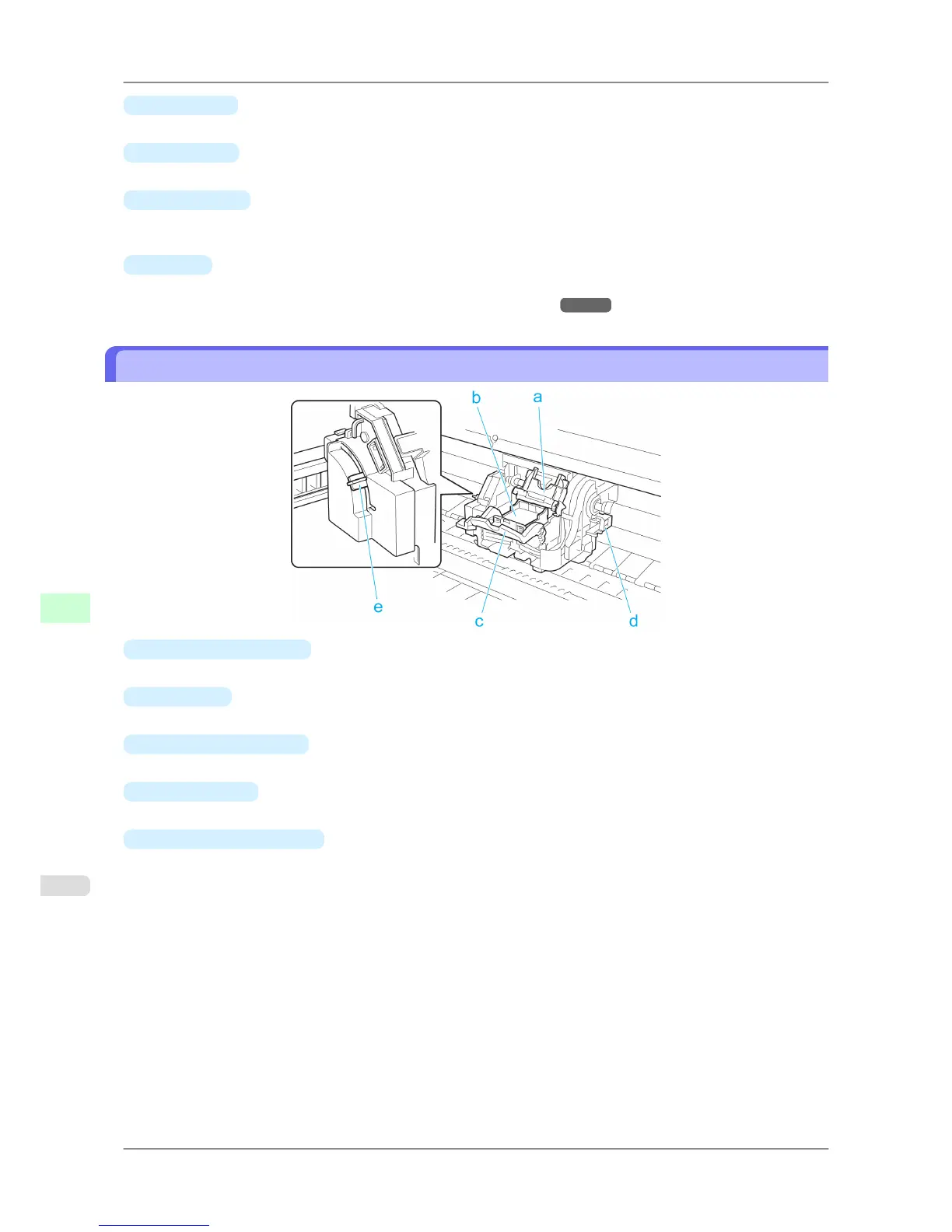
Carriage
a.
Printhead Fixer Cover
Holds the Printhead in place.
b.
Printhead
The printhead is equipped with ink nozzles. The carriage serves a key role in printing.
c.
Printhead Fixer Lever
Locks the Printhead Fixer Cover.
d.
Shaft Cleaner
Prevents the Carriage Shaft from becoming dirty.
e.
Angle Adjustment Lever
Use this lever to fine-tune the printer to correct misalignment of printed lines.
Printer Parts
>
Printer parts
>
Carriage iPF825
9
648














 To Next Page