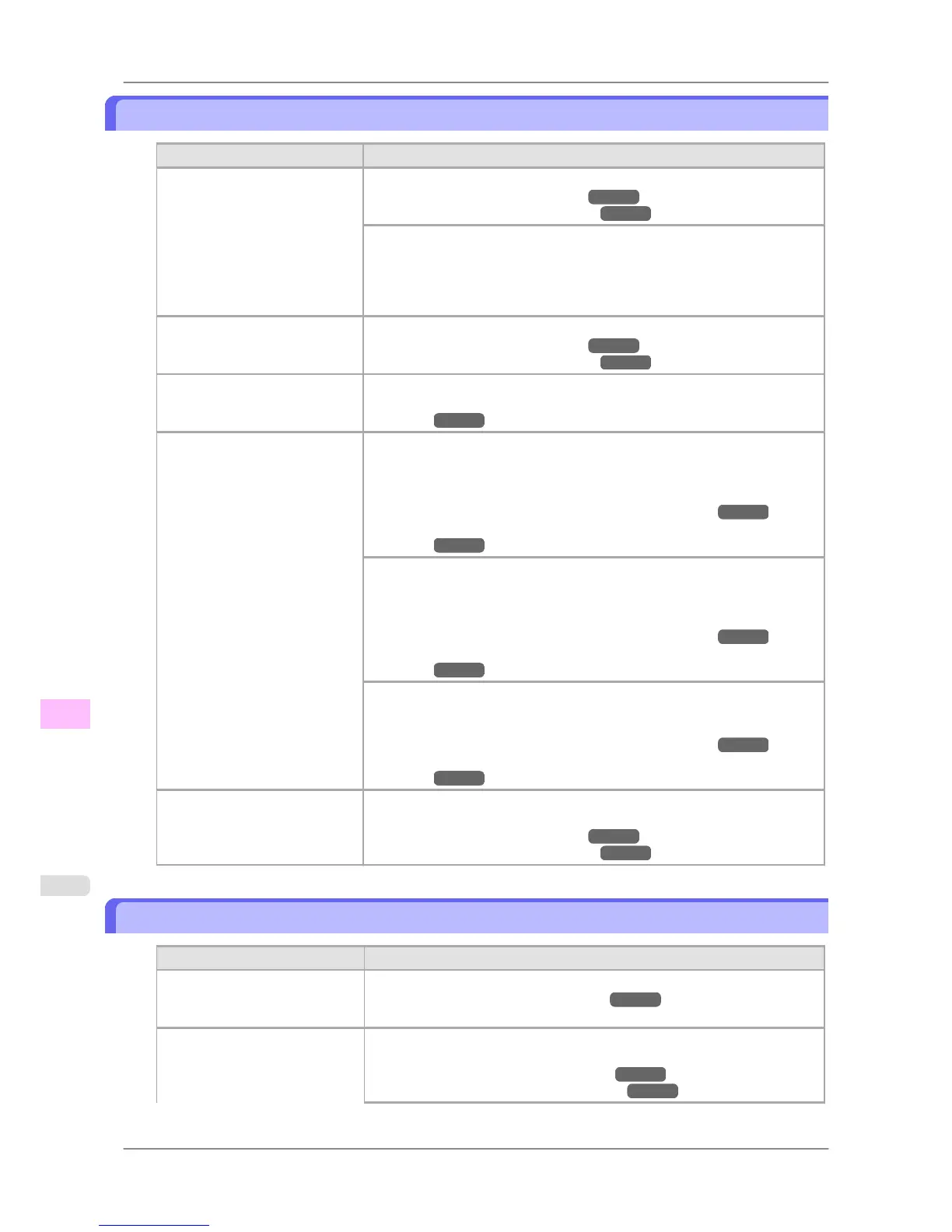
Paper rubs against the printhead
Cause Corrective Action
The type of paper specified in the
printer driver does not match the
type loaded in the printer.
Load paper of the same type as you have specified in the printer driver.
(See "Loading Rolls in the Printer.") →P.588
(See "Loading Sheets in the Printer.") →P.616
Make sure the same type of paper is specified in the printer driver as you have
loaded in the printer.
1. Hold down the Stop button for a second or more to cancel printing.
2. Change the type of paper in the printer driver and try printing again.
Paper has been loaded incorrect-
ly, causing it to wrinkle.
Reload the paper.
(See "Loading Rolls in the Printer.")
→P.588
(See "Loading Sheets in the Printer.") →P.616
The Printhead is set too low. In Head Height, choose Automatic.
(See "Troubleshooting Paper Abrasion and Blurry Images (Head
Height).") →P.633
You are printing on heavyweight
paper or paper that curls or wrin-
kles easily after absorbing ink.
When printing on Heavyweight Coated Paper or other paper-based media,
choose a VacuumStrngth setting of Strong or Strongest. If paper still rubs
against the printhead, try raising the Printhead by setting Head Height to
Highest.
(See "Adjusting the Vacuum Strength (VacuumStrngth).") →P.642
(See "Troubleshooting Paper Abrasion and Blurry Images (Head
Height).") →P.633
When printing on CAD Tracing Paper or other film-based media, choose a
VacuumStrngth setting of Standard, Strong, or Strongest. If paper still rubs
against the printhead, try raising the Printhead by setting Head Height to
Highest.
(See "Adjusting the Vacuum Strength (VacuumStrngth).") →P.642
(See "Troubleshooting Paper Abrasion and Blurry Images (Head
Height).") →P.633
When printing on paper 0.1 mm (0.004 in) thin or thinner, choose a Vac-
uumStrngth setting of Weakest. If paper still rubs against the printhead, try
raising the Printhead by setting Head Height to Highest.
(See "Adjusting the Vacuum Strength (VacuumStrngth).") →P.642
(See "Troubleshooting Paper Abrasion and Blurry Images (Head
Height).") →P.633
When you have loaded paper, the
paper you have loaded does not
match the type selected on the
Display Screen.
Be sure to select the correct type of paper in the printer menu when loading
paper.
(See "Loading Rolls in the Printer.") →P.588
(See "Loading Sheets in the Printer.") →P.616
The edges of the paper are dirty
Cause Corrective Action
The Platen has become dirty after
borderless printing or printing on
small paper.
Open the Top Cover and clean the Platen.
(See "Cleaning Inside the Top Cover.") →P.772
The paper type as specified on
the printer does not match the
type specified in the printer driv-
er.
Make sure the same paper type is specified on the printer as in the printer driv-
er.
(See "Selecting the Paper Type (Roll).") →P.595
(See "Selecting the Paper Type (Sheet).") →P.615
Troubleshooting
>
Problems with the printing quality
>
Paper rubs against the printhead iPF825
12
800














 To Next Page